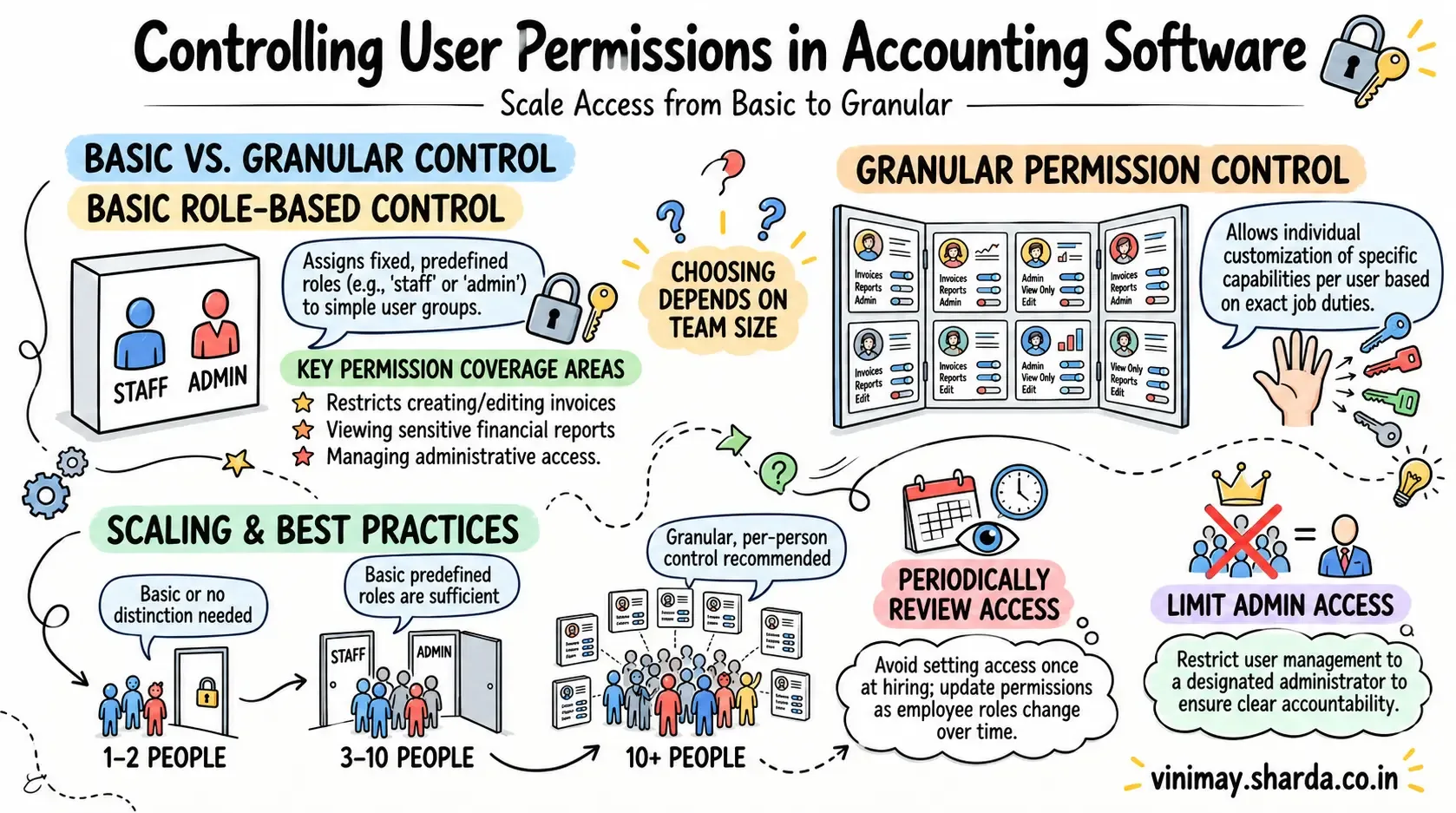
Permission control is the technical mechanism behind the broader access question—it's the specific settings and toggles that determine exactly what each person can and cannot do within the software, beyond just a general "yes, employees can log in." Yes, most accounting software built for teams offers some level of user permission control, ranging from basic (a couple of predefined roles) to granular (individually customizable permissions per person)—the depth of control varies significantly, and it's worth understanding which type you're actually getting.
Two Different Levels of Permission Control
Basic role-based control offers a small set of predefined roles—say, “staff” and “admin”—with fixed permissions attached to each. This approach is straightforward to set up and works well for smaller businesses where employees have clearly defined responsibilities. For example, an admin may have access to invoices, reports, customer records, and settings, while staff members may only need access to billing and customer information.
Granular permission control goes a step further by allowing businesses to customise individual capabilities for each user. One specific staff member might be allowed to view reports but not edit invoices, while another employee could create invoices but have no access to financial reports. These permissions are configured person by person or according to specific responsibilities rather than relying entirely on broad roles.
The difference becomes particularly important as a business grows and more employees begin using accounting software. Giving every employee full administrative access may expose sensitive financial information or allow unintended changes to important records. On the other hand, overly restrictive permissions can prevent employees from completing routine tasks efficiently.
Creating new invoices or transactions
Editing or deleting existing records
Viewing financial reports and summaries
Managing other users' access (typically admin-only)
Viewing sensitive details like full customer contact lists
Why Granular Control Matters More As Teams Grow
For a two-person operation, basic roles are usually sufficient. For a larger team with distinct functions—billing staff, inventory staff, and a manager reviewing figures—granular control prevents the awkward compromise of either over-granting or under-granting access to fit people into two broad buckets.
The Setup Habit That Makes Permissions Actually Work
Permissions are only useful if reviewed periodically—a staff member's role often changes over time, and permissions set correctly at hiring can become outdated without a periodic check, either granting too much access as trust grows or leaving outdated access after a role change.
Where Vinimay Fits This
Vinimay's underlying structure supports connected records across multiple contributors, with the specific permission granularity available depending on your plan. For teams needing this level of control, confirming exact permission options directly ensures the fit matches your team's actual structure.
Frequently Asked Questions
1. What's the difference between role-based and granular permissions?
Role-based assigns fixed permissions to predefined categories; granular allows customization per individual person.
2. Do small businesses need granular permission control?
Usually not immediately—basic roles typically suffice for smaller teams with similar staff functions.
3. Can permissions be reviewed and updated over time?
Yes, and this should be done periodically, since staff roles and trust levels change over time.
4. What's a common permission mistake businesses make?
Setting permissions once at hiring and never revisiting them, leading to outdated access as roles evolve.
5. Should managing other users' permissions be restricted to one person?
Typically yes, usually the business owner or a designated admin, to maintain clear accountability.
6. Does more granular control mean more setup complexity?
Somewhat,though this is usually a reasonable trade-off for larger, more varied teams.
7. Can permission levels affect what reports someone sees?
Yes, viewing financial reports is a common permission distinction between basic staff and management roles.
8. Is permission control the same as having separate logins?
Related but distinct—separate logins identify who's acting; permissions determine what that login is allowed to do.
9. Does Vinimay offer customizable permissions?
This depends on your specific plan—confirm current options directly for your team's needs.
10. How can I test the base billing permissions any staff member would use?
Vinimay's free invoice tool, up to 5 GST invoices, shows the core invoicing experience directly.
Related Topics
Published by Team Vinimay
Our editorial and compliance specialists create practical guides, tax calculation rules, and operational strategies to empower Indian small business owners and accountants.