How to Implement UAE E-Invoicing: Step-by-Step Guide 2026
Quick Answer: To implement UAE e-invoicing, businesses must identify their compliance deadline, appoint a Ministry of Finance-accredited service provider (ASP), prepare invoice data, connect their accounting system, test PINT-AE electronic invoices and activate reporting. Implementation becomes mandatory in phases starting January 2027.
UAE e-invoicing changes how businesses issue, exchange and report invoices. Instead of relying on PDFs or emailed documents, businesses will use structured electronic invoices exchanged through accredited service providers.
For companies in Dubai, Abu Dhabi and other Emirates, early preparation can prevent technical problems, rejected invoices and penalties.
1. Check Whether Your Business Must Comply
First, identify whether your business conducts in-scope transactions.
UAE e-invoicing generally covers qualifying business-to-business (B2B) and business-to-government (B2G) transactions, including businesses that are not VAT-registered.
Business-to-consumer (B2C) transactions are currently excluded.
Businesses must also review other applicable exclusions. Under the October 2026 amendments, transactions between members of the same tax group are temporarily excluded for 24 months from 1 January 2027.
2. Confirm Your UAE E-Invoicing Deadline
Implementation dates depend on annual revenue and business category.
The government extended the ASP appointment deadline for larger businesses to 30 October 2026.
Businesses should confirm their applicable phase before investing in integration.
3. Choose an Accredited Service Provider
An ASP is an authorised provider that connects businesses to the UAE electronic invoicing network.
The Ministry of Finance maintains the official list of accredited providers.
Before selecting one, compare:
MoF accreditation status.
Accounting or ERP integration capabilities.
PINT-AE technical support.
Implementation and subscription costs.
Security and service availability.
Support for invoices and credit notes.
Businesses can select their ASP through the FTA's EmaraTax onboarding process after entering into a commercial agreement.
Choose a provider based on business requirements, not simply the lowest price.
4. Prepare Your Business and Invoice Data
Accurate records are essential for successful electronic invoicing.
Businesses should review their customer, supplier and transaction information before integration.
Important fields include:
Business name and registered details.
Tax Identification Number (TIN).
Customer and supplier identifiers.
Invoice number and issue date.
Product or service descriptions.
Quantities and unit prices.
VAT categories and amounts.
Invoice totals and currencies.
The UAE electronic invoicing participant identifier is based on the business's TIN.
Incorrect or missing information can lead to validation failures.
5. Connect Accounting Software With Your ASP
The next step is integrating your accounting or ERP system with the selected ASP.
Under the UAE's five-corner Peppol model, the supplier sends invoice data to its ASP, which validates and exchanges it with the buyer's ASP.
Prescribed tax information is also reported to the Federal Tax Authority.
The electronic invoice must follow the PINT-AE structured data specification.
A PDF invoice alone does not satisfy this requirement.
Businesses should confirm whether their existing software offers a compatible integration or requires additional development.
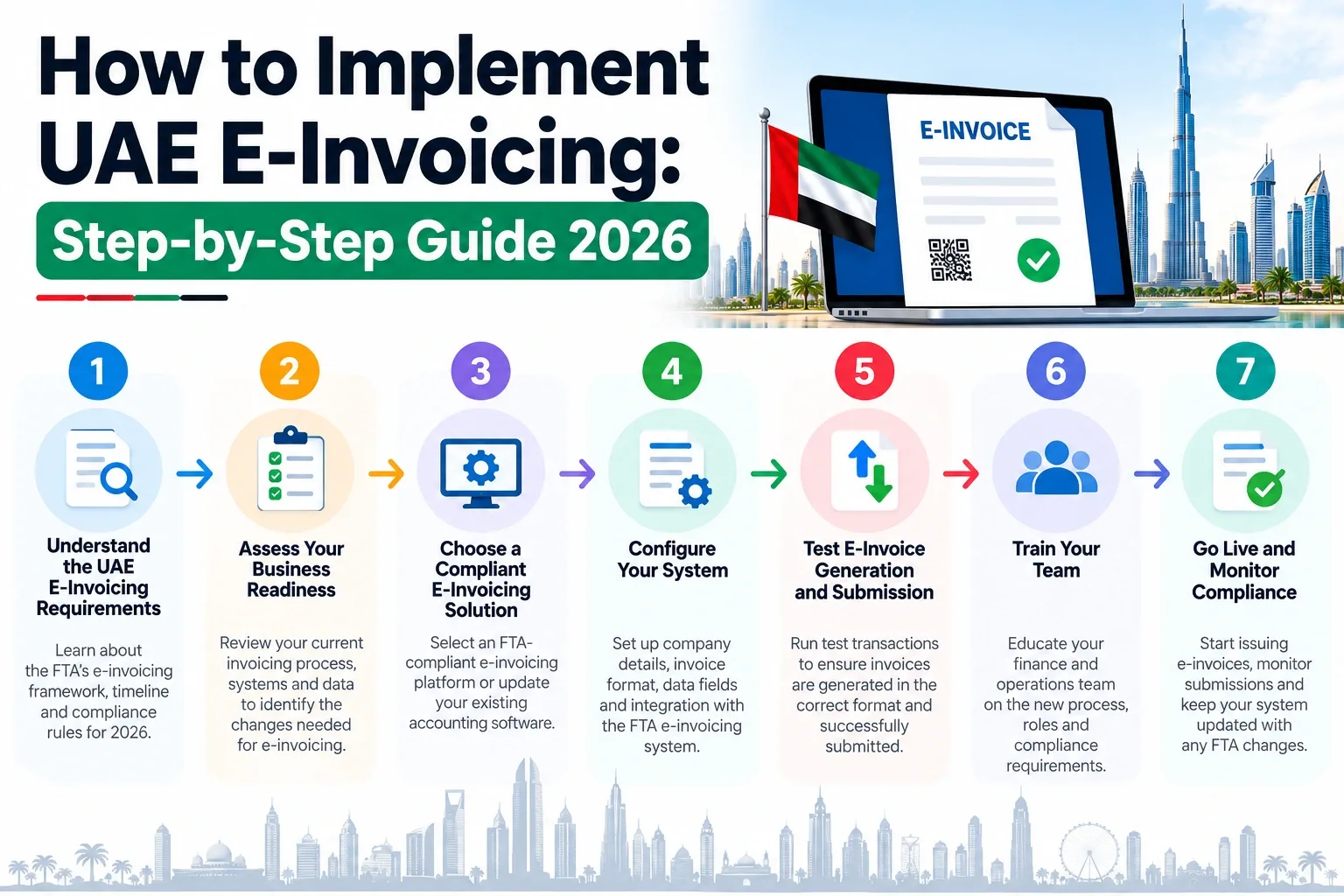
6. Test Electronic Invoices Before Going Live
Testing helps identify errors before mandatory implementation.
Businesses should test different transaction scenarios, including:
Standard-rated VAT invoices.
Zero-rated or exempt transactions where applicable.
Electronic credit notes.
Discounts and adjustments.
Foreign-currency invoices.
Rejected or invalid invoice data.
For example, a trading company should test whether its system correctly sends product descriptions, quantities, prices and VAT calculations.
Confirm that invoices reach the buyer and that reporting acknowledgements and errors can be tracked.
7. Launch E-Invoicing and Maintain Compliance
After successful testing, businesses can activate electronic invoicing according to their implementation plan.
Employees should understand how to issue invoices, correct rejected transactions and prepare credit notes.
Businesses must retain the prescribed electronic records and comply with applicable tax obligations.
Missing implementation deadlines can result in penalties.
The October 2026 amendments also changed certain system-failure notification and electronic record storage requirements. Businesses should follow the amended legislation.
8. How Can Vinimay Help Businesses Prepare?
Before implementing electronic invoicing, businesses need organised financial information.
Vinimay provides general accounting functions that can help with:
Creating and managing sales invoices.
Maintaining customer and supplier records.
Recording purchases and expenses.
Tracking customer payments.
Managing inventory and transaction reports.
These features can help businesses review existing invoice data and prepare information for an ASP integration project.
Important: Vinimay's PINT-AE compatibility, Peppol connectivity, ASP integration and FTA reporting capabilities have not been independently verified. Businesses should confirm these functions before relying on it for mandatory compliance.
Frequently Asked Questions
Related Topics
Published by admin
Our editorial and compliance specialists create practical guides, tax calculation rules, and operational strategies to empower Indian small business owners and accountants.