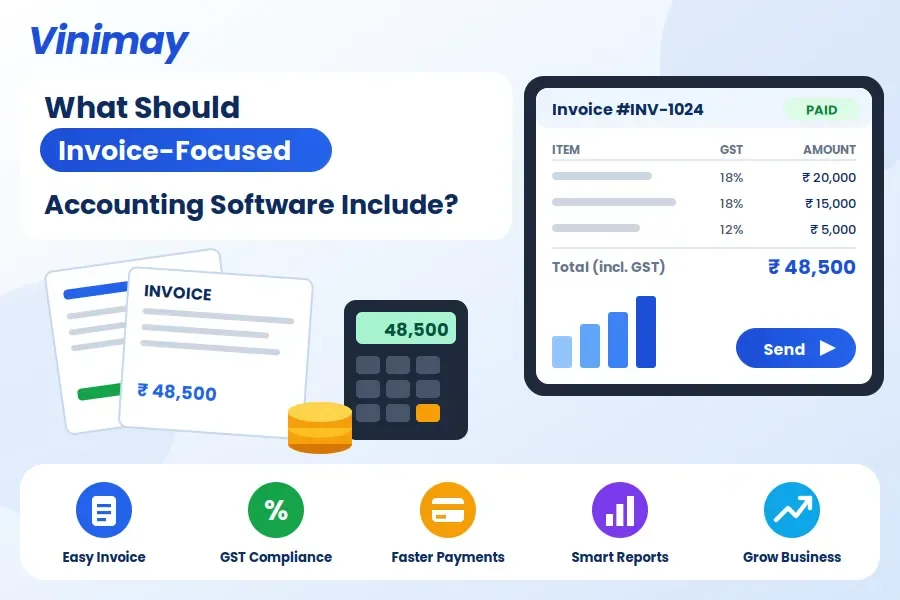
What Should Invoice-Focused Accounting Software Include?
Asking "Which accounting software is best for managing invoices" assumes there's a single universal answer, when what actually matters is whether a specific tool handles the mechanics of invoicing well—tax accuracy, numbering, payment status and history—regardless of its brand name. Once you know what "handling invoices well" specifically requires, evaluating any tool becomes a matter of checking it against that list, rather than trusting a ranking.
This guide breaks down exactly what invoice-focused accounting software needs to do well, one requirement at a time, so you can judge any option — including Vinimay — on the same, consistent criteria.
Why "Best for Invoices" Isn't a Fair Question to Ask
Invoice management needs differ meaningfully by business type — a service consultant sending five invoices a month has different priorities than a retail counter issuing fifty a day. "Best" implies one tool wins for everyone, when in reality the right choice depends on your volume, GST requirements, and how much history you need to retrieve later.
Requirement 1: Correct, Automatic Tax Application
An invoice-focused tool should apply CGST, SGST or IGST automatically based on the transaction, rather than requiring manual selection on every bill. This alone removes one of the most common sources of invoice errors — incorrect tax type applied due to a rushed manual choice.
Requirement 2: Sequential, Gap-Free Numbering
Every invoice needs a unique, sequential number with no gaps or duplicates — this isn't just good practice, it's a compliance requirement. Software should assign this automatically, so numbering stays consistent even across a high daily volume or multiple billing points.
Requirement 3: Payment Status Per Invoice
Good invoice management means knowing, for every single invoice, whether it's fully paid, partially paid, or still outstanding — without checking a separate ledger. This status should update the moment a payment is recorded against that specific invoice, not against the customer in general.
Requirement 4: Saved Customer Details
Retyping a customer's name, address, and GSTIN on every invoice is both slow and a common source of small, accumulating errors. Software should let you save these details once and select the customer for future invoices, reducing both time and inconsistency.
Requirement 5: Searchable Invoice History
At some point, every business needs to pull up a specific past invoice—for a customer dispute, a GST reconciliation, or simply to confirm what was billed last month. Invoice-focused software should make this retrievable by date, customer or invoice number, rather than requiring a manual scroll through everything ever created.
Checking These Requirements in Practice
A short, practical test reveals more than any comparison chart: create one invoice for an existing customer, record a partial payment against it, then try to retrieve that same invoice a few days later by searching for the customer's name. If all three steps work smoothly, the five requirements above are likely being met.
Where Vinimay Covers Invoice Management
Vinimay applies CGST, SGST and IGST automatically as part of its GST invoicing feature, assigns invoice numbers sequentially, and tracks payment status against each specific invoice rather than only at the customer level. Customer and vendor details are saved once for reuse across future billing, and invoice records remain accessible for retrieval as part of Vinimay's connected record-keeping.
To test this directly, Vinimay's free invoice tool lets you generate up to 5 GST invoices free, with tax applied automatically and customer details saved for reuse.
Conclusion
There's no single "best" accounting software for managing invoices — there are five specific requirements that determine whether any tool handles invoicing well: automatic tax application, sequential numbering, per-invoice payment tracking, saved customer details, and searchable history. Testing these directly with one real invoice reveals more than any ranking or comparison list. Vinimay meets these five requirements as part of its GST invoicing feature, with a free tool available to test the experience directly.
Frequently Asked Questions
1. Is there really a single "best" accounting software for invoices?
No — the right fit depends on your invoice volume, GST needs, and how much history you need to retrieve, which varies by business.
2. What's the most important invoice-management requirement to check?
Automatic, correct tax application — this prevents the most common and consequential invoicing errors.
3. Why does per-invoice payment tracking matter more than customer-level tracking?
Because it shows exactly which specific invoice is paid, partially paid, or outstanding, rather than a vague overall balance.
4. Does Vinimay apply GST tax automatically on invoices?
Yes, Vinimay applies CGST, SGST and IGST automatically based on the transaction and customer details.
5. How can I test if invoice history is genuinely searchable?
Try retrieving a specific past invoice by customer name or invoice number and see how easily it comes up.
6. Is sequential invoice numbering just a formality?
No, it's a compliance requirement, and gaps or duplicates can create real issues during GST review.
7. Do I need saved customer details if I only bill a few customers?
It still helps reduce repetitive typing and small inconsistencies, even with a smaller customer base.
8. How many free invoices can I test on Vinimay?
Vinimay's free invoice tool allows up to 5 GST invoices free, downloadable as PDF.
9. What's a quick way to evaluate any invoicing tool before committing?
Create one invoice, log a partial payment, and try retrieving that invoice later — if all three work smoothly, the core requirements are likely met.
10. Does invoice-focused software replace full accounting software?
Not necessarily — it covers invoicing and payment tracking well, but broader financial statements may still need a fuller accounting system or a CA.
Related Topics
Published by Team Vinimay
Our editorial and compliance specialists create practical guides, tax calculation rules, and operational strategies to empower Indian small business owners and accountants.