As businesses grow, accounting work is rarely handled by only one person. Owners, accountants, billing staff, purchase teams, and managers may all need access to different parts of business information. However, giving every employee access to financial records can create privacy and control concerns. A billing employee may only need to create invoices, while an accountant may need access to financial records and reports. Similarly, a purchase team may need supplier and purchase information but may not require access to complete business finances.
Vinimay helps businesses manage GST invoices, billing records, sales, purchases, inventory, customer and vendor information, payments, ledgers, and reports in a structured system. By maintaining organised business records, businesses can manage their daily operations more efficiently while following proper access practices.
Why Is Employee Access Control Important in Accounting Software?
Accounting data contains important business information such as sales performance, expenses, customer transactions, supplier payments, and financial records. Not every employee requires access to all this information. Providing unnecessary access can increase the chances of accidental changes or exposure of confidential information.
For example, an employee responsible for billing may only need access to invoices and customer details, while business owners or authorised managers may need broader visibility into reports and financial records. A proper access structure helps businesses ensure that employees can perform their responsibilities without accessing information they do not require.
How Does Employee Access Control Work?
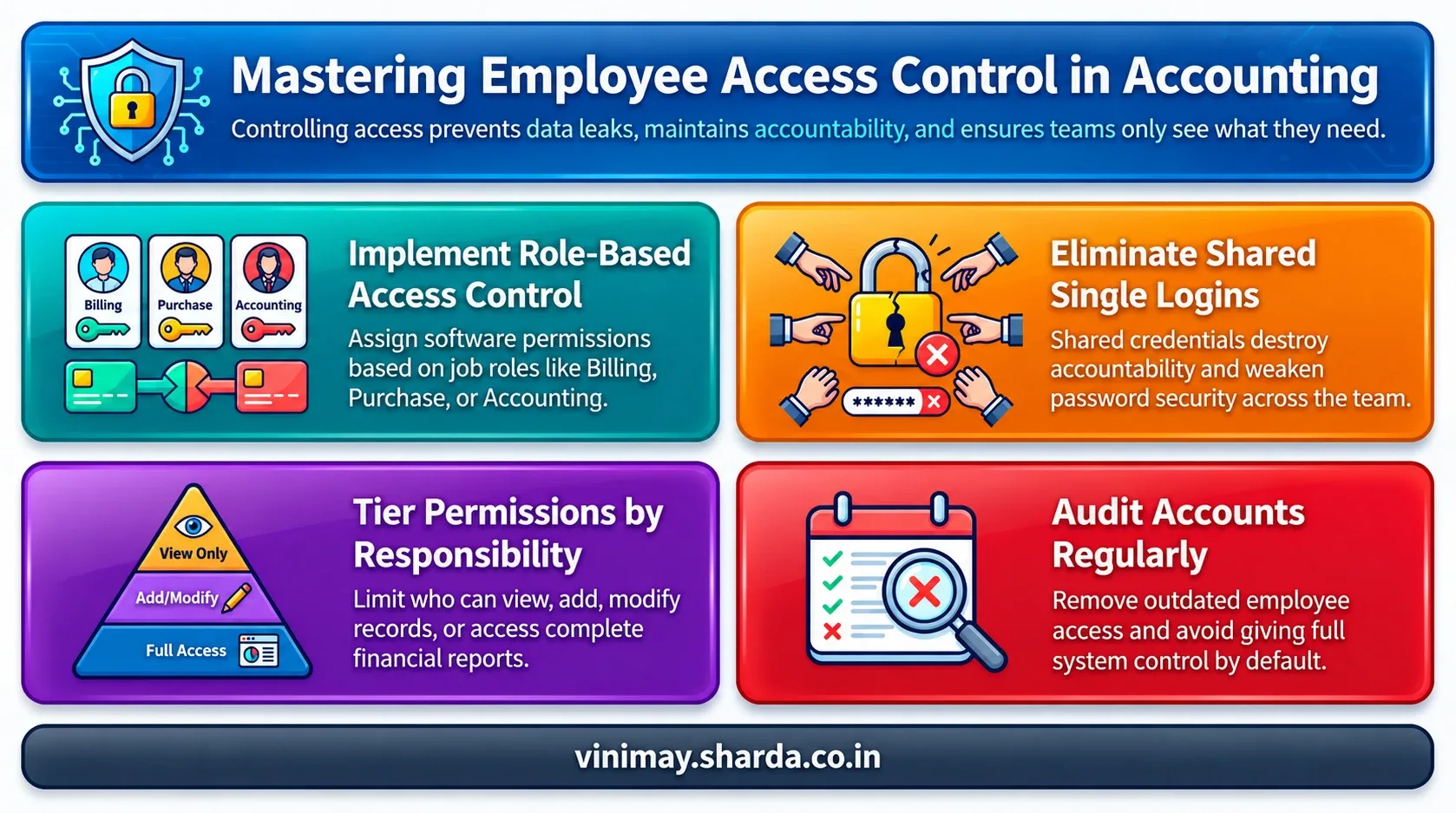
Employee access control works by assigning access based on a person's role and responsibilities. This approach is commonly known as role-based access control, where permissions are linked to user roles rather than giving every user the same level of access.
Instead of creating one common login for everyone, businesses can organise access according to different requirements.
For example:
The exact access structure depends on the business workflow and software capabilities.
Why Should Businesses Avoid Sharing One Login?
Many small businesses share a single accounting software login between multiple employees. While this may appear convenient, it creates problems in managing accountability.
When multiple people use the same credentials:
It becomes difficult to identify who made a change
Password security becomes weaker
Employee access cannot be managed properly
Separate user access helps businesses maintain better control over their accounting information.
What Permissions Should Businesses Consider?
The level of control required depends on the size and nature of the business. A small business may need only basic user separation, while a larger business may require more detailed access management.
Businesses should consider whether employees need permission to:
View records
Add new entries
Modify information
Access reports
The objective is not to restrict employees unnecessarily but to provide access according to their actual responsibilities.
How Can Businesses Protect Accounting Data While Allowing Employee Access?
Good access management combines suitable software practices with internal business processes.
Businesses should regularly review:
Security is not only about software features; employee awareness and internal processes also play an important role.
Common Mistakes Businesses Make With Employee Access
Many businesses focus on maintaining accounting records but overlook access management.
Common mistakes include:
Giving every user complete access
Not reviewing old user access
Allowing access without clear responsibility
As businesses grow, these practices can create confusion and increase data security risks.
What Should Businesses Check Before Choosing Accounting Software?
Before selecting accounting software, businesses should understand how the software handles users and access.
Important considerations include:
Whether different users can be managed separately
Whether business records remain organised
Whether employees can access only the information required for their work
Whether the software supports the business's workflow
A good accounting system should help businesses maintain both operational efficiency and better control over information.
Frequently Asked Questions
1. Can I restrict employee access in accounting software?
Yes, many accounting systems allow businesses to manage user access according to roles and responsibilities.
2. Should every employee have access to accounting data?
No. Employees should generally have access only to the information required for their work responsibilities.
3. Why should businesses create separate user accounts?
Separate user accounts improve accountability and make it easier to manage employee access.
4. Can billing employees access financial reports?
Access depends on the permissions provided by the business and the accounting software capabilities.
5. Is sharing one accounting login safe?
Sharing one login can make it difficult to track users and manage security properly.
6. How can businesses protect accounting information?
Businesses can protect accounting information through controlled access, proper login practices, and regular review of user permissions.
7. What is role-based access in accounting software?
Role-based access means users receive permissions according to their job responsibilities rather than receiving identical access.
8. Why is access control important for growing businesses?
As more employees handle business operations, access control helps maintain privacy and better management of financial information.
Related Topics
Published by Team Vinimay
Our editorial and compliance specialists create practical guides, tax calculation rules, and operational strategies to empower Indian small business owners and accountants.