Benefits of Free Accounting Software for Small Businesses
Manual billing breaks down fast as sales grow—bills go missing, totals get miscalculated, and payments get tracked from memory. Free accounting software fixes this with one place to record invoices, payments, and purchases at no upfront cost—usually the first step away from paper and spreadsheets. Vinimay is built for what comes next: GST invoices, inventory, and records together once a free tool's limits start showing.
What Is Free Accounting Software?
A no-cost billing tool that lets a business record invoices, track payments, and store business data digitally — usually aimed at very small businesses and freelancers.
Does Free Accounting Software Support GST Billing?
Direct answer: Yes, most free tools support basic GST billing, but depth varies.
GSTIN, tax rate, and HSN/SAC fields on invoices, at no cost
Multiple tax rates or HSN-wise reporting often exposes gaps
Vinimay keeps GST invoicing connected to sales, purchase, and customer records, not standalone
Why Small Businesses Start With Free Accounting Software
It removes the cost barrier while solving the core problem — scattered, manual records. Early on, a business may not have enough volume to justify paid software, so a free plan lets the owner test digital billing first.
What Are the Benefits of Using Free Accounting Software for Small Businesses?
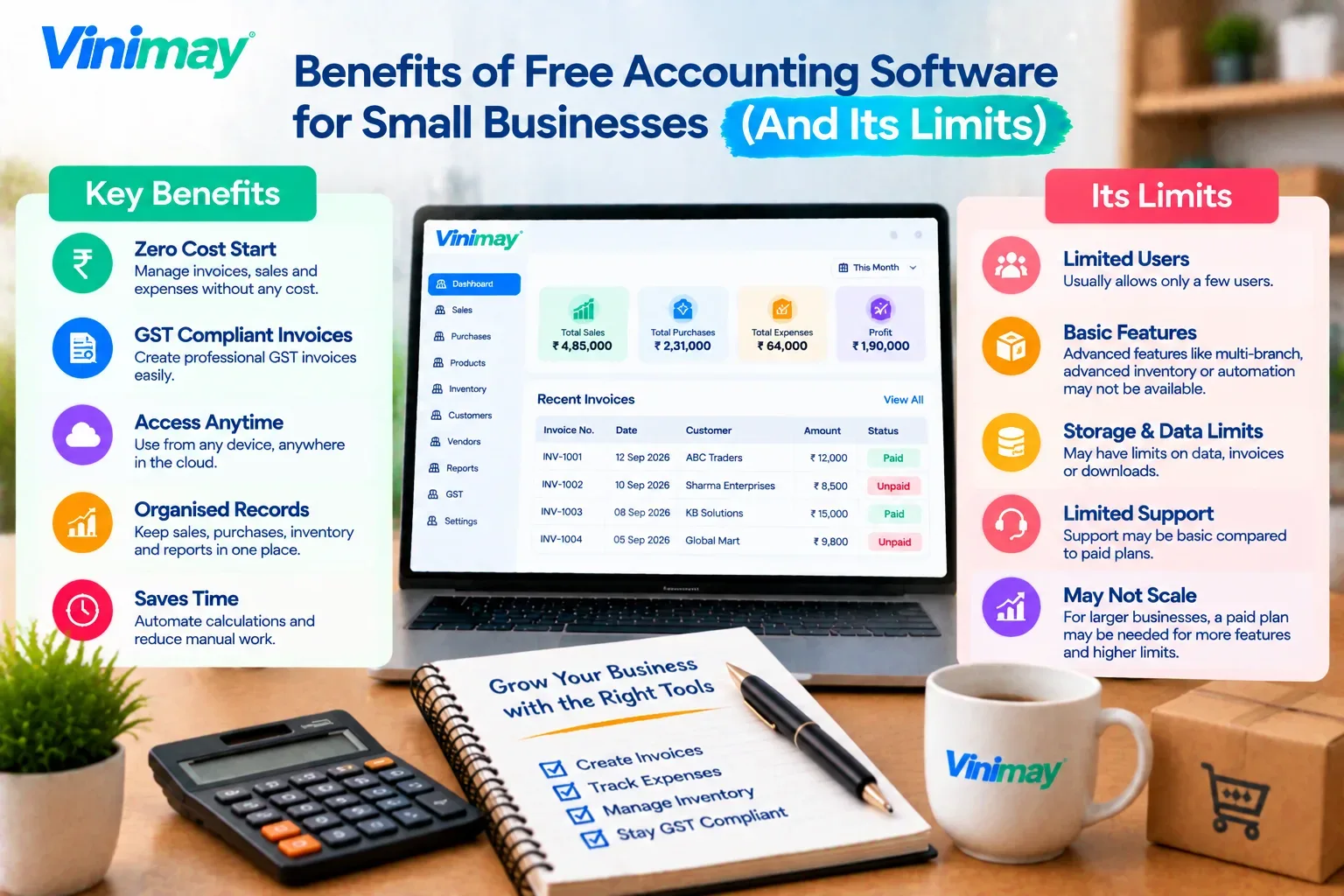
Direct answer: Organized records, fewer errors, no upfront cost.
Sales, purchases, and payments sit in one searchable place, not scattered notebooks
Invoices and tax totals calculate automatically, cutting manual errors
Receivables and payables become visible instead of tracked from memory
These benefits shrink fast as volume grows
What Free Accounting Software Usually Provides
Common Limitations of Free Plans
Invoice limits: Monthly caps become an issue as sales grow.
User limits: Single-user access breaks down once staff need entry.
Feature restrictions:Inventory, reports, or multi-company are often locked.
Can Free Accounting Software Manage Inventory and Expenses?
Direct answer: Expenses, usually yes — inventory, rarely well.
Expense entry fits naturally into most free billing tools
Vinimay keeps inventory and expenses in one system, updating stock automatically
Can Free Accounting Software Generate Profit and Loss Statements and Balance Sheets?
Direct answer: Not usually—these need double-entry bookkeeping, which most free tools don't do.
Free tools mostly handle single-entry records: invoices, payments, summaries
Vinimay's ledger and reporting keep data structured for an easier CA handoff—not a confirmed P&L/balance sheet generator
When Should a Business Move Beyond Free Software?
Regularly hitting the monthly invoice limit
Needing more than one person to access records
Requiring stock or inventory tracking alongside billing
Managing more than one business entity
6 Reasons Small Businesses Move to Accounting Software
Fewer billing errors — totals and tax are calculated automatically, not by hand
Faster invoicing — saved customer and product details cut repetitive entry
Clear payment status—unpaid invoices are visible at a glance, not tracked from memory
One place for records — sales, purchases, and expenses stop being scattered across notebooks or files
Time saved on reporting — basic summaries are ready without manually compiling numbers
Room to grow — moving early, even to a free tool, avoids a harder switch later once records are already messy
Accounting Software for Beginners: What Does a Small Business Actually Need?
Direct answer: For most small businesses just starting out, the essentials are invoice generation, GST fields, basic sales/purchase records, and a way to see who owes what — not the full feature set a paid tool advertises.
Must-have: GST-compliant invoicing and a record of sales and purchases
Usually needed soon after: A view of unpaid invoices and customer balances
Only needed once products are involved: Inventory or stock tracking
Rarely needed at the beginner stage: Multi-company management, advanced reporting, or multi-user access
Starting with just the essentials avoids paying for (or learning) features that aren't relevant yet
What Accounting Software Do Small Businesses Typically Use?
Direct answer: Most fall into a few categories rather than one specific tool — free or paid GST billing apps, spreadsheet-based tracking, or, for businesses that have outgrown both, connected billing-and-inventory systems.
Very early-stage businesses often start with spreadsheets or a basic free invoicing app
Businesses with regular GST invoicing move to dedicated billing software with GST fields built in
Businesses selling physical products eventually need billing connected to inventory, not billing alone
The right category depends on business type and stage — not a single tool that fits everyone
What Vinimay Adds Once a Business Outgrows Free Software
Billing: GST invoicing, proforma invoices, delivery challans
Records: Sales/purchase records with customer/vendor management
Stock: Inventory tracking, often missing in free plans
FAQs
1. What are the benefits of free accounting software?
Organised records, fewer invoice errors, and clearer payment visibility — at no cost.
2. What are its main limitations?
Invoice caps, single-user access, and restricted inventory or reporting as volume grows.
3. When should a business move to paid software?
Once it hits invoice limits, needs multiple users, or manages more than one company.
4. Can it manage inventory along with billing?
Rarely well — most free plans offer little to no inventory tracking.
5. What does Vinimay add for growing businesses?
GST invoicing, inventory, and multiple company management together.
6. Is a free trial the same as free software?
No — a trial expires; free software stays free within its limits.
7. Does free accounting software support GST billing? Most free tools support basic GST fields, but depth and reliability vary between tools.
8. Can free accounting software generate P&L and balance sheets?
Not usually—that needs double-entry bookkeeping, which most free tools don't provide.
9. What does free accounting software usually provide?
Basic invoicing, sales/purchase entry, and summary reports, typically for a single user.
10. What should you check before choosing free accounting software?
Invoice limits, GST accuracy, user access, and whether inventory or reports are included.
Related Topics
Published by Team Vinimay
Our editorial and compliance specialists create practical guides, tax calculation rules, and operational strategies to empower Indian small business owners and accountants.