Business owners are not always available at their office desk. They may need to check sales activity, review payments, verify customer details, or understand business performance while travelling or managing operations from different locations. This creates a common question — can business accounts be accessed from a mobile device?
The answer depends on the accounting software and how the system is designed. Modern accounting solutions can provide flexible access to business information, but businesses should understand what information is available, how access is managed, and what security practices are followed.
Vinimay helps businesses manage GST invoices, billing records, sales, purchases, inventory, customer and vendor information, payments, ledgers, and reports in a structured system. By keeping business information organised digitally, businesses can review important records and manage daily accounting activities more efficiently.
Why Do Businesses Need Mobile Access to Accounting Information?
Business decisions often need to be made quickly. Waiting until someone reaches the office computer to check financial information can slow down routine activities.
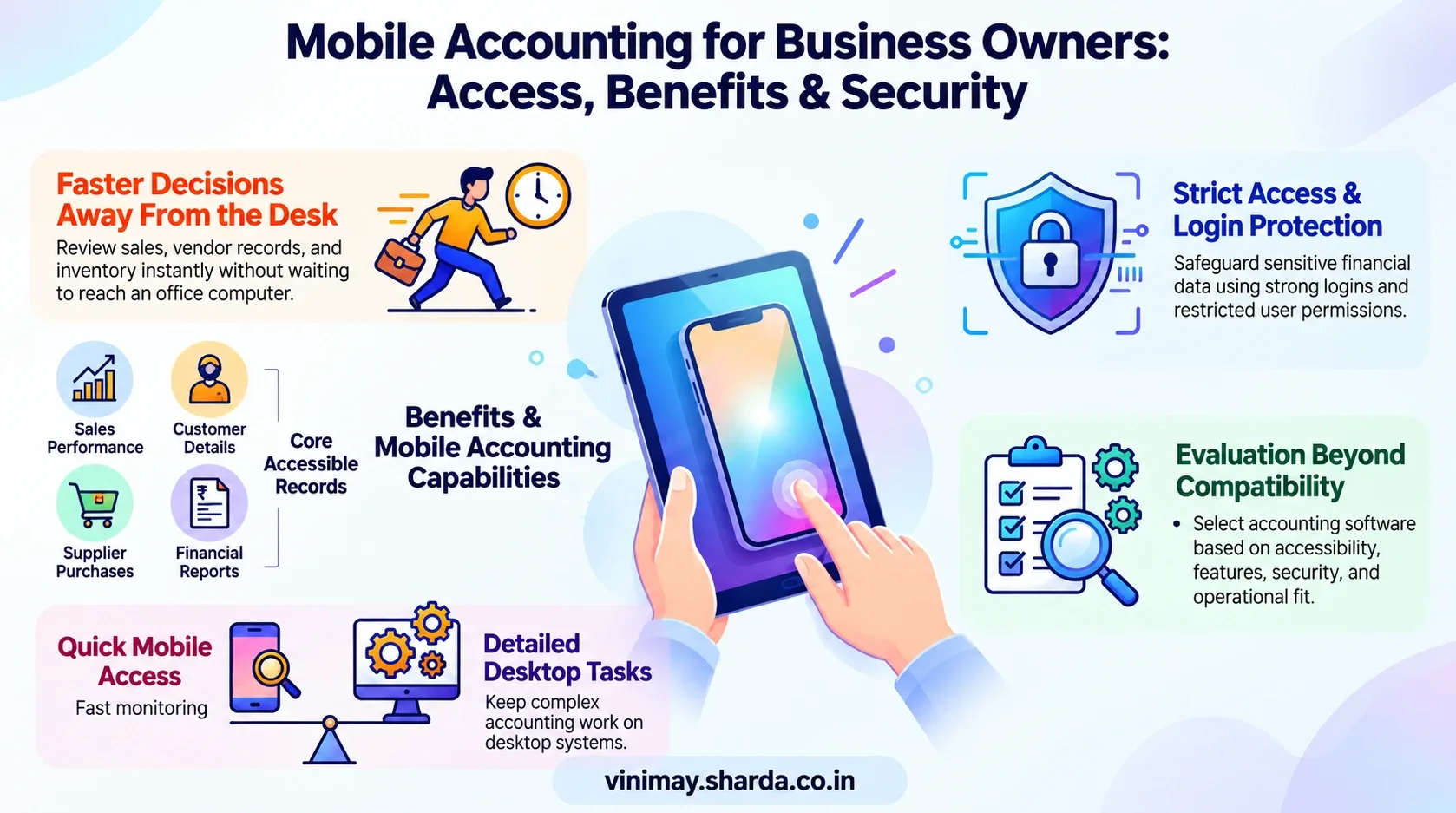
Mobile access can help business owners stay connected with important information such as sales activity, transaction records, customer details, and business reports.
For example, a business owner meeting a supplier may need to check previous purchase information before discussing a new order. Similarly, an owner travelling outside the office may want to review recent sales activity.
The purpose of mobile access is not to replace proper accounting processes but to make important information easier to access when required.
What Business Information Can Be Accessed Remotely?
The information available through mobile access depends on the accounting software and its features.
Businesses may be able to review information related to:
The availability of specific features depends on the accounting system being used.
How Does Mobile Access Help Business Owners?
Mobile access is especially useful for business owners who are frequently outside the office or managing multiple activities. Instead of depending only on physical files or one computer, businesses can stay connected with their records.
For example:
A retailer can check recent sales information while visiting another location. A business owner can review payment-related details before following up with customers. A manager can access important transaction information while coordinating daily operations. Mobile access improves convenience, but businesses should still ensure that access is controlled and secure.
Is Mobile Access Safe for Business Accounts?
Accessing business accounts from mobile devices requires proper security practices because accounting information contains sensitive financial data.
Businesses should consider:
Security depends on both the accounting software and how users manage their accounts.
Business accounts should avoid sharing login details and should provide access only to authorised users.
Can Mobile Access Replace Desktop Accounting?
Mobile access provides convenience, but it does not always replace every accounting activity performed on a desktop system. Detailed accounting work, large reports, data review, and complex business tasks may still require a complete accounting environment.
Mobile access is generally useful for checking information, monitoring activities, and handling quick business decisions while away from the main system. The best approach depends on how the business operates and what tasks users need to perform.
What Should Businesses Check Before Choosing Accounting Software?
Businesses should evaluate more than just whether software can be accessed from mobile.
Important factors include:
A suitable accounting system should support the way a business works instead of only providing access through a particular device.
Managing Business Information Better With Vinimay
Businesses need organised records to make quick decisions. When invoices, purchases, payments, inventory, and customer information are maintained separately, accessing the right information becomes difficult.
Vinimay helps businesses manage GST invoices, billing records, sales records, purchase records, expense records, customer management, vendor management, inventory, stock tracking, payment tracking, receipt tracking, ledger management, and business reports. By maintaining these records in a structured system, businesses can review important accounting information more easily during daily operations. The practical benefit is better visibility into business activities and easier management of financial records.
Conclusion
Mobile access has changed how businesses interact with their accounting information. Instead of depending only on office systems, business owners can review important records and stay connected with daily activities when their accounting software supports remote access.
However, convenience should always be balanced with proper security and access management. Businesses should choose systems that provide organised records, suitable features, and reliable control over financial information.
Frequently Asked Questions
1. Can I access my business accounts from mobile?
Yes, businesses can access accounting information from mobile if their accounting software supports mobile or remote access features.
2. What accounting information can I check from mobile?
Depending on the software, businesses may access sales records, customer details, purchase information, and reports.
3. Is mobile accounting useful for small businesses?
Yes, mobile access can help small business owners stay connected with important information while managing daily activities.
4. Can employees access accounting software from mobile?
Access depends on the software capabilities and the permissions provided by the business.
5. Is accessing accounts from mobile secure?
Mobile access can be secure when businesses use proper login practices and manage user access carefully.
6. Can mobile access replace complete accounting software?
Mobile access supports accounting activities but may not replace all detailed accounting tasks.
7. Why do business owners need remote accounting access?
Remote access helps business owners review important information without always being present at the office.
8. What should I check before choosing mobile accounting software?
Businesses should check features, security, user access, and whether the software matches their operational requirements.
Related Topics
Published by Team Vinimay
Our editorial and compliance specialists create practical guides, tax calculation rules, and operational strategies to empower Indian small business owners and accountants.