How Can I Organize My Business Records Digitally
Business Records Most business owners don't set out to have messy records — it happens gradually. An invoice gets saved on a phone, an expense receipt sits in a WhatsApp chat, a payment gets remembered instead of logged, and a spreadsheet somewhere is meant to tie it all together but rarely gets updated. None of it feels urgent until a CA asks for last quarter's numbers, or a loan application needs proof of consistent revenue, and suddenly reconstructing months of records becomes a stressful scramble.
Organizing records digitally isn't really about picking one tool — it's about deciding, once, where each type of record lives and making sure every transaction reliably ends up there. A system only works if it's used consistently, which means it needs to be simple enough to update in the moment, not just in theory after the fact.
This guide breaks down what "organizing records digitally" actually involves, why scattered systems tend to fail, and a practical, step-by-step way to set up something reliable — including how Vinimay fits into keeping business records connected in one place.
What Does "Organizing Records Digitally" Actually Mean?
Direct answer: Organizing business records digitally means keeping every transaction-related document — invoices, expenses, payments, purchase records — in one connected, accurately updated system, rather than spread across notebooks, spreadsheets, and messaging apps.
It's not just about scanning paper into PDFs — a folder of unorganized scans is still disorganized, just digital
The goal is retrievability: being able to find any specific record quickly, without digging
Accuracy matters as much as storage — a digitized record is only useful if it's correct and current
Why Scattered Record-Keeping Breaks Down Over Time
Scattered systems tend to fail quietly rather than dramatically, which is exactly why they're so easy to keep tolerating. A missing invoicedoesn't announce itself — it just isn't there when someone eventually goes looking for it, usually at the worst possible moment, like during a tax filing deadline or a sudden audit request. The same is true of payments tracked only in memory: everything feels fine until two people both think a customer has paid, or a customer insists they've paid when the business has no clear record either way. Spreadsheets compound this problem instead of solving it, since a manually updated file depends entirely on someone remembering to update it every single time, and that discipline tends to slip exactly when the business gets busier — which is also when accurate records matter most.
Core Categories of Business Records to Organize
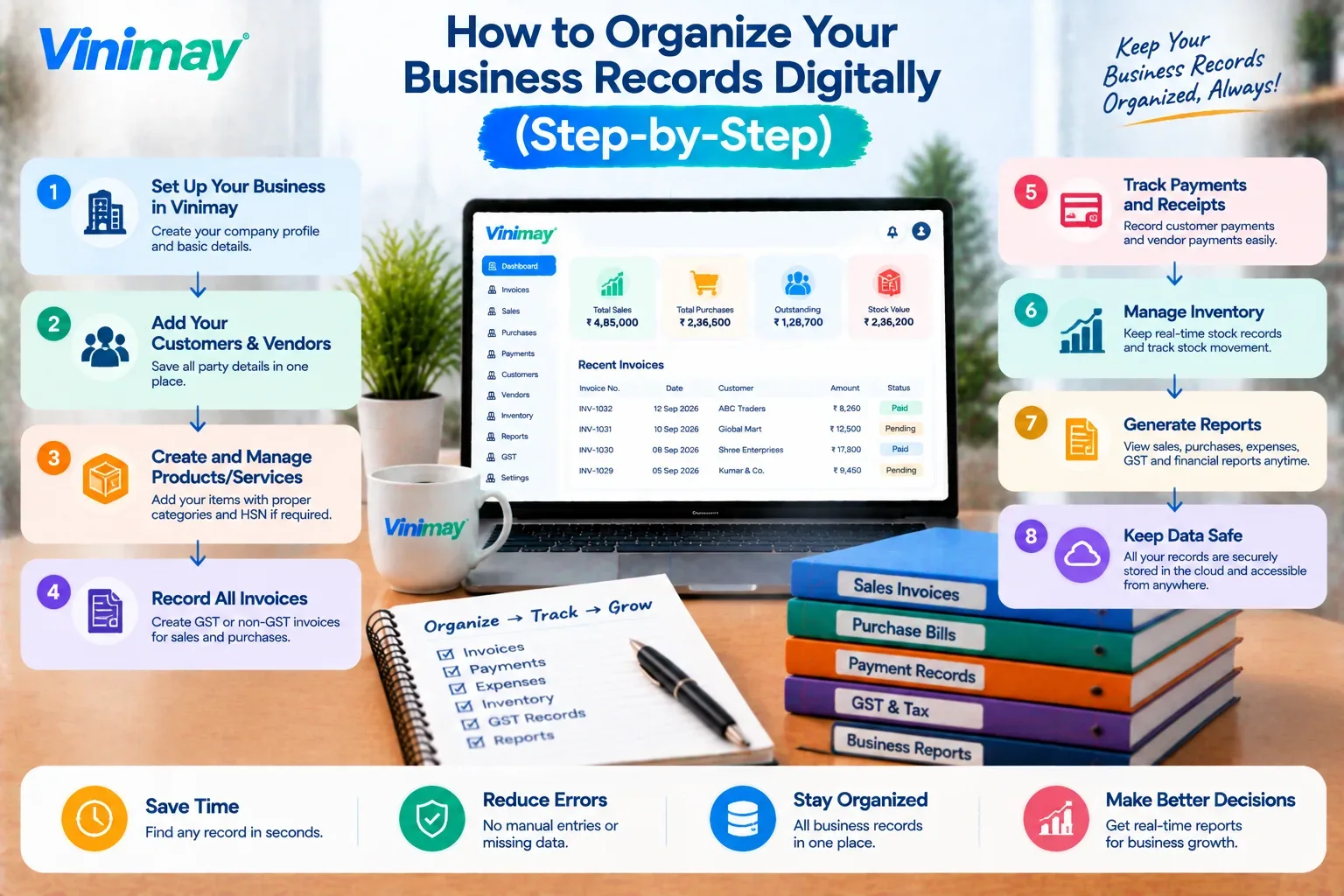
Step-by-Step: Setting Up a Digital Record System
List every record type your business generates — using the categories above as a starting point, not a fixed rulebook.
Choose one connected system, not several separate tools — a spreadsheet for invoices and a different app for expenses recreates the same scattering problem digitally.
Record transactions as they happen, not in batches — batching "for later" is exactly where records get lost or forgotten.
Set a consistent naming or numbering pattern — especially for invoices, so nothing gets duplicated or skipped.
Back up automatically, not manually — a system that depends on remembering to back up will eventually fail to back up.
Review records monthly — a short, regular check catches a missing entry before it becomes a bigger problem at tax time.
Where Vinimay Keeps Your Records Organized
Generates GST-compliant invoices and keeps them connected to customer and payment records automatically
Tracks sales records, purchase records, and payment tracking together, instead of across separate files
Keeps receivables and payables updated as an accurate, current record — not something reconstructed later
Organizes customer and vendor details through customer and vendor management, avoiding scattered contact records
Supports proforma invoices and delivery challans alongside regular invoicing, keeping related documents together
Produces reports and ledger entries directly from recorded transactions, so records stay retrievable without manual reconstruction
Conclusion
Digital record organization is about consistency and connection, not just moving paper into folders
Scattered systems fail quietly — a missing record usually surfaces at the worst possible moment
A reliable system records transactions as they happen, in one connected place, with a consistent structure
Vinimay keeps invoicing, payments, and records connected automatically, reducing the manual discipline a scattered system depends on
FAQs
How can I organize my business records digitally?
By keeping invoices, payments, purchases, and expenses in one connected system, updated as transactions happen rather than reconstructed later from scattered sources.
What business records need to be digitized first?
Invoices and payment records are usually the highest priority, since they're most frequently needed for GST compliance, tax filing, and reconciling with customers.
Is a spreadsheet enough to organize business records digitally?
It can work at very low volume with one person managing it consistently, but spreadsheets tend to break down as transaction volume or team size grows.
How long should digital business records be kept?
This depends on applicable tax and regulatory requirements in your jurisdiction, so it's worth checking the specific retention period that applies to your business.
What's the risk of keeping records scattered across different apps?
Records become harder to retrieve accurately when needed, and inconsistencies (like a payment marked differently in two places) become more likely over time.
Should invoices and expenses be organized in the same system?
Ideally yes — keeping them connected gives a more accurate, complete picture of the business than managing them as separate, disconnected records.
How often should digital business records be reviewed?
A monthly review is a practical baseline for most small businesses, catching missing or inconsistent entries before they accumulate.
Can digital record organization help during a GST audit?
Yes, having invoices, payments, and purchase records organized and accurate in one place makes it significantly easier to respond to audit or reconciliation requests.
Do I need separate backups if my records are already digital?
Yes, digital doesn't automatically mean backed up — a reliable system should include automatic backups, not just digital storage on one device.
What's the biggest mistake businesses make when going digital with records?
Digitizing records without a consistent, connected structure — ending up with organized-looking folders that are still effectively scattered and hard to reconcile.
Related Topics
Published by Team Vinimay
Our editorial and compliance specialists create practical guides, tax calculation rules, and operational strategies to empower Indian small business owners and accountants.