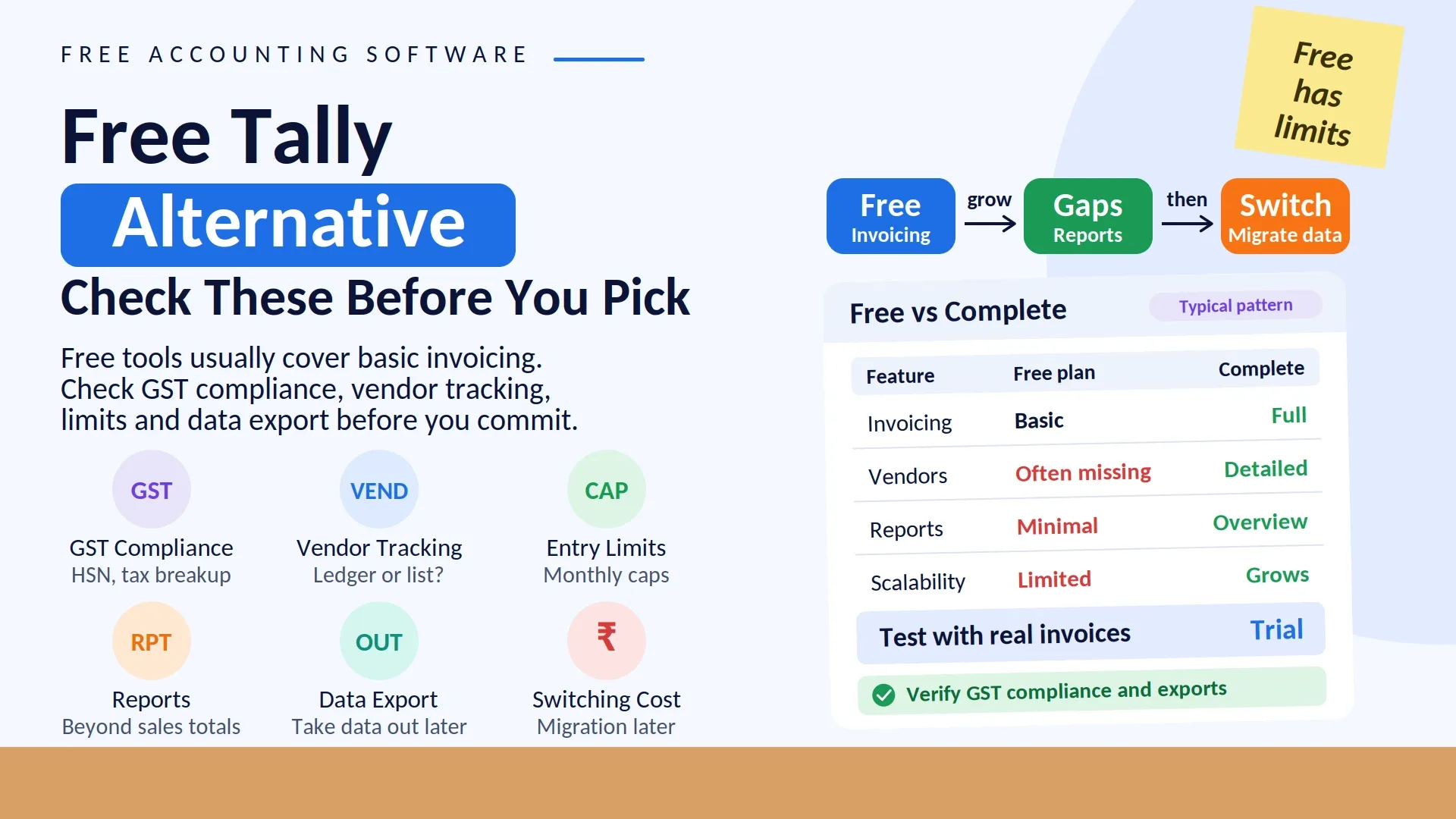
When looking for a myBillBook ka free alternative, it's worth knowing upfront that free plans across most billing tools tend to offer basic invoicing only — detailed vendor ledgers, comprehensive reports, and higher transaction limits are usually reserved for paid tiers. Before picking a free option, it helps to list out your actual requirements — GST compliance, customer/vendor tracking, reporting — and check the free plan against that list rather than just going with whatever is free.
Many small business owners, especially those just starting out, look for free billing tools to keep costs down early on. That's a reasonable approach, but free plans often come with limitations that surface later — a monthly invoice cap, missing vendor management, or reports too basic to be useful — which can force a switch once the business picks up volume.
Decide what you actually need first, then evaluate whether the free plan genuinely covers it.
What Free Billing Software Typically Offers
A capped number of invoices per month
Basic GST invoice format
A simple customer list, without a detailed ledger
Little to no vendor management
Minimal reporting
What To Check Before Choosing A Free Plan
1. GST Compliance
Confirm the free version generates invoices with all mandatory GST fields — HSN code, tax breakup — not a stripped-down format.
2. Invoice or Transaction Limits
If your monthly volume is likely to exceed the free cap, the plan won't stay practical for long.
3. Vendor Management
Many free plans skip vendor tracking entirely, which becomes a problem the moment you're dealing with regular suppliers.
4. Room To Grow
Check whether upgrading later is smooth, without losing existing data in the process.
Common Mistakes Businesses Make
Picking a plan just because it's free, without checking feature gaps
Not verifying GST compliance properly
Underestimating how soon vendor management becomes necessary
Ignoring future growth while evaluating a free plan
How Vinimay Helps
Vinimay offers an organized, CA-led accounting foundation:
GST Invoice Management: Consistently compliant invoicing
Customer and Vendor Management: Organized, detailed tracking
Ledgers: Auto-updating balances
Reports: A business-relevant overview
Digital Invoice Records: CA-ready data
Businesses can evaluate whether a basic free tool is enough, or whether a scalable accounting system that grows alongside the business makes more sense.
FAQs
1. What is the best free alternative to myBillBook?
The right alternative depends on what your business actually needs. If you only need basic invoice creation, a simple free billing tool may be enough. If you also need GST invoicing, customer and vendor ledgers, payment tracking, stock records, and business reports, you should evaluate the complete feature set rather than choosing a tool only because its starting price is ₹0.
How Vinimay Helps: Vinimay combines invoicing, customer and vendor management, payment records, ledgers, and business reporting in one organized system.
2. Can I use free billing software for GST invoices?
Yes, some free billing tools support GST invoicing, but the level of functionality can vary. Before choosing one, check whether it supports important details such as GSTIN, HSN/SAC codes, tax breakup, invoice numbering, and other information required for your billing process.
How Vinimay Helps: Vinimay is designed around GST invoice management so businesses can maintain consistent billing records.
3. Is a free billing app enough for a small business?
It can be enough for a business that only creates a limited number of invoices and does not require detailed accounting records. However, once the business starts managing regular customers, suppliers, payments, and outstanding balances, basic invoicing alone may no longer be sufficient.
How Vinimay Helps: Vinimay supports the broader workflow of a growing business instead of focusing only on invoice creation.
4. Does free billing software include customer and vendor ledgers?
Not always. Some free tools provide a customer list but do not offer detailed ledger tracking or supplier-wise balances. This distinction matters when you need to know how much a customer owes you or how much you need to pay a vendor.
How Vinimay Helps: Vinimay keeps customer and vendor records organized with ledger-based tracking.
5. Can free billing software track outstanding payments?
Some tools provide basic payment tracking, while others limit this functionality to paid plans. If your business regularly sells on credit, outstanding payment tracking becomes an important part of daily operations.
How Vinimay Helps: Vinimay helps maintain payment records and outstanding balances so businesses can track receivables more systematically.
6. What are the limitations of free billing software?
Common limitations can include invoice limits, restricted reports, basic customer records, limited vendor management, fewer accounting features, and restrictions on data or advanced functionality. The exact limitations depend on the software and plan.
How Vinimay Helps: Vinimay provides a broader accounting workflow covering purchases, stock, sales, invoices, payments, ledgers, and reports.
7. Is free billing software suitable for businesses with regular suppliers?
It depends on how the software handles vendor records. If you regularly purchase goods or services from multiple suppliers, simply storing vendor names may not be enough. You may also need purchase records, outstanding balances, and vendor-wise transaction history.
How Vinimay Helps: Vinimay treats vendor management as part of the core business workflow rather than an optional feature.
8. Can I manage purchases and sales with a free billing tool?
Some free billing applications support both purchases and sales, while others are primarily focused on sales invoices. Businesses dealing with inventory or regular purchases should check whether purchase transactions and stock movement are supported.
How Vinimay Helps: Vinimay connects purchase, stock, sale, invoice, payment, ledger, and reporting activities within one workflow.
9. Does free billing software provide business reports?
Basic free plans may provide simple sales summaries, while more detailed reports can be restricted depending on the software. Before choosing a free plan, check whether the reports you need are available without an upgrade.
How Vinimay Helps: Vinimay provides business-oriented reports that help organize and review transaction data.
10. Can I switch from myBillBook to another billing software?
Yes. Businesses can move to another billing system when their current software no longer matches their requirements. Before switching, check how your existing customer, vendor, invoice, and transaction data can be transferred or retained.
How Vinimay Helps: Vinimay can be considered when a business wants to move from basic billing toward a more organized accounting workflow.
Conclusion
Looking for a free alternative to myBillBook is a reasonable starting point, but it helps to go in knowing that free tools are generally built for basic invoicing only. Evaluate your actual needs — GST compliance, vendor management, reporting — against what the free plan offers, and decide from there whether it's genuinely sufficient or whether investing in a more complete, scalable system makes more sense.
Related Topics
Published by admin
Our editorial and compliance specialists create practical guides, tax calculation rules, and operational strategies to empower Indian small business owners and accountants.