A "professional invoices" isn't about price — it's about whether the document actually looks like it came from a legitimate business, rather than something dashed off in a hurry. Free software can absolutely produce this, and the misconception that "free" means "amateur-looking" doesn't hold up once you look at what actually makes an invoice look professional.
Yes, free accounting software can create professional invoices — the visual polish of an invoice depends on template design and consistent formatting, not on whether money changed hands to access the tool. Vinimay's free invoice tool, for instance, produces the same clean, structured PDF format regardless of whether you're using the free tier or a fuller plan.
What Actually Makes an Invoice Look "Professional"?
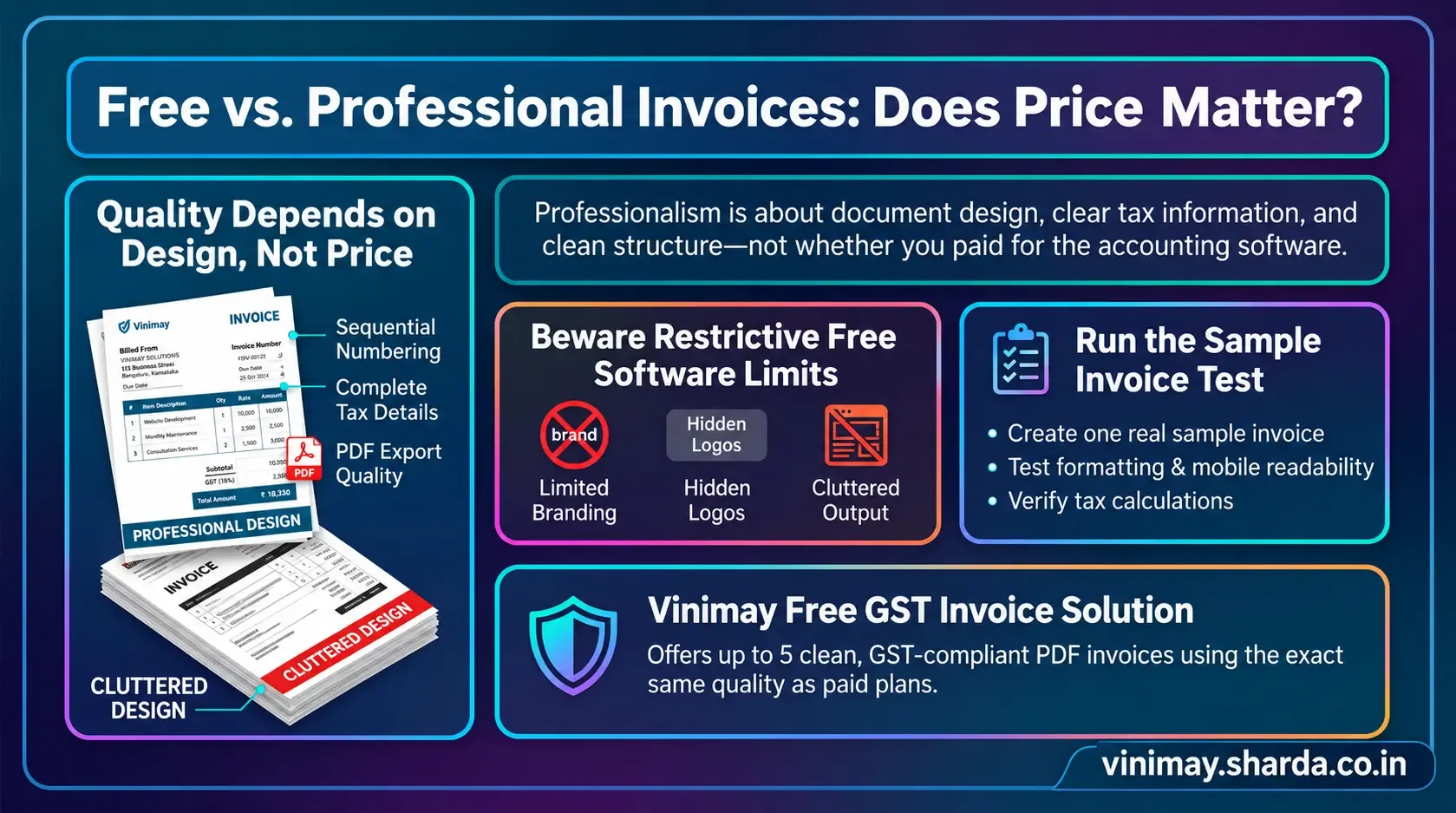
Clean, consistent layout with clear sections for business details, customer details, and line items
Correct, complete tax information displayed clearly
A sequential invoice number and date, signalling organised record-keeping
Legible formatting that doesn't cram information together
A downloadable PDF format, rather than a plain text or handwritten appearance
Where Free Tools Sometimes Genuinely Fall Short
To be fair, not every free tool handles this equally well. Some free tiers restrict template customisation heavily, limit branding options like logos, or produce a visually cluttered default layout. This varies by provider — it's not universal to "free" as a category.
The Real Test
Rather than assuming that a free accounting software solution will or will not create professional invoices simply because it is free, the best approach is to test the actual invoice yourself. Create one sample professional invoices using your business details and review it from the perspective of a customer who is receiving it for the first time.
Check whether the invoice clearly displays important information such as the business name, address, GSTIN, invoice number, invoice date, customer details, product or service description, quantity, price, applicable GST rate, tax amount, total payable amount, and payment information. The layout should also be clean and easy to understand without making the customer search through unnecessary information.
You should also check whether the professional invoices can be downloaded or shared easily, particularly in PDF format, and whether the final version looks professional when viewed on a computer or mobile device. Make sure there are no missing fields, calculation issues, formatting problems, or unnecessary elements that could make the invoice confusing.
This simple test takes only a few minutes and gives you a much more practical understanding of the software's invoicing capabilities than relying solely on pricing pages or marketing claims. If the invoice is accurate, readable, properly structured, and suitable for your business requirements, the fact that the software is free does not automatically make the invoice less professional.
Where Vinimay Fits This
Vinimay's free professional invoices tool generates GST-compliant invoices with a clean, structured layout, correct tax breakdown, and immediate PDF download — the same underlying format used across the platform, not a stripped-down version.
Frequently Asked Questions
Q1. Does "free" mean an invoice will look less professional?
Not inherently — visual quality depends on template design, not price, though this does vary by specific provider.
Q2. What makes an invoice look unprofessional?
Inconsistent formatting, missing tax details, unclear layout, or a non-PDF, hard-to-read output.
Q3. Can I test invoice quality before committing to any software?
Yes, creating one real invoice and reviewing it as a customer would be the most reliable test.
Q4. Does Vinimay's free invoice differ visually from its paid tier?
No, the underlying invoice format and quality remain consistent across the free tool and fuller plans.
Q5. Is PDF export important for professionalism?
Yes, a downloadable, properly formatted PDF is generally expected over a plain text or screenshot-based invoice.
Q6. How many free invoices can I create with Vinimay?
Up to 5 GST invoices free, downloadable as PDF.
Q7. Do all free accounting tools offer the same invoice quality?
No, this varies significantly by provider — some restrict templates or branding more than others.
Q8. Should I judge invoice quality by price alone?
No, judging by an actual sample invoice is far more reliable than assuming based on cost.
Q9. Does invoice numbering affect how professional it looks?
Yes, sequential numbering signals organised, ongoing record-keeping rather than one-off, informal billing.
Q10. Can a professional-looking invoice still have compliance issues?
Yes, appearance and tax accuracy are separate things — a clean-looking invoice can still have an incorrect tax field if setup wasn't done carefully.
Related Topics
Published by Team Vinimay
Our editorial and compliance specialists create practical guides, tax calculation rules, and operational strategies to empower Indian small business owners and accountants.