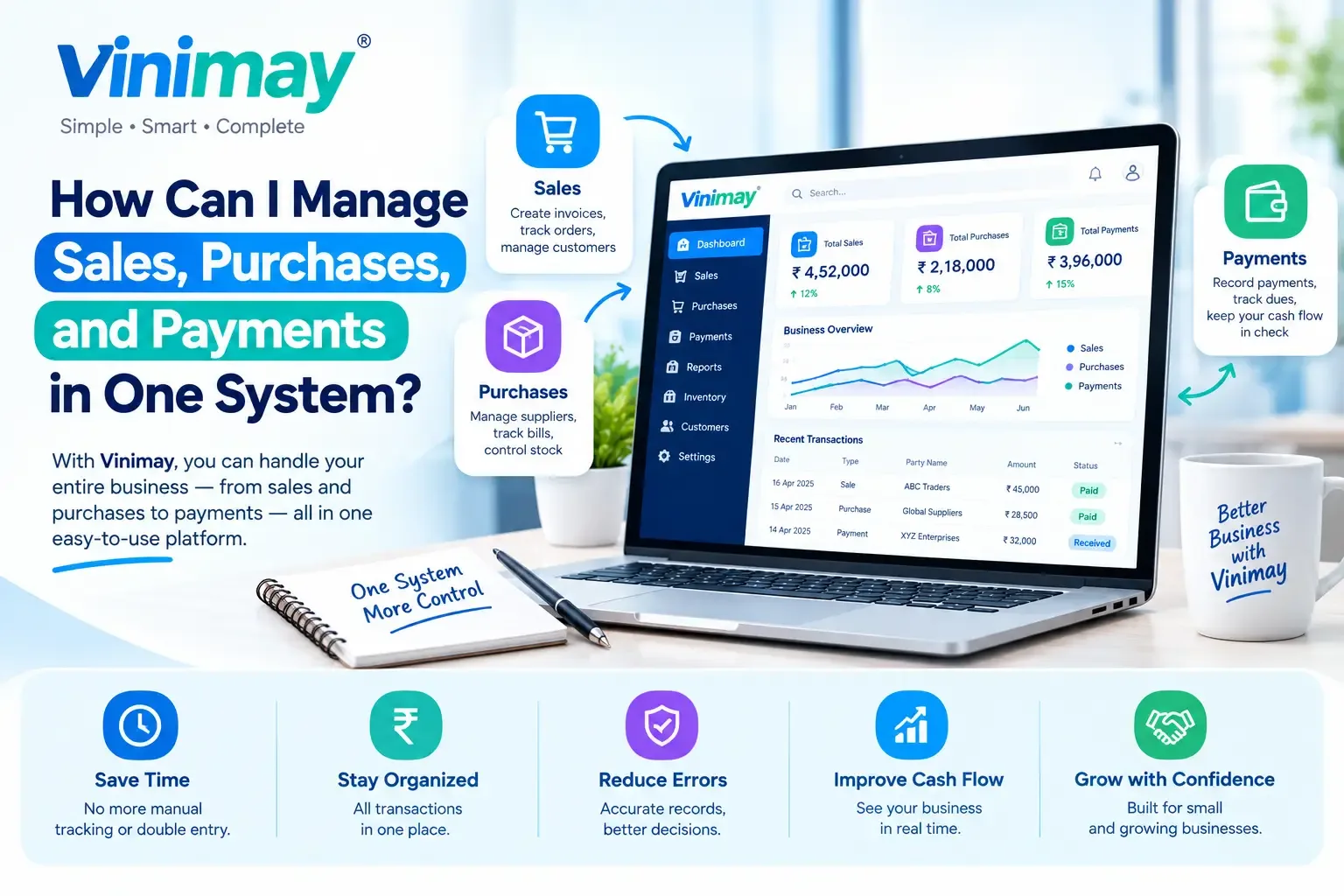
How Can I Manage Sales, Purchases, and Payments in One System?
Sales, purchases and payments feel like three separate jobs mainly because they usually get handled at three separate moments—a bill written at the counter, a purchase noted when a delivery arrives, and a payment logged whenever someone remembers to check who's paid. None of these moments naturally line up with each other, which is exactly why the three drift apart over time.
Managing sales, purchases, and payments in one system means recording all three as connected parts of the same transaction history, rather than as separate logs that need to be cross-referenced later. It isn't about using three features in the same app — it's about making sure a sale, a purchase and a payment can all be traced back to each other without manual matching.
This guide walks through what genuinely connecting these three requires, a practical daily order for recording them, and what to do when the numbers don't line up.
Why These Three Usually End Up Scattered
Sales happen fast, often under time pressure at a counter. Purchases happen irregularly, whenever stock arrives. Payments happen at yet another time entirely—sometimes immediately, sometimes weeks later. Because each has its own rhythm, they naturally end up recorded in whatever was closest at hand—a register for sales, a memory or a diary for purchases, and a mental tally for payments. None of this is a discipline failure; it's simply what happens when three different rhythms aren't deliberately brought together.
What "One System" Actually Requires
Bringing these three together isn't just about using one app for all of them — it specifically requires:
Every sale linked to a customer record, so payments can be matched against it later
Every purchase linked to a vendor record, in the same way
Every payment recorded against the specific invoice or purchase it settles, not just against a customer or vendor name in general
A single, shared product or item reference, so a sale and a purchase of the same item are recognisably connected
Without these specific links, having sales, purchases, and payments in the same software doesn't actually connect them—it just stores them near each other.
Setting Up the Right Order of Entry
A consistent entry order makes the connections above happen naturally, rather than needing to be fixed after the fact:
Record the sale or purchase first, as the primary transaction
Attach the payment to that specific transaction, whether it's immediate or comes later
Update the outstanding balance automatically from the difference between the transaction amount and the payment recorded
Repeat consistently, so every transaction—without exception—follows the same order
Skipping step two—recording a payment separately instead of against the specific transaction—is the single most common reason these three drift apart even in a "combined" system.
A Practical Daily Routine
Log every sale at the point of billing, not at the end of the day
Log every purchase as soon as a delivery or invoice arrives, not when convenient
Record a paymentthe moment it's received or made, tagged to the specific invoice
Do a five-minute end-of-day check: does the day's sales total match what was actually collected plus what's still outstanding?
What to Do When the Three Don't Match Up
Signs Your Current Setup Is Already Falling Apart
You've had to ask a customer to remind you what they've already paid
Month-end totals require adding up figures from more than one place
You've discovered a purchase that was never formally logged anywhere
Checking "who owes what" takes more than a minute or two
Any one of these is a sign that sales, purchases, and payments aren't actually connected yet, even if they're technically recorded somewhere.
How Vinimay Brings These Three Together
Vinimay links every sale and purchase to the relevant customer or vendor record, and every payment is recorded against the specific invoice it settles — so outstanding balances update automatically rather than requiring manual matching. Because sales, purchase and payment records share the same underlying data, checking whether the three line up is a matter of viewing one connected record, not cross-referencing separate logs.
To see this connection directly, Vinimay's free tool lets you generate up to 5 GST invoices free, with payment status tracked against each one from the start.
Conclusion
Managing sales, purchases, and payments in one system isn't just about having all three in the same app — it's about linking every payment to the specific transaction it settles and following a consistent entry order every time. Most disconnection happens quietly, through skipped links rather than dramatic errors, which is why a daily routine and a quick end-of-day check matter more than the software itself. Vinimay ties these three together at the record level, so outstanding balances and totals stay accurate without manual cross-referencing.
Frequently Asked Questions
1. What's the biggest mistake that keeps sales, purchases and payments disconnected?
Recording a payment separately instead of linking it to the specific sale or purchase it settles.
2. Do I need special software to connect these three, or can I do it manually?
It's possible manually with careful discipline, but software makes the linking automatic rather than dependent on memory.
3. What should I check daily to keep these three in sync?
A quick check that the day's sales total matches payments collected plus what remains outstanding.
4. How does Vinimay link sales, purchases and payments?
By tying every payment to a specific invoice or purchase record, rather than tracking it separately against a customer or vendor name alone.
5. What's the first sign that these three have fallen out of sync?
Needing to ask a customer or vendor to clarify what's already been paid.
6. Should purchases be logged immediately or can they wait?
Immediately, or as close to the delivery as possible — delayed logging is a common cause of missed entries.
7. Can I fix a mismatch after it's already happened?
Yes, by tracing back through recent entries to find the missing or misapplied record, though it's more time-consuming than preventing it.
8. How many free invoices can I try on Vinimay to test this?
Vinimay's free invoice tool allows up to 5 GST invoices free, with payment tracking included from the first entry.
Related Topics
Published by Team Vinimay
Our editorial and compliance specialists create practical guides, tax calculation rules, and operational strategies to empower Indian small business owners and accountants.