You open the Customer Ledger in Vinimay and want to see the account of one customer, or only a period of time. The page has a Filters box at the top, and it is not obvious how it works.
The box has a Select Customer search, a From Date and a To Date, a Reset button and a chip that says how many filters are active. In the example the chip says "0 active filters".
This guide starts from the login page and shows each filter with real screenshots of Vinimay.
Step 1: Log in to Vinimay
Open the Vinimay login page. Choose Client Login for the account owner or User Login for staff (marker 1). Enter the Username (marker 2) and Password (marker 3), type the CAPTCHA (marker 4), and click Sign In (marker 5).
Step 1: Log in to Vinimay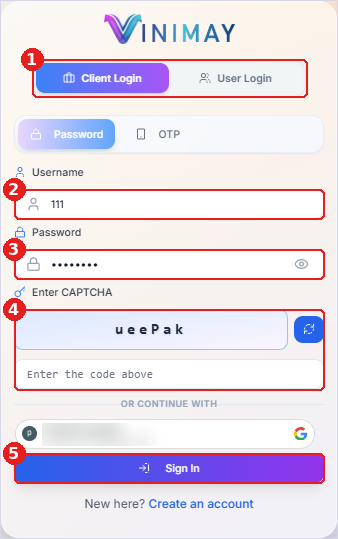
Step 2: Open Ledger and Receivables from the Dashboard
After you sign in, you land on the Dashboard. In the left menu, open Ledger and click Receivables (marker 6). The page is titled Customer Ledger.
Ledger > Receivables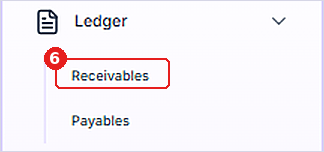
Step 3: See the page header
The title is Customer Ledger. The chip Receivables overview (marker 7) shows the kind of ledger. The Export CSV button (marker 8) is shown greyed out in the example.
The page header
Step 4: Select a customer
In the Filters box, Select Customer (marker 9) is a search box that says "Search customers...". Type a name to find one customer.
Select Customer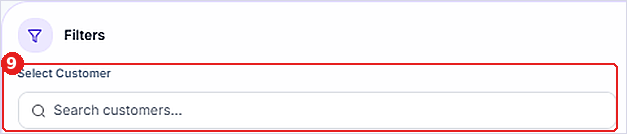
Step 5: Choose the dates and reset
From Date (marker 10) says "Select start date". To Date (marker 11) shows a date, October 9th, 2026 in the example. The chip at the top right (marker 12) says how many filters are active, for example "0 active filters". Reset (marker 13) clears the filters. It is greyed out in the example, where no filter is set.
From Date, To Date and Reset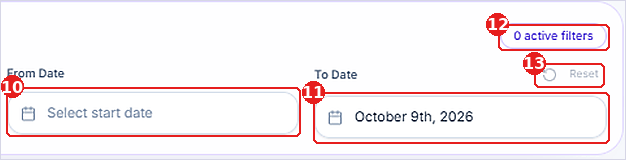
Tips
Start with the customer, then add the dates.
Watch the active filters chip to see what you have set.
Use Reset to start again.
Check the To Date when a recent entry is missing.
Conclusion
The Customer Ledger in Vinimay has a Filters box with Select Customer, From Date and To Date, a Reset button and an active filters chip.
Type a customer name, pick the dates and read the list below. Use Reset to clear the filters.
Knowing the filters lets you find an account quickly. Create a free Vinimay account and try them on your own ledger.