Proforma Invoice vs Sales Invoice in Vinimay: Which One Should You Create?
A customer asks for a rate, and you are not sure whether to make a proforma invoice or a sales invoice. Both look similar, both have items and totals, and it is easy to pick the wrong one.
In general, a proforma invoice is a quote you send before the sale is final, and a sales invoice records the sale itself. Vinimay has a separate window for each: Create a proforma invoice for quotes, and create a transaction with the Sales tab for sales.
This guide shows both windows side by side, with the fields that differ, so you can choose the right one. Each screenshot has a red box and a number that match the text. At the end, you will find answers to 10 common questions. Where our screenshots do not show a detail, we say so.
Quick answer
• Giving a quote first: create a proforma invoice.
• The sale is done: create a sales invoice (Transactions, Sales tab, New Transaction).
Step 1: Find the two buttons
On the Transactions page, the top right has three buttons: AI Entry Creation, New Transaction (image 1) for sales and other entries, and Create Proforma Invoice (image 2) for quotes.

New Transaction (1) and Create Proforma Invoice (2)
Step 2: Look at the proforma window
The Create Proforma Invoice window says "Fill in the details below to create a new proforma invoice". Under Customer Details, you will see Customer Name (image 3), required, and an optional Reference Number (image 4), for a PO number or similar. The Bank field (image 5) is shown without a red star. Shipping Address is required, and "Same as billing address" is selected by default.
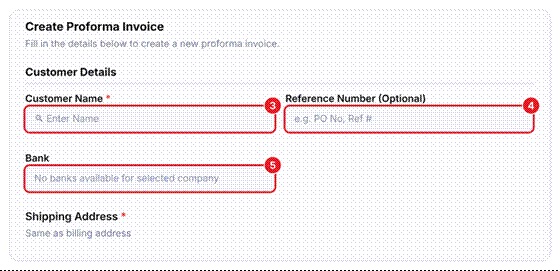
Proforma window: customer (3), reference number (4) and bank (5)
Step 3: Look at the sales window
In Create Transaction with the Sales tab selected, the fields are a little different. Customer (image 6) and Payment Method (image 7) are required. Bank (image 8) has a red star, so it is required; if the company has no bank, a yellow message with an Add Bank Details button appears. There is also a Scan Invoice button (image 9), which our screenshots do not explain.
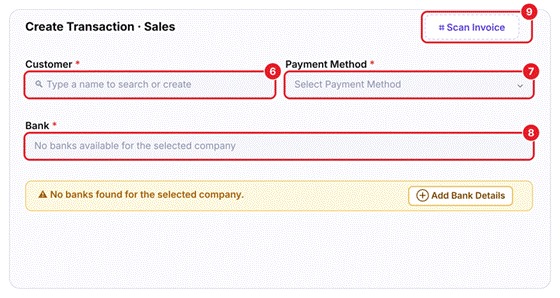
Sales window: customer (6), payment method (7), bank (8) and Scan Invoice (9)
Step 4: Compare the two
This table puts what we saw in both windows side by side.
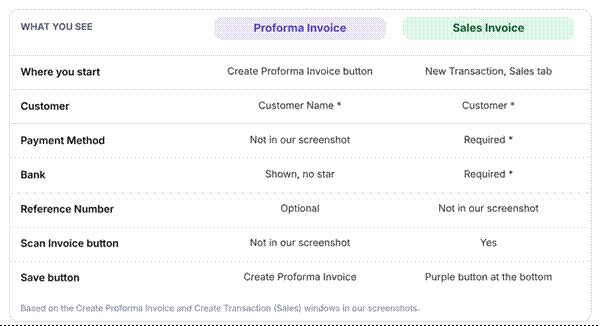
Proforma invoice and sales invoice at a glance
Step 5: Check where each one appears
The Transactions page has tabs for All, Sales, Purchases, Receipts, Payments and Journals. Your sales are listed under Sales (image 10). Proforma invoices are listed under Proforma (image 11), which appeared at the end of the tabs in one of our screenshots. In another screenshot, the Proforma tab was not there, so it may depend on your account or plan.

Sales tab (10) and Proforma tab (11)
Tip: Not sure which one to create? Ask yourself: has the customer agreed to buy? If yes, create a sales invoice. If you are only giving a rate, create a proforma.
Conclusion
A proforma invoice and a sales invoice look alike, but they do different jobs. The proforma is a quote you give before the sale. The sales invoice records the sale once it is final.
To recap, use Create Proforma Invoice for quotes, and use New Transaction with the Sales tab for sales. The sales window needs a payment method and a bank, while the proforma has an optional reference number.
Choosing the right one keeps your records clean. If you have more questions, the FAQs below cover the most common ones.