Vinimay LogoVinimay Text
About Us
Features
GST Billing & InvoicingInventory ManagementPOS BillingCustomer ManagementVendor ManagementTransaction Management
Solutions

Business Solutions

Choose a solution built for your business

General

Billing, inventory & accounts

→

Travels

Bookings, routes & billing

→

Courier

Tracking, delivery & billing

→

Transportation

Trips, vehicles & expenses

→

Marbles

Stock, units & sales

→

Restaurant & Cafe

Sales, stock & vendors

→

Kirana & Grocery

Billing, inventory & invoice

→

Service

Sales, raw material & stock

→

Manufacturing

Production, raw material & stock

→

Trading

Purchase, sales & stock ledger

→
Explore All Solutions→
Pricing
Knowledge Centre

Knowledge Base→

Step-by-step product tutorials & setup

Blogs→

Industry news, GST & tax tips

IN
About Us→
Knowledge Base→
All FeaturesGST Billing & InvoicingInventory ManagementPOS BillingCustomer ManagementVendor ManagementTransaction Management
All SolutionsGeneralTravelsCourierTransportationMarblesRestaurant & CafeKirana & GroceryServiceManufacturingTrading
Pricing→

Knowledge Base

Product help & tutorials

→

Blogs

Industry news & tax tips

→

Region / Country

India

© 2025 Vinimay. All rights reserved.

🏠Getting Started
Quick setup guideHow to Add Unlimited Custom Business Fields to InvoicesHow to Set/Change Language in Vinimay Mobile AppHow to Update Phone Number/e-Mail of a BusinessHow to Add or Delete a Business in Vinimay AccountWhy Vinimay is a Better Alternative to Vyapar App
📋Billing & Invoicing
How to Add a Receiver's Signature Field to Your Invoices?How to Use Party-Wise Item PricesHow to Add and Edit Party Names for Shipping Addresses?Add Precise Quantities with Up to 4 Decimal Places
🛒Inventory Management
How to Add Items and Manage StockHow to Track Low Stock Alerts
👥Party Management
How to Add Customers and SuppliersHow to Send WhatsApp Payment Reminders
💰Accounting
How to Record Expense Entries in VinimayManaging Cash & Bank Accounts
📊Grow your business
How to Set Up Online Store in VinimayTrip & Fleet Management Guide
Contents

INVOICE

Billing
Made
Simple
Simpler billing. Brighter businesses.

Let's grow your business together.

Quick Setup

Get started in minutes

Secure & Reliable

Your data is safe with us

Built for Growth

Simple. Practical. Useful.

Vinimay Logo

Smart Billing. Stronger Businesses.

[email protected]

Product

  • GST Billing & Invoicing
  • Inventory Management
  • POS Billing
  • Customer Management
  • Vendor Management
  • Transaction Management

Solutions

  • General
  • Travels
  • Courier
  • Transportation
  • Kirana & Grocery
  • Restaurant & Cafe
  • Marbles
  • Service
  • Manufacturing
  • Trading

Company

  • About Us
  • Features
  • Pricing
Small Businesses
Big Dreams
Vinimay Logo

Smart Billing. Stronger Businesses.

[email protected]
Small Businesses
Big Dreams

Product

  • GST Billing & Invoicing
  • Inventory Management
  • POS Billing
  • Customer Management
  • Vendor Management
  • Transaction Management

Solutions

  • General
  • Travels
  • Courier
  • Transportation
  • Kirana & Grocery
  • Restaurant & Cafe
  • Marbles
  • Service
  • Manufacturing
  • Trading

Company

  • About Us
  • Features
  • Pricing
  • Blogs
  • Contact Us
  • Careers
Grow
Progress
Repeat

© 2026 Vinimay. All rights reserved.

Built for Growth|Simple Tools. Real Growth.

📄Getting Started

Vinimay में नया Staff User कैसे जोड़ें? पूरी Step-by-Step Guide

P

Written By prachi kahar

Updated 9 days ago

Overview

अगर आप अपने बिजनेस में Accountant, Billing Staff, Manager या किसी Employee को Vinimay Software का Access देना चाहते हैं, तो आप आसानी से नया Staff User बना सकते हैं।

Vinimay में नया Staff User कैसे जोड़ें? पूरी Step-by-Step Guide

अगर आप अपने बिजनेस में Accountant, Billing Staff, Manager या किसी Employee को Vinimay Software का Access देना चाहते हैं, तो आप आसानी से नया Staff User बना सकते हैं।

इस गाइड में हम आपको बताएंगे कि Vinimay में नया Staff User कैसे जोड़ें, उसकी Login Details कैसे बनाएं, Role कैसे चुनें और Company का Access कैसे दें।

Step 1: Vinimay में Login करें

सबसे पहले Vinimay Software की वेबसाइट खोलें। अब Client Login विकल्प चुनें और अपना Username, Password और CAPTCHA दर्ज करें। इसके बाद Sign In बटन पर क्लिक करें।
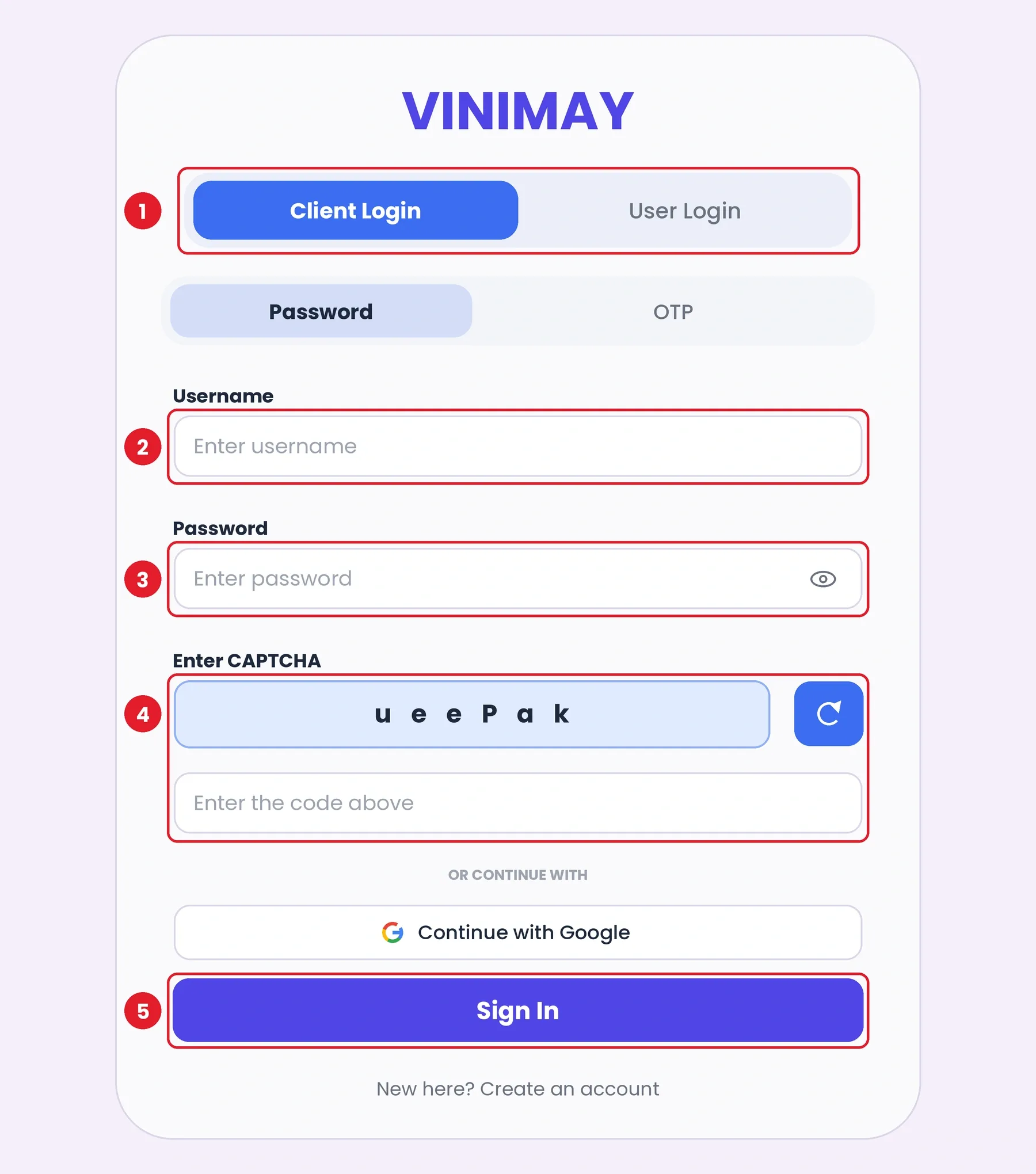
vinimay-login-full-form-clear


                                                                              Vinimay Login Page

Step 2: Users सेक्शन खोलें

Login करने के बाद Dashboard के बाईं ओर दिए गए Menu में Users विकल्प पर क्लिक करें।

इस सेक्शन से आप अपने बिजनेस के Staff Users को मैनेज कर सकते हैं और नए Users जोड़ सकते हैं।

Pasted screenshot


                                                         Users Section in Vinimay

Step 3: Add New User Form खोलें

Users सेक्शन में जाने के बाद Add New User विकल्प पर क्लिक करें।

इसके बाद आपके सामने एक Form खुलेगा, जिसमें आपको नए Staff User की जरूरी जानकारी भरनी होगी।
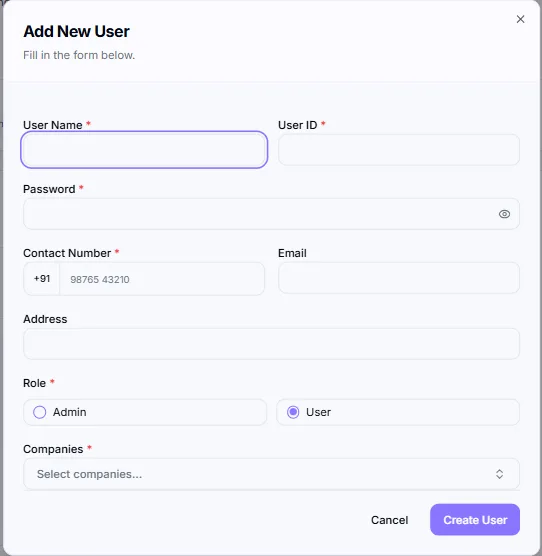
Pasted screenshot


                                                                Add New User Form

Step 6: Company चुनें और Create User पर क्लिक करें

अब Companies Dropdown से उस कंपनी को चुनें जिसके लिए आप नया Staff User बना रहे हैं।

सभी जरूरी जानकारी भरने और सही Company चुनने के बाद Create User बटन पर क्लिक करें।


Pasted screenshot
Pasted screenshot


                                                        Select Company and Create User

Step 7: Staff User का Login Verify करें

नया Staff User बनाने के बाद उसे उसकी User ID और Password सुरक्षित तरीके से दें।

इसके बाद कर्मचारी को Vinimayके User Login विकल्प से Login करने के लिए कहें।

Login होने के बाद यह जांचें कि उसे सही Company और जरूरी Features का Access मिल रहा है या नहीं।

निष्कर्ष

Vinimay में नया Staff User जोड़ना एक आसान प्रक्रिया है। इसके लिए आपको Users सेक्शन खोलना है, Add New User Form में कर्मचारी की जानकारी भरनी है, सही Role और Company चुननी है और अंत में Create User पर क्लिक करना है।

इस तरह आप अपनी टीम के अलग-अलग कर्मचारियों को अलग Login देकर Billing, Accounting और दूसरे Business Operations आसानी से मैनेज कर सकते हैं।


Frequently Asked Questions

Did this article solve your question?

Not really
Somewhat
Very helpful!

More in Getting Started📄

Vinimay में Staff को अलग-अलग Permissions कैसे दें?Vinimay में नया यूज़र कैसे जोड़ें? जानें पूरी प्रक्रियाWhat Does Total Purchases Mean on the Vinimay Dashboard?Vinimay में User को Remove या Deactivate कैसे करें? जानें पूरी प्रक्रिया

Vinimay में Staff को अलग-अलग Permissions कैसे दें?

Next
Previous

How to Shift from Excel to Vinimay: A Simple Step-by-Step Guide

Still Have Questions?

Talk directly with our product specialist team

Our customer support team is available Mon-Sat, 9:00 AM - 7:00 PM IST to help you configure your business.

Email Support: [email protected]
Contents