What Happens to Your Business Records When You Switch Accounting Software?
Switching accounting software is often delayed for one specific fear: that years of invoices, customer details and payment history will simply disappear the moment you stop using the old system. That fear is understandable, but it's also largely preventable with the right preparation before making the move. Records
What actually happens to your records depends heavily on the specific provider —some retain your data indefinitely even after you stop actively using the account, some archive it after a period, and some restrict access entirely once you're no longer a paying or active user. There's no universal answer, which is exactly why checking this specifically, before switching, matters more than assuming.
This guide walks through what to export before switching, how to set up your new system with accurate opening data, and what typically can't be transferred directly between two different tools.
Why This Varies So Much Between Providers
Different providers have different data retention and export policies, shaped by their own business models — some are built around easy portability to encourage trust, others make export more restrictive to reduce customer churn. Neither approach is inherently wrong, but it means you can't assume your data behaves the same way across two different tools, and confirming this directly before switching avoids an unpleasant surprise afterward.
What to Export Before You Switch
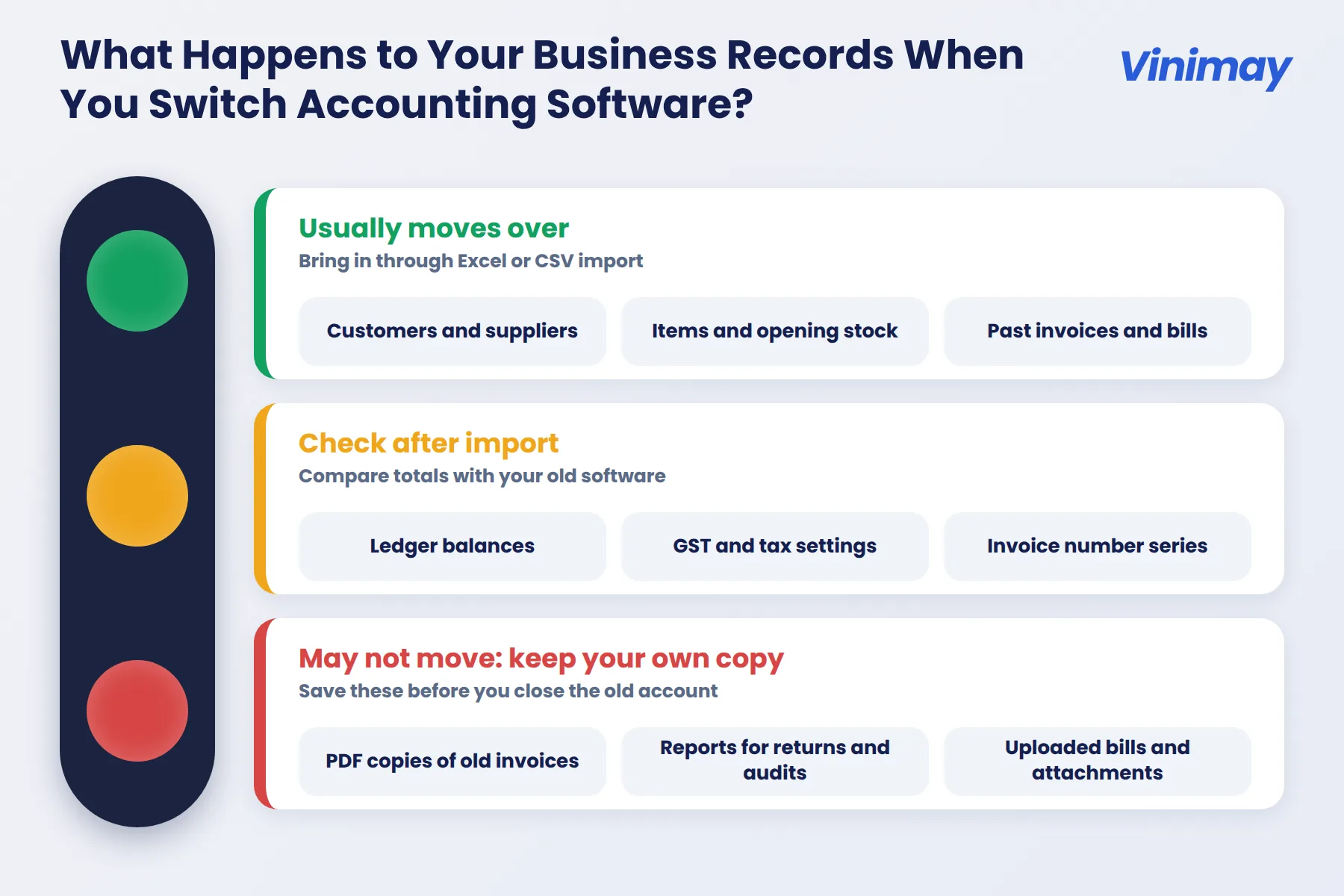
All invoicesfor at least the past financial year, ideally as PDFs
Customer and vendor contact and GSTIN details
Current outstanding balances—who owes you, and what you owe
Current stock levels, if inventory is tracked
Any reports you might need to reference later, exported as files rather than left inside the old system
Setting Up Opening Balances in the New System
Enter your current outstanding customer balances as a starting point in the new system
Enter current vendor dues the same way
Enter current stock quantities if inventory is part of your setup
Confirm these opening figures match what you had in the old system before entering any new transactions
What Usually Can't Be Transferred Directly
Full historical invoice-by-invoice detail rarely transfers automatically between two unrelated systems
Custom categorisation or labeling from the old system often doesn't map cleanly to the new one's structure
Any reports or analysis built specifically within the old tool's interface typically need to be recreated, not imported
This is why exporting key documents as standalone files (PDFs, spreadsheets) before switching matters — it preserves access to the detail even when it can't be directly imported.
A Pre-Switch Checklist
How Vinimay Approaches This Transition
Every invoice created in Vinimay is downloadable as a PDF immediately, meaning you retain your own copy of every transaction regardless of what happens to the platform account later — this directly addresses the biggest fear around switching, since your invoice history isn't solely dependent on the platform retaining it. When starting fresh in Vinimay after moving from another system, opening balances for customers, vendors and stock can be entered as a starting point, similar to how any switch to a new system is typically handled.
To see how records are handled from day one, Vinimay's free invoice tool lets you generate up to 5 GST invoices free, each downloadable immediately as a PDF.
Conclusion
Switching accounting software doesn't have to mean losing your business history, but it does require deliberate preparation—exporting past invoices, noting current balances, and setting up accurate opening figures in the new system, since full automatic transfer between two different tools is rarely guaranteed.
Vinimay's immediate PDF export on every invoice means your own copy of every transaction stays with you regardless of the platform, reducing dependency on any single system retaining your history indefinitely
Frequently Asked Questions
1. Will I lose all my past records if I switch accounting software?
Not necessarily, but this depends heavily on the specific provider's data retention and export policies — always confirm before switching.
2. What's the most important thing to export before switching?
Past invoices as PDFs and current outstanding balances, since these are hardest to reconstruct from memory later.
3. Can I transfer detailed transaction history automatically between two different tools?
Usually not fully — most switches rely on entering opening balances rather than a complete automatic transfer.
4. Does Vinimay let me keep my own copy of every invoice?
Yes, every invoice created in Vinimay can be downloaded as a PDF immediately.
5. How do I set up opening balances in a new system?
Enter your current outstanding customer and vendor amounts, along with current stock levels, as a starting point before recording new transactions.
6. What typically doesn't transfer well between accounting tools?
Custom categories, detailed historical reports, and system-specific formatting usually need to be recreated rather than imported directly.
7. Should I keep the old system active during the transition?
It's often useful to keep read-only access briefly, in case you need to reference older records you didn't export.
8. How many free invoices can I try on Vinimay to see PDF export in action?
Vinimay's free invoice tool allows up to 5 GST invoices free, each downloadable as a PDF.
Related Topics
Published by Team Vinimay
Our editorial and compliance specialists create practical guides, tax calculation rules, and operational strategies to empower Indian small business owners and accountants.