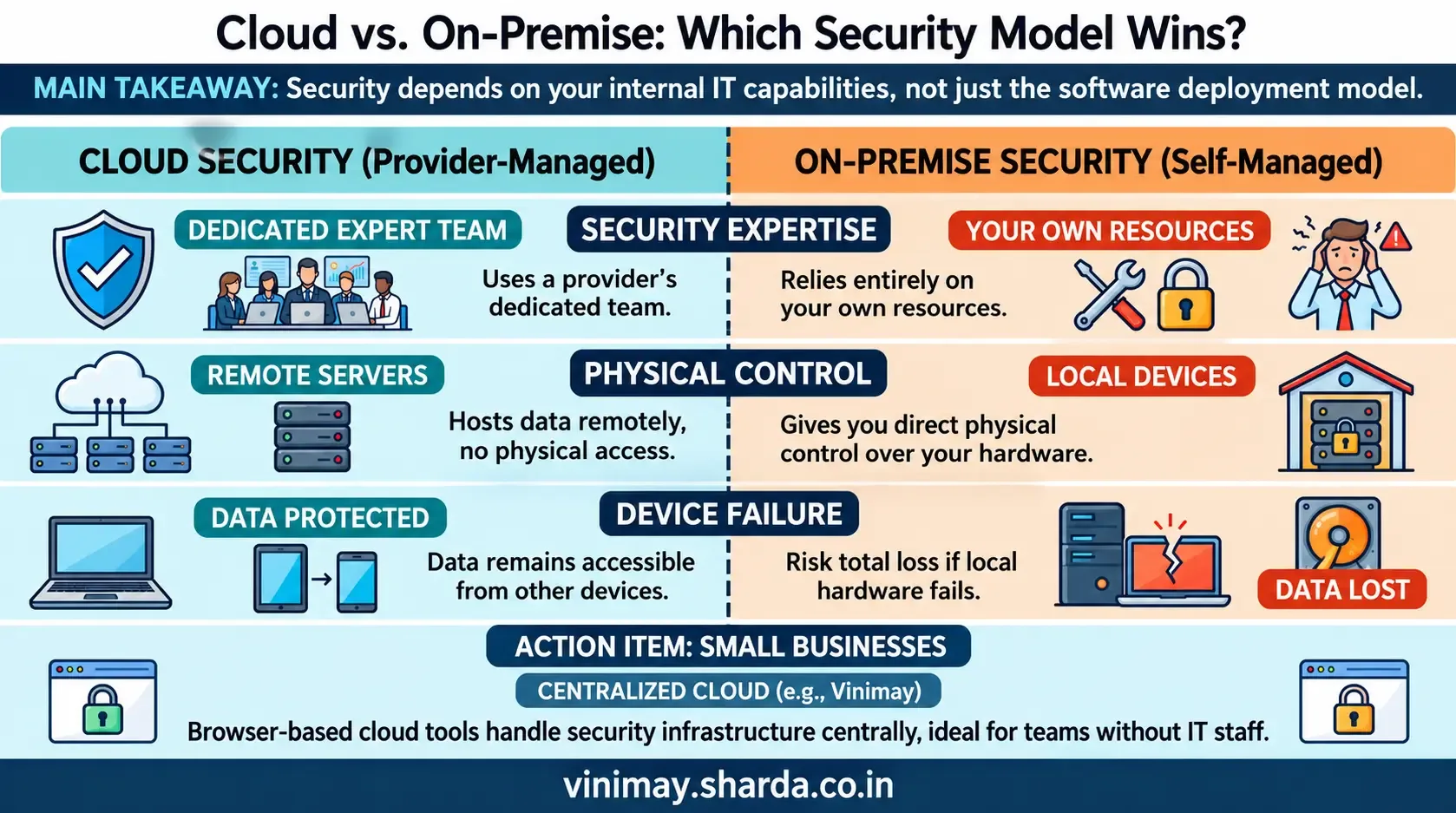
This specific comparison—cloud versus on-premise, security-focused—deserves its own answer distinct from broader "is cloud safe" discussions, because the actual security trade-off between these two models is more nuanced than either being universally safer. Cloud accounting and on-premise software each carry different security responsibilities and risks—cloud software puts security largely in the provider's hands (professional infrastructure, but a remote target), while on-premise software puts security in your own hands (full control, but dependent on your own practices)—neither is inherently more secure; they distribute risk differently.
The Cloud Security Trade-Off
Cloud accounting providers typically maintain professional-grade security infrastructure—encryption, monitoring, redundancy—that a small business likely couldn't replicate on its own local systems. The trade-off is that your data lives on infrastructure you don't directly control and depends on that provider's specific practices being sound.
The On-Premise Security Trade-Off
On-premise software keeps data on your own local systems, giving you direct physical control. The trade-off is that your own security—device protection, local backup discipline, physical access control—becomes entirely your responsibility, without the benefit of a provider's dedicated security infrastructure and expertise.
A Direct Comparison
Why "More Secure" Depends on Your Own Capability
For a small business without dedicated IT resources, cloud accounting software's professional infrastructure often provides better practical security than that same business could maintain on its own local systems. For a business with strong internal IT capability and specific data control requirements, on-premise control might align better with their own standards.
The Question Worth Asking Instead
Rather than assuming one model is universally safer, the more useful question is which specific risks matter most to my business, and which model's trade-offs align better with my own capability to manage the remaining risk?
Where Vinimay Fits This
Vinimay's free invoice tool operates as a cloud-based service, meaning security infrastructure—encryption, access control—is maintained centrally rather than depending on your own local device security, which particularly benefits businesses without dedicated technical resources of their own.
Frequently Asked Questions
1. Is cloud accounting automatically safer than on-premise software?
Not automatically—each distributes security responsibility differently, and which is "safer" depends on your own capability to manage the remaining risk.
2. What's the main security advantage of cloud software?
Professional-grade infrastructure and expertise that a small business likely couldn't replicate on its own local systems.
3. What's the main security advantage of on-premise software?
Direct physical control over where your data actually resides, without depending on a third-party provider's practices.
4. Does cloud software put my data at more risk from external attacks?
It's a different risk profile, not automatically higher—professional infrastructure often includes stronger monitoring than typical local setups.
5. Is on-premise software better for businesses with strong internal IT?
It can align well with businesses that have the specific capability and desire to control their own security infrastructure.
6. What happens to cloud data if my own device is lost?
It typically remains accessible from another device, unlike on-premise data tied to a specific local machine.
7. Does Vinimay's free tool operate as cloud-based software?
Yes, it's accessed through a browser, with security maintained through the platform's infrastructure.
8. Should a small business without IT staff choose cloud or on-premise?
Cloud accounting often provides more practical security for businesses without dedicated technical resources of their own.
9. Is this security comparison the only factor in choosing cloud vs. on-premise?
No, accessibility, cost, and internet dependency also factor into this decision beyond security alone.
10. How many free invoices can I test on Vinimay's cloud-based tool?
Up to 5 GST invoices free, accessible from any device with a browser.
Related Topics
Published by Team Vinimay
Our editorial and compliance specialists create practical guides, tax calculation rules, and operational strategies to empower Indian small business owners and accountants.