Why Is an ERP System Important, and How Do You Implement One?
Quick Answer: An Enterprise Resource Planning (ERP) system helps businesses manage accounting, inventory, sales, purchases and operations in one connected platform. It reduces duplicate work, improves reporting and provides better financial visibility. Successful ERP implementation involves assessing business needs, choosing suitable software, migrating data, testing workflows and training employees.
For businesses in Dubai, Abu Dhabi and across the UAE, managing transactions across different spreadsheets and software systems can become difficult as operations grow.
An ERP system connects important business processes, helping owners maintain accurate records and make informed decisions.
1. What Is an ERP System?
ERP stands for Enterprise Resource Planning. It is business management software that connects multiple departments and processes.
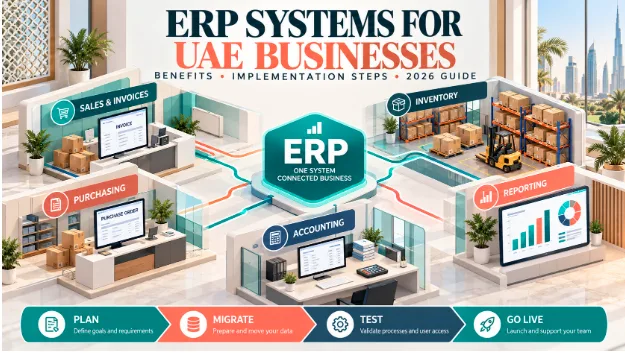
Common ERP modules include accounting, sales, purchasing, inventory, customer management, manufacturing and reporting.
For example, when a trading company sells a product, a connected ERP can record the invoice, update inventory, create the customer receivable and update financial reports.
This reduces the need to enter the same transaction repeatedly.
2. Why Is ERP Important for UAE Businesses?
ERP software can improve accuracy, efficiency and visibility.
A growing trading company, for instance, can use a connected system to monitor purchases, available stock, customer sales and outstanding payments.
However, the benefits depend on the software's capabilities and correct implementation.
3. Which Businesses Need an ERP System?
ERP may be useful for retailers, wholesalers, manufacturers, construction companies, distributors and service businesses.
A business should consider ERP when it experiences frequent stock discrepancies, duplicate entries, delayed reporting or difficulty managing multiple users and locations.
Small businesses may need only accounting and inventory software initially. A large manufacturing company may require production planning, bill of materials and warehouse management.
The best system is not necessarily the one with the most features; it is the one that matches actual business operations.
4. How Do You Implement an ERP System Step by Step?
Successful ERP implementation usually follows these stages:
Assess requirements: Identify problems in accounting, inventory and daily operations.
Choose software: Compare features, security, scalability and total cost.
Plan implementation: Assign responsibilities, timelines and milestones.
Prepare data: Clean customer, supplier, product and accounting records.
Configure workflows: Set user permissions, approval rules and business processes.
Test transactions: Check invoices, purchases, stock movements and financial reports.
Train employees: Teach users their daily responsibilities.
Go live and review: Monitor errors, reconcile balances and improve workflows.
Businesses may introduce modules gradually rather than changing every process simultaneously.
5. What Data Should Be Migrated?
Data migration means transferring existing records into the new system.
Important information includes customer details, supplier records, products, opening stock, outstanding invoices, bank balances and accounting ledger balances.
For example, before migration, a business may have AED 150,000 in customer receivables.
After migration, the ERP receivables report should still agree with the verified opening balance.
Businesses should retain backups and reconciliation reports throughout the process.
6. How Much Does ERP Implementation Cost?
ERP costs vary according to business size, users, modules, integrations and implementation complexity.
Typical cost components include software subscriptions, configuration, data migration, staff training, ongoing support and upgrades.
A basic invoicing and accounting setup will generally require less work than a multi-warehouse manufacturing implementation.
Businesses should compare total implementation and operating costs, not only the advertised monthly subscription.
They should also verify data export options to avoid being locked into a system that is difficult to replace.
7. Can ERP Help With UAE VAT, Corporate Tax and E-Invoicing?
ERP systems can help organise sales, purchases, invoices, expenses and records used in tax reporting.
For UAE businesses preparing for mandatory electronic invoicing, the Ministry of Finance encourages changes to existing enterprise systems so they can support the required structured data and integration.
The implementation schedule includes:
The ASP appointment deadline for the first category is 30 October 2026.
ERP software is not automatically FTA-compliant or e-invoicing-ready. Businesses must confirm the relevant requirements, integration capabilities and Accredited Service Provider arrangements.
8. How Can Vinimay Help Businesses Manage Operations?
Vinimay offers accounting and operational features such as invoicing, sales and purchase management, payment tracking, customer and supplier ledgers, inventory and financial reporting.
These features can help small and growing businesses organise transactions in one environment.
For manufacturers, available bill-of-materials and production-related functionality may also assist with organising material consumption and production records, depending on the configuration.
However, Vinimay's UAE-specific VAT filing, Corporate Tax calculations, mandatory e-invoicing, PINT-AE integration and Accredited Service Provider connectivity have not been independently verified.
Businesses should verify these functions before using Vinimay as part of their UAE statutory compliance process.
Frequently Asked Questions
Related Topics
Published by Satyam mahajan
Our editorial and compliance specialists create practical guides, tax calculation rules, and operational strategies to empower Indian small business owners and accountants.