Can Billing Software Connect to a Bank Account for Reconciliation?
A business owner marking an invoice as "paid" in their billing software is making an assumption — that the money shown as received in the software actually landed in the bank account. Most of the time this assumption holds, but it's still an assumption, not a verified fact, unless something is actively checking it against the bank itself.
This is exactly what bank reconciliation is meant to solve, and it's a fair question to ask whether billing software can handle this connection automatically, since manually checking a bank statement against every invoice is genuinely tedious work that most business owners would rather not repeat every month by hand.
This article breaks down what bank reconciliation actually involves, how a direct bank connection typically works where it's offered, where it tends to fall short even when available, and what to check before assuming any software handles this reliably.
What "Bank Reconciliation" Actually Means
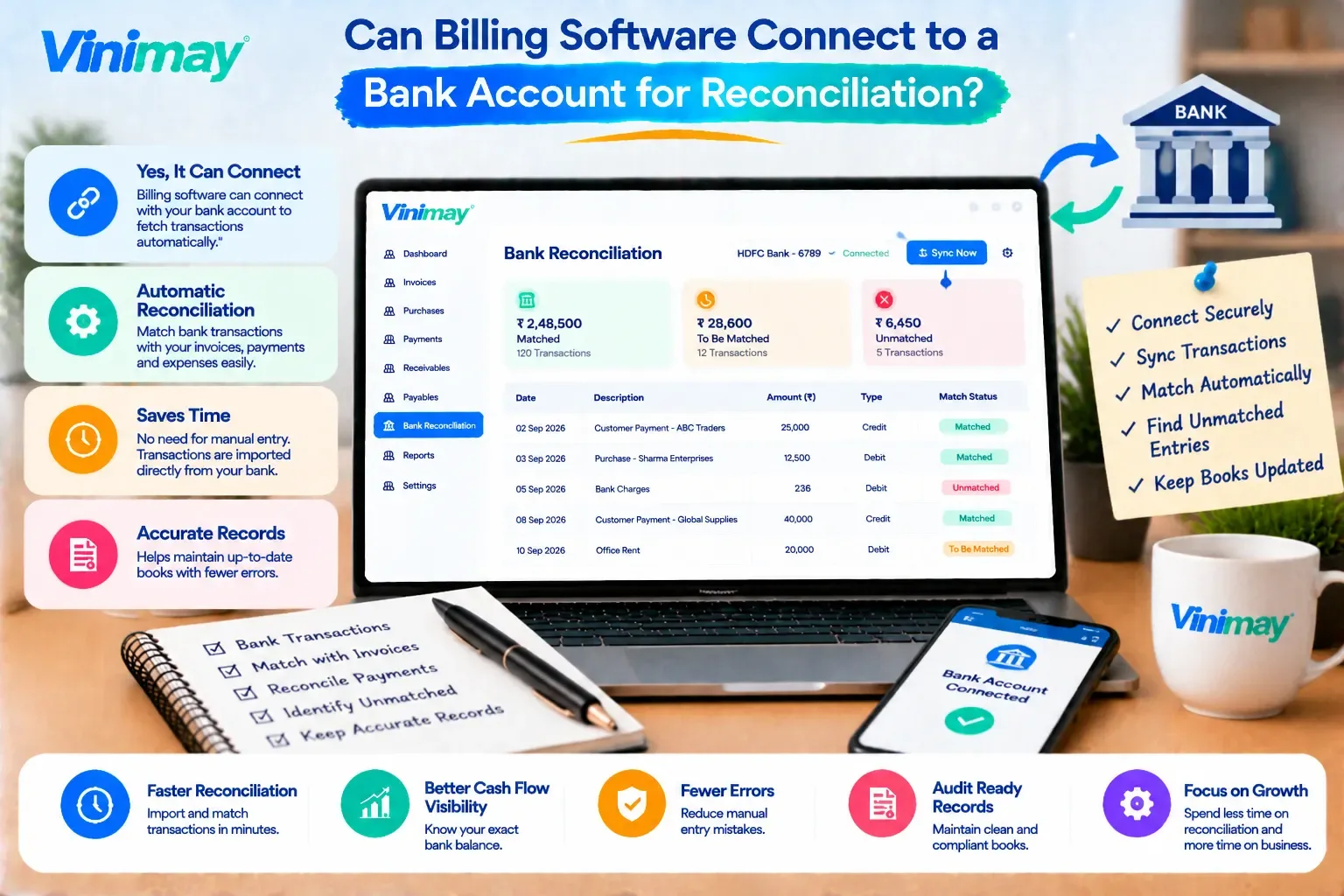
Direct answer: Bank reconciliation is the process of matching the payments recorded in your billing or accounting records against the actual transactions that appear on your bank statement, to confirm they agree.
It answers a specific question: does what my books say I received match what my bank says I actually received? Any mismatch — a payment recorded but never actually deposited, or a bank credit that was never logged against an invoice — gets caught through this process.
Why This Question Comes Up So Often
Businesses ask this because manual reconciliation is genuinely tedious:
Scrolling through a bank statement line by line
Matching amounts against invoices, often with slightly different reference numbers
Handling bank charges, rounding differences, or partial deposits that don't match cleanly
Doing this every month, whether or not anything seems obviously wrong
The appeal of a direct bank connection is removing this manual matching entirely.
How Bank Connection Typically Works When It's Offered
Where this feature exists in software, it generally follows this pattern:
The business links its bank account to the software through a secure connection
Transactions from the bank feed into the software automatically
The software attempts to match each bank transaction to an existing invoice or payment entry
Unmatched transactions are flagged for manual review
This is different from simply "recording" a payment — it's an active, ongoing comparison between two separate sources of truth.
What This Feature Requires Behind the Scenes
This is a meaningfully more complex technical requirement than basic invoicing or stock tracking, since it depends on external bank systems rather than data the software fully controls.
Where Bank Sync Commonly Falls Short
Even where this feature is offered, it doesn't always work as smoothly as expected:
Partial payments often don't match automatically and need manual linking
Multiple invoices paid in one bank transfer can confuse automatic matching
Delayed bank feeds mean the software's view of the account isn't always current
Different banks and account types may not all be supported equally
None of this means the feature is useless — it means it reduces manual work rather than eliminating the need for review entirely.
Manual Reconciliation: Still a Valid Alternative
Without an automatic bank connection, reconciliation is still very doable manually:
Download the bank statement for the period being checked
Compare it against the outstanding and recently paid invoices in your billing records
Mark off matches, and investigate anything that doesn't line up
Do this on a fixed schedule — monthly is common — rather than only when something feels off
This takes more time than an automated match, but it's a well-established, reliable process that many businesses use successfully without any direct bank integration.
What to Verify Before Trusting a Bank Connection Feature
If evaluating software that claims bank reconciliation support:
Confirm your specific bank is actually supported
Check how partial or combined payments are handled
Ask how often the bank feed refreshes
Test with a real transaction before relying on it fully
Understand what happens to reconciliation if the bank connection is interrupted
A Clear Answer for Vinimay Users
Vinimay focuses on GST invoicing,billing, sales and purchase records, receivables and payables, and stock tracking as its confirmed feature set. Direct bank account connection for automatic reconciliation isn't part of Vinimay's current confirmed features, so businesses relying on Vinimay for receivables tracking should pair it with manual bank statement reconciliation on a regular schedule, using the payment and invoice records Vinimay maintains as the reference point for that check.
Conclusion
Bank reconciliation, whether automatic or manual, exists to confirm that what your billing records show actually matches real money movement in your bank account.
Where a direct bank connection is available, it reduces manual matching but still requires review for edge cases like partial or combined payments. Where it isn't available, a consistent manual reconciliation schedule using accurate invoice and payment records achieves the same goal, just with more hands-on effort.
FAQs
1. What exactly does bank reconciliation solve that invoice tracking alone doesn't?
Invoice tracking shows what your records say happened, while bank reconciliation confirms that what happened in your records actually matches real money movement in your bank account, catching gaps that invoice tracking alone wouldn't reveal.
2. Is a direct bank connection necessary for accurate financial records?
Not strictly — accurate records depend on consistent, correct data entry and periodic manual reconciliation just as much as on an automatic bank feed, though the automatic version reduces the manual effort involved.
3. Why do automatic bank-matched transactions sometimes need manual review anyway?
Partial payments, combined transfers covering multiple invoices, or slightly mismatched reference details often can't be matched automatically with full confidence, so a manual review step remains necessary even with a bank connection in place.
4. How often should manual bank reconciliation be done if there's no automatic connection?
A monthly schedule is common and generally sufficient for most small businesses, though higher transaction volume may benefit from a more frequent, such as weekly, check.
5. Does connecting a bank account to software introduce any security concerns?
Any bank connection involves sharing some level of account access with a third party, so it's worth understanding exactly what permissions are granted and how that data is protected before connecting.
6. Can bank reconciliation be done without any software at all?
Yes, it can be done with just a bank statement and a manual record of invoices and payments, comparing the two directly — software simply makes this faster, not fundamentally different in purpose.
Related Topics
Published by admin
Our editorial and compliance specialists create practical guides, tax calculation rules, and operational strategies to empower Indian small business owners and accountants.