Can Accounting Software Manage Invoices and Payments?
A Invoices common assumption when starting out is that accounting software only handles record-keeping — entering numbers after the fact—while invoicing and payment collection need separate tools. In reality, most accounting software built for small businesses is designed to handle both together, since an invoice and its payment status are naturally connected: a bill isn't fully accounted for until it's either paid or marked as outstanding.
This connection is exactly what makes accurate accounting software valuable day to day. Instead of creating an invoice in one place and tracking whether it's been paid somewhere else, connected software updates both automatically — reducing the chance of a payment being missed or a customer being billed twice by mistake.
This guide gives a direct answer on what accounting software can and can't do with invoices and payments, and what to check for accuracy before relying on any tool for this.
Can Accounting Software Handle Both Invoicing and Payments?
Direct answer: Yes. Most accounting andbilling softwaredesigned for small businesses can generate invoices and track their payment status — whether an invoice is paid, partially paid, or outstanding — in one connected system, without needing separate tools for each.
The level of payment functionality varies by provider: some software focuses on accurate tracking of payment status (recording that a payment was received), while others also process online payments directly (accepting a card or bank transfer through the software itself).
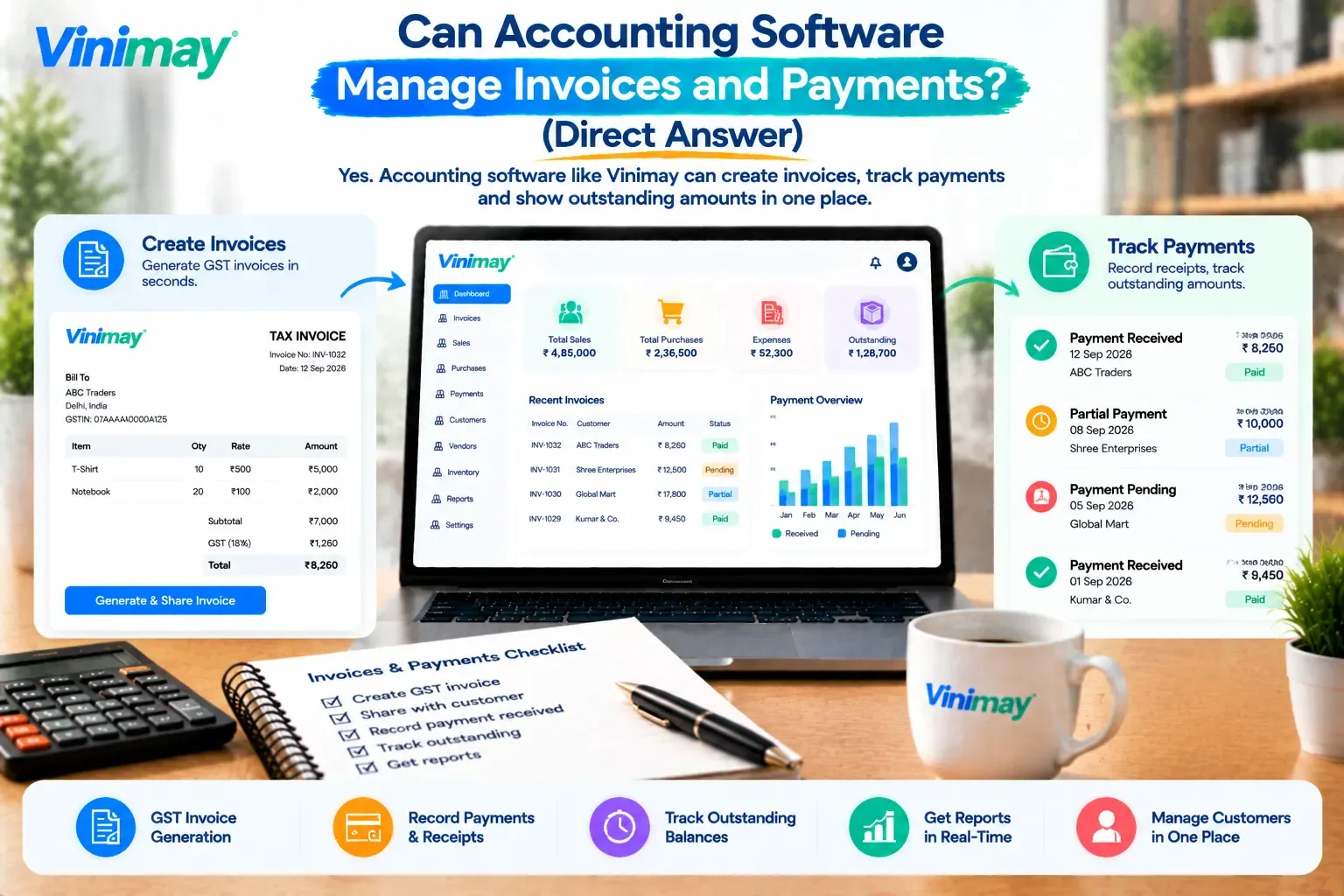
How Invoicing and Payment Tracking Work Together
An invoice is created with accurate GST calculation and itemised details.
The invoice is recorded against the specific customer, updating their outstanding balance.
A payment is received and logged — either fully or partially — against that specific invoice.
The customer's balance updates automatically, showing exactly what's still outstanding.
Reports reflect this in real time, giving an accurate picture of receivables across all customers.
This connected flow is what separates reliable accounting software from a plain invoice template, where payment status has to be tracked manually and separately.
What to Check for Accurate Invoice and Payment Management
A genuinely dependable system holds up on all five points — not just invoice creation, but accurate ongoing payment tracking.
What Accounting Software Typically Can't Do for Payments
It's worth being clear on this too: not all accounting software processes live online payments (like accepting a card or UPI payment directly within the invoice). Many tools — including most billing-focused software — are built to record and track payments accurately rather than process the transaction itself. This distinction matters when evaluating software, since "manage payments" can mean either accurate tracking or live payment processing, and confirming which one applies avoids a mismatch with what the business actually needs.
Problem → Reason → Prevention: Confusion often comes from assuming every accounting tool processes payments directly — checking this specific point before adopting a tool prevents an inaccurate expectation from the start.
How Vinimay Handles Invoices and Payments
Vinimay generates GST-compliant invoices with accurate tax calculation, and keeps payment tracking connected to those invoices, so outstanding amounts stay accurate as payments come in. Receivables and payables are tracked together, giving a clear, dependable view of what customers owe and what's due to vendors.
Alongside this, Vinimay keeps receipt tracking, sales records, and customer and vendor management connected, so a payment isn't recorded in isolation — it updates the full picture for that customer or vendor. Reports and ledger management give a reliable, ongoing view of invoicing and payment activity across the business.
Conclusion
Time savings from accounting software aren't uniform. They concentrate heavily in repetitive, cross-referencing tasks like invoice creation, balance checks, and stock reconciliation, while judgment-based decisions remain manual regardless of the tool. Understanding exactly where this time comes from, and why it holds up mechanically rather than just as a claim, helps set realistic expectations for what software can and can't speed up.
FAQs
Can accounting software manage both invoices and payments?
Yes, most accounting software built for small businesses generates invoices and tracks their payment status together in one connected system.
Does accounting software process online payments directly?
This varies by provider — some track payment status accurately (recording that a payment was received), while others also accept live online payments within the software itself.
Can accounting software track partial payments on an invoice?
Yes, reliable software allows partial payments to be recorded against an invoice, updating the remaining outstanding balance accurately.
How does accounting software know an invoice has been paid?
Payments are recorded manually against the relevant invoice (or automatically, if online payment processing is integrated), updating that customer's balance accordingly.
Can I see which customers have overdue invoices?
Yes, accurate accounting software typically includes an overdue or ageing report showing which invoices remain unpaid past their due date.
Is invoice tracking the same as accounting?
Not exactly—invoice tracking is one part of accounting software, which also typically includes broader records like ledgers, reports, and expense tracking.
Do I need separate software for invoicing and for tracking payments?
No, most accounting software built for small businesses handles both together, so a separate tool usually isn't necessary.
Can accounting software handle payments in multiple methods, like cash and bank transfer?
Most accounting software supports recording payments across common methods like cash, bank transfer, and cheque, though live processing options vary by provider.
Does accurate payment tracking affect GST reporting?
Indirectly, yes — accurate receivables records help ensure invoices are correctly reflected during return preparation and reconciliation.
What should I check before trusting software to manage my invoices and payments?
Confirm that it updates balances automatically, supports partial payments, and provides clear, accurate reports on outstanding amounts.
Related Topics
Published by admin
Our editorial and compliance specialists create practical guides, tax calculation rules, and operational strategies to empower Indian small business owners and accountants.