Businesses operating in different regions may need to manage different tax rules, rates, and compliance requirements. Accounting software helps simplify tax management by applying relevant tax calculations, maintaining transaction records, and generating invoices with required tax details.
The level of tax support available in free accounting software can vary depending on the software and the country-specific requirements it is designed to handle. Some free solutions may support basic tax calculations, while advanced compliance features and detailed tax reports may be available in paid plans. Vinimay helps businesses manage GST billing, tax-related invoices, and accounting records in an organised system, making it easier to maintain accurate transaction data.
What "Standard GST" Handling Typically Covers
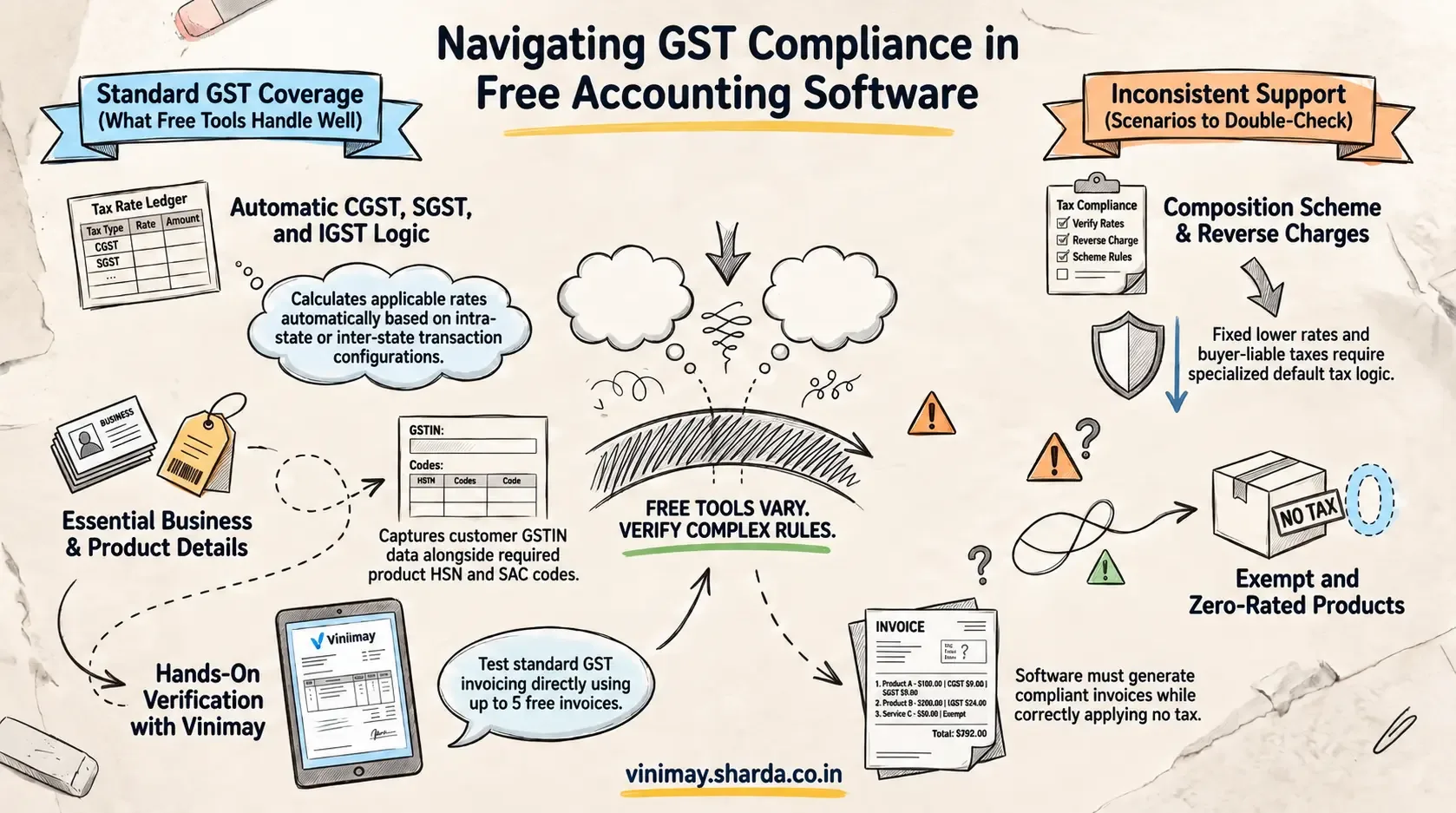
For a regular GST-registered business with standard-rate transactions, many free billing and accounting tools can cover the basic requirements effectively. This may include calculating the CGST and SGST or IGST based on whether a transaction is intra-state or inter-state, applying configured GST rates to products or services, and capturing HSN or SAC details where required. For B2B transactions, businesses may also be able to record the customer's GSTIN and include the relevant GST details on invoices. These features are particularly useful for businesses with straightforward sales and purchase transactions and limited tax complexity. However, the availability and accuracy of each feature depend on the software, its configuration, and the type of transactions being recorded. Businesses should verify tax rates, place-of-supply settings, HSN/SAC details, GSTIN information, and invoice data rather than assuming that every free plan handles GST requirements in the same way.
Where Support Gets Inconsistent
Composition scheme businesses, which pay tax at a fixed, lower rate rather than standard GST rates, may not be supported by every tool's default tax logic
Exempt or zero-rated goods require the software to correctly apply no tax while still generating a compliant invoice — not every tool handles this cleanly
Reverse charge transactions, where the buyer rather than the seller is liable for tax, need specific handling that basic invoicing tools sometimes lack
Questions Worth Asking Before Assuming Coverage
Why This Matters More for a Growing or Diversifying Business
Business Changes: Tax requirements can become more complex as a business adds new products, services, or transaction types.
Exempt Products: Adding exempt or non-taxable products may require different tax treatment from standard-rated goods.
Composition Scheme: Businesses moving into or considering the composition scheme may have different compliance and invoicing requirements.
Multiple Tax Treatments: Selling products with different tax rates can require more flexible tax configuration.
Software Limitations: A free plan that works for simple transactions may not support every future tax scenario.
Check Before Expanding: Review the software's tax features before introducing new products, services, or business models.
Avoid Last-Minute Changes: Identifying software limitations early can reduce the need for rushed changes when tax requirements become more complex.
Plan for Growth: Choose software that can accommodate your expected business and tax requirements as they evolve.
The Honest Approach to Evaluating This
Rather than assuming "GST compliant" means universal coverage, it's worth testing your own specific scenario directly — create an invoice reflecting your actual, current tax situation and confirm it comes out correctly, rather than trusting a general compliance claim.
Where Vinimay Stands on This
Vinimay applies standard CGST, SGST, and IGST tax logic accurately based on verified customer and product setup, covering the most common GST scenario well. For businesses with composition scheme status, specific exemptions, or reverse charge requirements, it's worth confirming current support for these particular scenarios directly, since standard tax handling and specialised scheme handling are genuinely different technical requirements.
Vinimay's free invoice tool lets you test standard GST invoicing directly, creating up to 5 GST invoices free to confirm it fits your specific tax situation.
Frequently Asked Questions
1. Can free accounting software support different tax systems?
Some free accounting software can support multiple tax rates or tax configurations, but the available options depend on the software and plan.
2. Can free accounting software handle GST?
Yes, some free accounting tools support GST invoicing, tax calculations, and GST-related records. Businesses should verify the specific features available in the free plan.
3. Can software handle CGST, SGST, and IGST?
Many GST-enabled systems can calculate CGST and SGST for applicable intra-state transactions and IGST for applicable inter-state transactions when configured correctly.
4. Can free accounting software support different GST rates?
Some software allows businesses to configure multiple GST rates for different products or services. The available rates and configuration options vary by provider.
5. Can accounting software handle exempt products?
Some systems can record exempt or non-taxable products separately from taxable products. Check whether this functionality is included in the free plan.
6. Does free accounting software support the composition scheme?
Support varies between software providers. Businesses using or considering the composition scheme should verify whether the software supports the required invoicing and reporting requirements.
7. Can accounting software use HSN and SAC codes?
Many GST-enabled systems allow HSN or SAC codes to be recorded against products or services, but the exact functionality may vary.
8. Can free software support interstate and intrastate sales?
GST-enabled accounting software can often distinguish between intra-state and inter-state transactions and apply the relevant tax treatment when the necessary information is configured correctly.
9. Can one business use different tax treatments in the same software?
Depending on the software, a business may be able to configure different tax rates or treatments for different products, services, or transactions.
10. What should businesses check before choosing free accounting software for taxes?
Check GST support, tax-rate configuration, CGST/SGST/IGST handling, HSN/SAC fields, exempt transactions, composition-scheme support, tax reports, and any limits imposed by the free plan.
Related Topics
Published by Team Vinimay
Our editorial and compliance specialists create practical guides, tax calculation rules, and operational strategies to empower Indian small business owners and accountants.