Free accounting and billing software works by bringing essential business financial activities into a single digital system. Instead of maintaining separate records for invoices, payments, customers, and transactions, businesses can use software to create bills, record sales, track payments, and maintain organised financial data in one place.
The working process usually starts with adding business details, customers, products or services, and transaction information. The software then helps generate invoices, update payment records, and provide reports based on the entered data. This guide explains how free accounting and billing software works, what features are commonly available, and how businesses can use it effectively for daily financial management.
Vinimay helps businesses manage GST invoices, billing, and transaction records in a structured way. This guide explains how this type of software actually works, step by step, so you know what to expect before setting it up.
Why Do Businesses Move to Accounting and Billing Software?
Businesses typically switch from manual methods to software when they notice:
Invoices taking too long to prepare manually
Difficulty finding past transactions when needed
Errors in tax calculations or invoice totals
No clear view of what customers owe or what's been spent
Software addresses these by keeping every transaction in one searchable, structured system instead of separate documents.
What Does This Type of Software Actually Do?
Accounting and billing software creates invoices, records payments, and organises this information into customer, product, and transaction records that can be reviewed later.
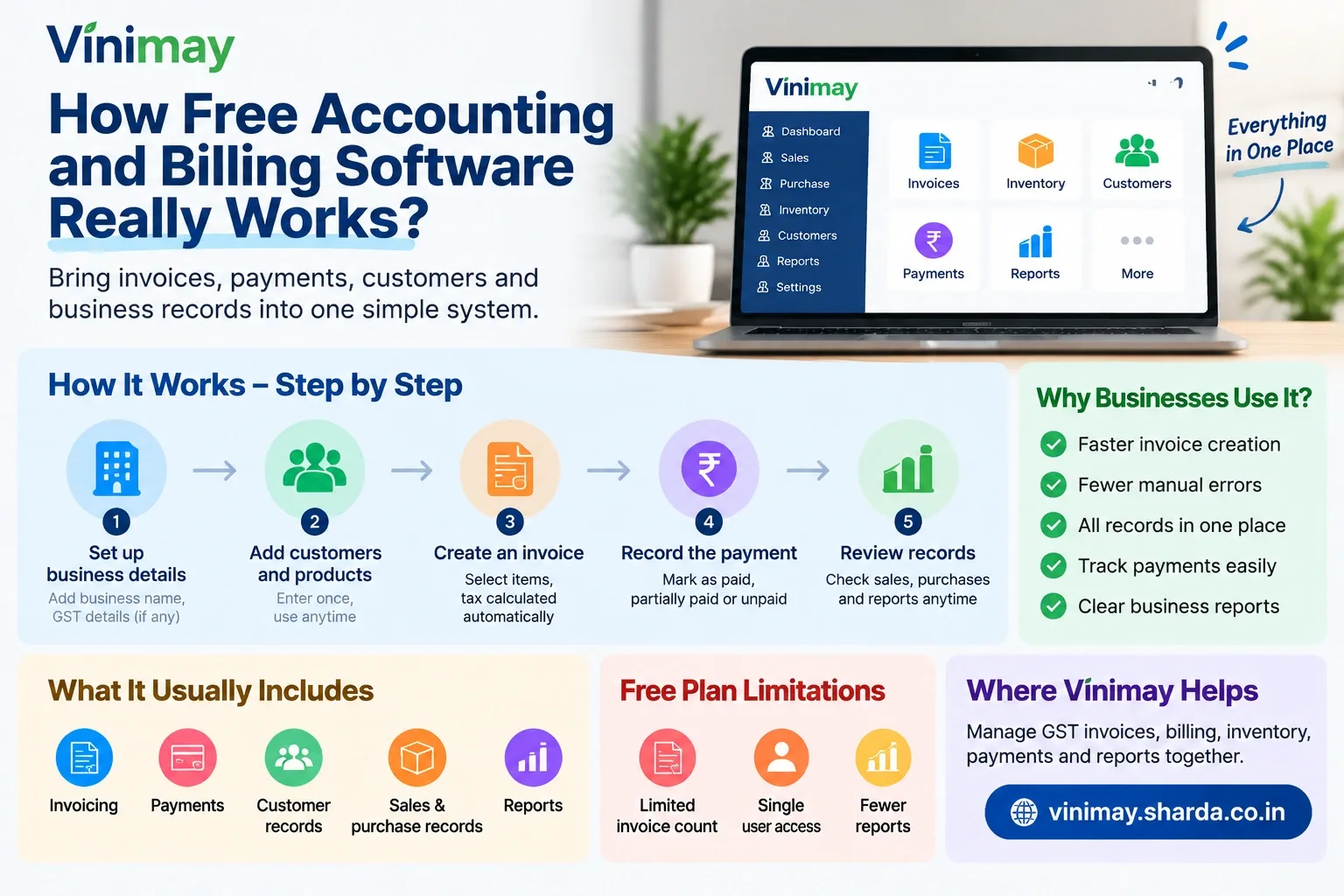
At a basic level, it typically covers:
How Does It Work, Step by Step?
Set up business details — enter your business name, GST details (if applicable), and invoice format preferences.
Add customers and products — enter customer details and product or service information once, so they can be reused on future invoices.
Create an invoice — select the customer and items, and the software calculates totals and applicable tax automatically.
Record the payment — mark the invoice as paid, partially paid, or unpaid, and the system updates the customer's balance.
Review records — check sales, purchases, or payment history whenever needed, without digging through paper files.
What Happens Behind Each Invoice?
Problem: A business isn't sure what actually gets recorded when an invoice is created.
Reason: Because the process looks like just filling a form, it isn't obvious that the software is also updating linked records.
Solution: Understand that a single invoice usually updates the sales record, the customer's outstanding balance, and (if supported) stock quantity, all at once.
Prevention: Review your invoice list periodically to confirm these related records are updating as expected.
This is the core advantage of software over manual methods — one entry updates multiple related records instead of requiring separate updates everywhere.
What's Different About the Free Version?
Free versions generally work the same way mechanically, but with restrictions layered on top:
A cap on the number of invoices or transactions per month
Limited or single-user access
Fewer report types available
Basic or no inventory tracking
The core workflow — create invoice, record payment, review records — usually stays the same across free and paid tiers. What changes is how much volume, detail, and additional functionality are available.
Common Mistakes When Starting with Free Software
Not setting up customer and product details properly before billing, leading to repeated manual entry
Ignoring monthly invoice limits until they're unexpectedly hit
Assuming all reports are available without checking the free plan's scope
Not checking whether GST fields are filled in correctly on the first few invoices
What Should You Check Before Getting Started?
Where Does Vinimay Fit In?
Businesses that move from manual billing to software often expect it to simply replace a notebook, without realising it can also connect invoicing with stock, payments, and records. Vinimay helps maintain GST invoicing, billing, sales and purchase records, and payment tracking together, so each invoice created updates related records rather than requiring separate manual entry.
For businesses that also need product-level tracking, Vinimay supports product management and inventory management alongside billing, along with reports and ledger management for reviewing transactions over time.
Frequently Asked Questions
Q1. How does free accounting and billing software work?
It creates invoices, records payments against them, and organises this information into customer and transaction records that can be reviewed later, with certain features or volume capped in the free tier.
Q2. Do I need accounting knowledge to use billing software?
Basic invoicing and payment recording are generally straightforward without formal accounting knowledge, though understanding your own record-keeping needs helps you use the software effectively.
Q3. What's the difference between billing software and accounting software?
Billing software focuses on creating invoices and recording transactions, while accounting software typically also covers broader financial records like ledgers, expenses, and reports.
Q4. Does creating an invoice update other records automatically?
In connected systems, yes — creating an invoice can update the customer's balance and, where supported, stock levels, without separate manual entry.
Q5. Can I use free software without technical knowledge?
Most free accounting and billing tools are designed for non-technical users, focusing on straightforward forms for invoices and payments.
Q6. What information do I need before setting up billing software?
Business details, GST information if applicable, a customer list, and a product or service list are typically needed to start.
Q7. Is free software slower or less reliable than paid software?
Not necessarily in terms of core functionality, but free plans often have volume caps, fewer users, and limited reports compared to paid tiers.
Q8. Can multiple people use free billing software at once?
Many free plans restrict access to a single user; multi-user access is often a paid-tier feature.
Q9. How do I know if I've outgrown free software?
Common signs include regularly hitting invoice limits, needing multiple users, or requiring reports and features not available on the free plan.
Q10. Is switching from manual records to software difficult?
The main effort is in initial setup — entering customer and product details — after which day-to-day billing is generally faster than manual methods.
Related Topics
Published by admin
Our editorial and compliance specialists create practical guides, tax calculation rules, and operational strategies to empower Indian small business owners and accountants.