How Do I Manually Back Up My Billing Software Data?
Losing billing data doesn't usually happen from one dramatic event—a device gets lost, an account gets accidentally deleted, or a subscription lapses without anyone realizing records were tied to it. In any of these situations, a business without its own backup is left trying to reconstruct invoices, customer balances, and payment history from memory or scattered documents, which is a much harder problem than it needs to be.
Manual backups matter regardless of how reliable any specific software claims to be, simply because they put control in the business's own hands rather than depending entirely on one system or provider. A habit of exporting and storing key records independently is a small, recurring effort that prevents a potentially very costly loss later.
This guide covers what's worth backing up, how often, and a practical, reliable routine for doing it manually—regardless of which billing software a business uses.
Why Manually Back Up Data at All?
Direct answer: Manual backups protect a business from data loss caused by account issues, device failure, accidental deletion, or a lapsed subscription—giving the business its own independent copy of records rather than relying entirely on one system staying accessible.
Even reliable software can have account access issues, so an independent copy adds a layer of safety
Manual backups also make it easier to switch software later, since records exist outside any one system
It's a small, recurring habit rather than a one-time task
Why Relying on Assumptions About Backup Is a Common Mistake
A common and understandable mistake is assuming that "the software probably backs everything up automatically," without actually confirming what that means in practice—how often, where it's stored, and whether the business itself can access and restore it if needed. Backup practices vary significantly between providers, and terms like "cloud-based" don't automatically mean a business has its own retrievable copy of its data; it may simply mean the data lives on the provider's servers.
which is a different thing entirely from having your own accessible backup. The safest approach is to treat any backup claim as something to verify directly with the specific software you use, rather than assume, and to maintain your own manual backup regardless of what the answer turns out to be — since an independent copy costs little effort and removes the uncertainty entirely.
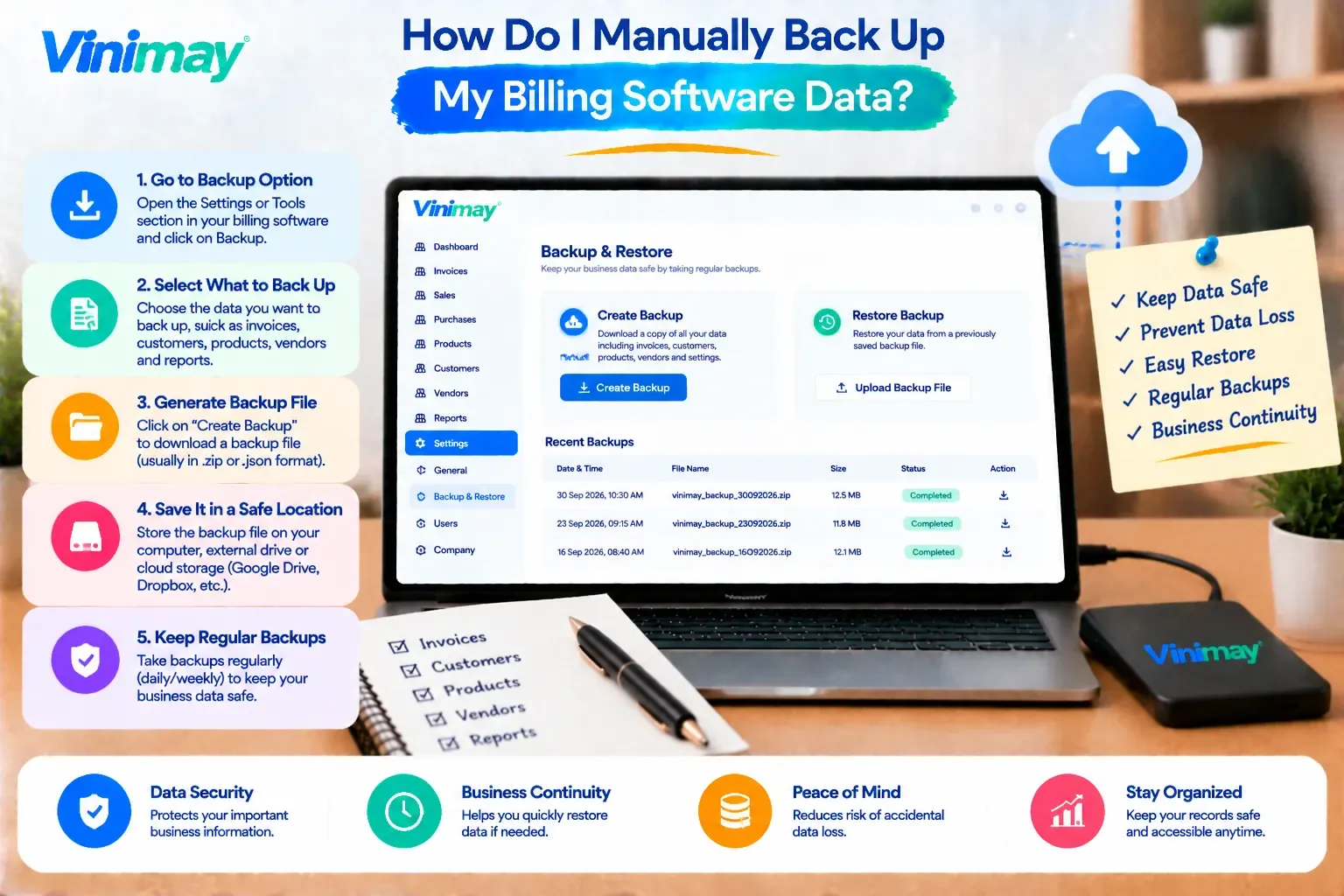
What to Back Up and How Often
Practical Steps for a Reliable Manual Backup
Export invoices as PDFs regularly—most billing software allows generating and downloading PDF copies of individual or bulk invoices
Download available reports periodically—sales, receivables, and expense reports capture a snapshot of your records at a point in time
Store backups in more than one place — a local drive and a separate cloud storage folder, rather than just one location
Label backups clearly by date — so you can identify the most recent complete backup quickly if needed
Set a recurring reminder — a monthly or quarterly backup habit is far more reliable than doing it "when you remember"
Test that a backup file actually opens and makes sense — an unreadable or incomplete backup provides false confidence
How Vinimay Fits Into Your Backup Routine
Supports PDF invoice generation, allowing invoices to be exported and saved independently as part of your own backup routine
Provides reports that can be reviewed and saved periodically, giving you a point-in-time record of sales, receivables, and other business data
Keeps records connected and organised, making it easier to export a complete, meaningful snapshot rather than scattered pieces
For specifics on how your account's data is stored and whether automatic backups are included, it's worth confirming directly with current Vinimay account details, since this is the kind of detail worth verifying rather than assuming
Conclusion
Manual backups protect a business regardless of how any specific software handles data storage
Assuming automatic backup exists without confirming the details is a common and risky mistake
A simple, recurring routine — exporting invoices and reports monthly, storing them in more than one place — is enough to stay protected
Vinimay's PDFinvoice generation and reports support building your own reliable manual backup routine
FAQs (Inside Blog)
How do I manually back up my billing software data?
Export invoices as PDFs and download key reports (sales, receivables, expenses) regularly, storing copies in more than one location such as a local drive and cloud storage.
How often should I back up billing data?
A monthly backup is a practical baseline for most small businesses, aligned with a regular review routine.
Does cloud-based billing software automatically back up my data?
This varies by provider — "cloud-based" doesn't automatically mean you have your own retrievable copy, so it's worth confirming directly rather than assuming.
What's the most important data to back up first?
Invoices and customer/vendor records are typically the highest priority, since they're the most frequently needed and hardest to reconstruct from memory.
Where should I store my manual backups?
In more than one place — for example, a local device and a separate cloud storage folder — to protect against a single point of failure.
Can I lose billing data even with reliable software?
Yes, account access issues, accidental deletion, or a lapsed subscription can all affect data access regardless of how reliable the underlying software is.
Should I test my backups after creating them?
Yes, confirming that a backup file actually opens and contains complete, readable data is important — an unusable backup provides false confidence.
Does manual backup help if I want to switch software later?
Yes, having your own exported records makes it easier to reference historical data even if you move to a different system.
How do I know if my current software's backup is reliable?
Ask the provider directly what's backed up, how often, and whether you can access and restore it yourself — don't rely on assumptions.
Is manual backup still necessary if my software says it has automatic backups?
It's still a reasonable extra precaution, since an independent copy in your own control adds a layer of safety beyond any single system.
Related Topics
Published by admin
Our editorial and compliance specialists create practical guides, tax calculation rules, and operational strategies to empower Indian small business owners and accountants.