My BillBook Kyu Chodkar Dusra Software Use Kare?
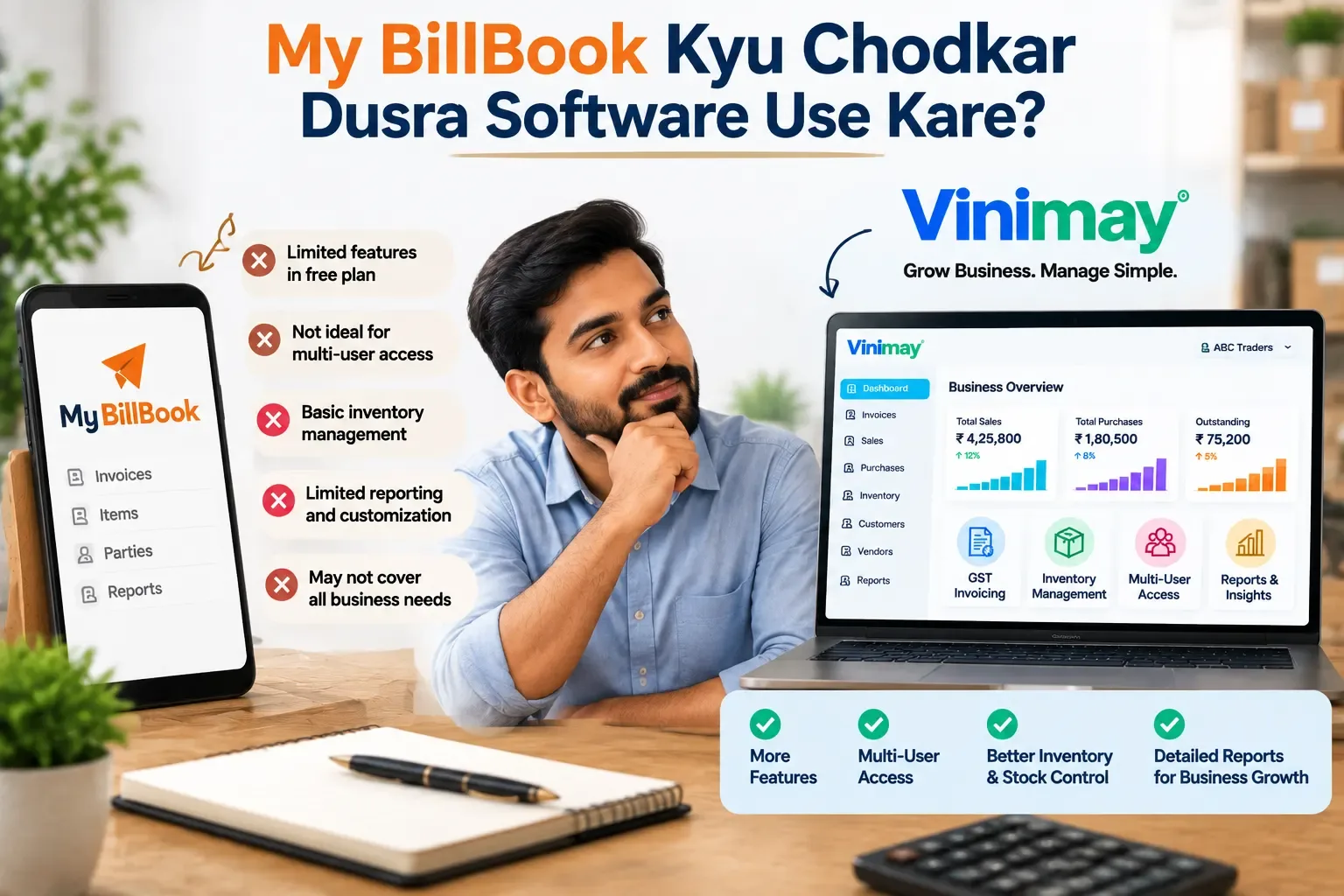
Businesses consider moving away from myBillBook when billing alone stops being enough—when vendor payments need tracking, customer credit balances need to be clear at a glance, or the CA keeps asking for data that takes hours to compile. If your business has grown past simple invoicing and now needs structured accounting behind it, switching to a more complete platform can remove a lot of that manual overhead.
myBillBook works well as a fast, mobile-friendly billing tool, which is exactly what many small businesses need in their early stages. But as vendor relationships multiply and credit transactions become routine, the gap between "billing" and "accounting" starts to show—dues get missed, balances get unclear, and preparing data for the CA becomes a manual exercise every time.
The decision to switch should come down to whether your actual pain points are about accountingdepth, not billing speed—myBillBook already handles billing speed well.
Signs It Might Be Time To Switch
Vendor payments and purchase history aren't tracked in an organized way
You're manually compiling data every time your CA needs it
Customer outstanding balances aren't visible without manual calculation
Multiple staff bill without any access control in place
You need reports beyond a basic sales summary
What Switching To A Complete Platform Solves
Before You Make The Switch
1. List Your Real Pain Points
Be specific about what's missing — this keeps the decision grounded rather than based on general dissatisfaction.
2. Plan Data Migration
Customer and vendor balances need to carry forward accurately so nothing gets lost in the transition.
3. Talk To Your CA
Ask what data format would make their job easier — this often clarifies whether a switch is genuinely worth it.
Common Mistakes Businesses Make
Switching without a clear list of what's actually missing
Skipping proper data migration planning
Not preparing staff for the change before going live
How Vinimay Helps
Vinimay is built for businesses whose accounting needs have grown beyond basic billing:
GSTInvoice Management: Consistent, compliant invoicing
Customer and Vendor Management: Organized data on both sides
Ledgers: Auto-updating balances
Reports: A comprehensive business overview
Digital Invoice Records: CA-ready, organized data
FAQs
1. Is myBillBook only a billing software or does it provide accounting features?
MyBillBook is primarilyknown as a billing and invoicing solution that helps businesses create invoices, manage sales, and track basic business transactions. Businesses that need deeper accounting functions such as detailed ledgers, vendor accounting, financial reports, and structured records may require a more complete accounting platform.
How Vinimay Helps:
Vinimay combines GST billing with accounting features like customer/vendor management, ledgers, reports, and organized financial records.
2. What should I choose between myBillBook and accounting software?
The choice depends on your business requirements. If your main requirement is creating invoices quickly, billing software may be sufficient. If you need purchase tracking, customer outstanding management, vendor balances, accounting reports, and CA-ready data, complete accounting software can be more suitable.
How Vinimay Helps:
Vinimay provides billing along with accounting workflows so businesses can manage daily transactions and financial records in one place.
3. Can I manage customer outstanding payments in myBillBook?:
Many billing solutions provide basic outstanding tracking. However, businesses with frequent credit transactions may require detailed customer ledgers, payment history, and better visibility into receivables.
How Vinimay Helps:
Vinimay helps businesses maintain customer-wise records, track payments, and understand pending balances easily.
4. Can accounting software replace myBillBook?
Answer:
Yes, many accounting platforms can handle invoice creation along with additional accounting requirements. However, businesses should evaluate features such as GST compliance, reports, inventory needs, user access, and data migration before switching.
How Vinimay Helps:
Vinimay provides GST invoices, customer/vendor management, inventory support, ledgers, and reports in one platform.
5. How do I transfer my data from myBillBook to new accounting software?
Answer:
Before switching, businesses should export important information such as customer details, vendor records, products, balances, and transaction history. Proper data migration helps maintain continuity and prevents accounting errors.
How Vinimay Helps:
Vinimay supports organized setup so businesses can move towards structured accounting with minimum operational disruption.
6. Which software is better for GST billing and accounting?
Answer:
The right software depends on business requirements. GST billing software focuses mainly on invoice generation, while accounting software provides additional features like ledgers, financial reports, purchase management, and transaction tracking.
How Vinimay Helps:
Vinimay supports GST invoice management along with accounting features required for growing businesses.
7. Do small businesses need accounting software or only billing software?
Small businesses with limited transactions may only need billing software initially. However, as sales increase, credit transactions grow, and compliance requirements become more frequent, accounting software can help maintain better financial control.
How Vinimay Helps:
Vinimay is designed for small and growing businesses that want simple billing with structured accounting.
8. Can accounting software help my CA prepare GST returns?
Accounting software can help organize sales, purchases, tax-related information, and transaction records, making it easier for professionals to review business data.
How Vinimay Helps:
Vinimay maintains structured transaction records that businesses can share with their CA for accounting and compliance processes.
9. What problems occur when a business uses only billing software?
Businesses using only billing-focused tools may face challenges such as:
- Difficulty tracking vendor dues
- Limited financial reporting
- Manual reconciliation work
- More effort in preparing accounting data
- Less visibility into overall business performance
How Vinimay Helps:
Vinimay connects billing with accountingworkflows to provide better financial visibility.
10. Is switching accounting software difficult for a growing business?
Switching software requires planning, but the process can be smooth when businesses prepare their data, select the required features, and train users before implementation.
How Vinimay Helps:
Vinimay provides a structured accounting environment that helps businesses transition from basic billing to complete accounting management.
Related Topics
Published by admin
Our editorial and compliance specialists create practical guides, tax calculation rules, and operational strategies to empower Indian small business owners and accountants.