Businesses often switch accounting software when their existing system no longer meets their requirements, but moving financial records to a new platform can seem challenging. Important data such as customer details, vendor records, invoices, transactions, and inventory information needs to be transferred accurately to avoid disruption in daily operations.
Data migration features in accounting software help businesses move existing records from one system to another in a more organized way. The migration process depends on the software, available export formats, and the type of data being transferred. Vinimay helps businesses manage billing, accounting records, and transaction data in a structured system, making it easier for businesses to continue their operations with organized financial information.
Why This Depends More on the Old System Than the New One
The real bottleneck in software-to-software migration usually isn't the new system's ability to accept data—it's whether the old system lets you export it in a usable format at all. Some platforms make export straightforward; others restrict it, particularly if you're leaving a paid plan or ending an active subscription.
What to Check on Your Current Software First
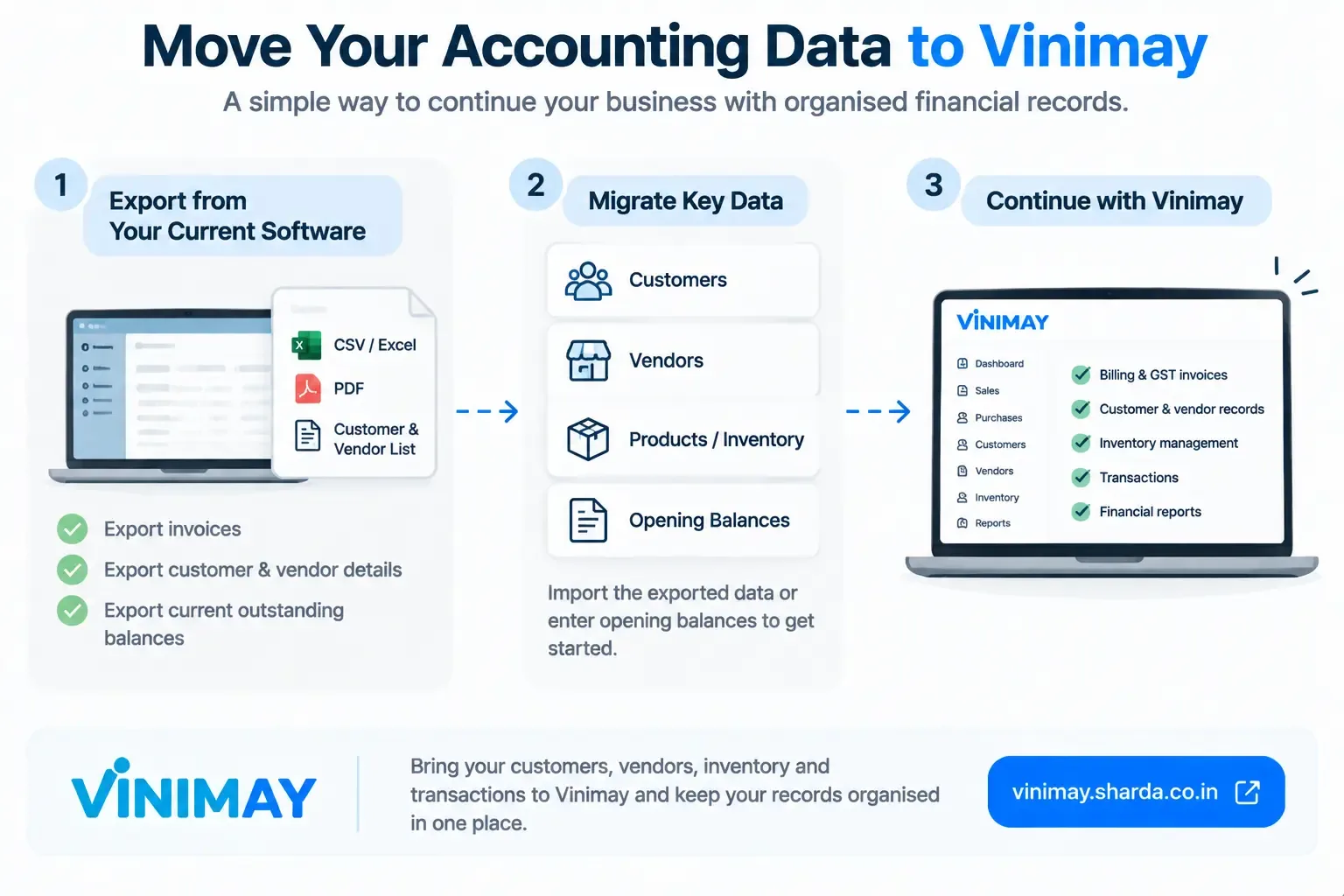
Can you export invoices as PDFs or a spreadsheet, not just view them on screen?
Can you export a full customer and vendor list with contact details?
Can you export current outstanding balances, not just historical totals?
Is there a time limit on export access after you stop being an active user?
What Typically Transfers vs. What Doesn't
The Opening Balance Approach
Rather than expecting a complete, seamless transfer, most successful migrations use an opening balance approach: enter current customer dues, vendor dues, and stock levels as a starting point in the new system, while keeping exported files from the old one as historical reference. This is less dramatic than a full data transfer but far more reliable in practice.
A Realistic Migration Timeline
Expect this to take longer than a simple software setup—gathering exports from the old system, reviewing them for accuracy, and entering opening balances typically takes a few hours to a couple of days, depending on how much historical data you want preserved versus simply referenced.
Where Vinimay Fits Into This
Vinimay supports entering opening balances for customers, vendors, and stock as a starting point, which is the practical foundation most migrations rely on. Every invoice created going forward is downloadable as a PDF immediately, which helps avoid this same export dilemma if you ever need to move again later.
Frequently Asked Questions
1. Can I migrate my data from one accounting software to another?
Yes, data can often be migrated from one accounting system to another, depending on the export and import options supported by both platforms. The process may involve Excel, CSV, or other supported formats.
2. What accounting data can be migrated?
Depending on the software, businesses may be able to migrate customer and supplier details, product information, opening balances, sales, purchases, expenses, payments, and other transaction records.
3. Can I transfer my customer and supplier records?
Yes, customer and supplier information can often be exported from the old system and imported into the new one. Fields such as names, contact details, addresses, GST information, and outstanding balances may be transferable.
4. Can I migrate my inventory data?
Many accounting and billing systems support inventory migration. Product names, item codes, quantities, prices, units, and stock balances may be transferred if the required fields are supported.
5. Can I transfer old invoices and purchase records?
Some systems allow historical sales and purchase transactions to be imported, while others may have limitations on transaction-level migration. The available options depend on the software being used.
6. Do I need to clean my data before migration?
Yes. It is useful to check for duplicate customers, incorrect balances, missing information, inconsistent product names, and other data errors before moving records to the new system.
7. Will my old accounting software data be deleted after migration?
No. Migrating data generally involves exporting a copy of the records and importing them into the new system. However, businesses should keep a backup of the original data before starting the migration.
8. Can I migrate several years of accounting records?
This depends on the capabilities and data limits of the new accounting software. Some businesses migrate complete historical records, while others transfer opening balances and retain older records separately for reference.
9. What if the old and new accounting software use different formats?
The data may need to be converted or mapped to match the new system's required format. For example, column names, date formats, account categories, or product codes may need to be adjusted before import.
10. How can I make accounting software migration easier?
Start by taking a complete backup, identify the data that needs to be transferred, clean and organize the records, and check the new software's import format. After migration, review important balances, customers, suppliers, inventory, and transactions to confirm that the data has transferred correctly.
Related Topics
Published by Team Vinimay
Our editorial and compliance specialists create practical guides, tax calculation rules, and operational strategies to empower Indian small business owners and accountants.