Managing bank transactions is an important part of maintaining accurate business accounts. When businesses track bank entries manually, it can become time-consuming to match deposits, payments, and expenses with accounting records, especially as transaction volumes increase. Accounting software with bank connectivity features can help businesses organize financial transactions by linking banking information with accounting records. It can make processes such as transaction tracking, reconciliation, and financial reporting more efficient, depending on the available integrations and features. Vinimay helps businesses manage billing, payments, and accounting records in one system, providing better visibility into business transactions and financial data.
What Bank Connection Actually Means Technically
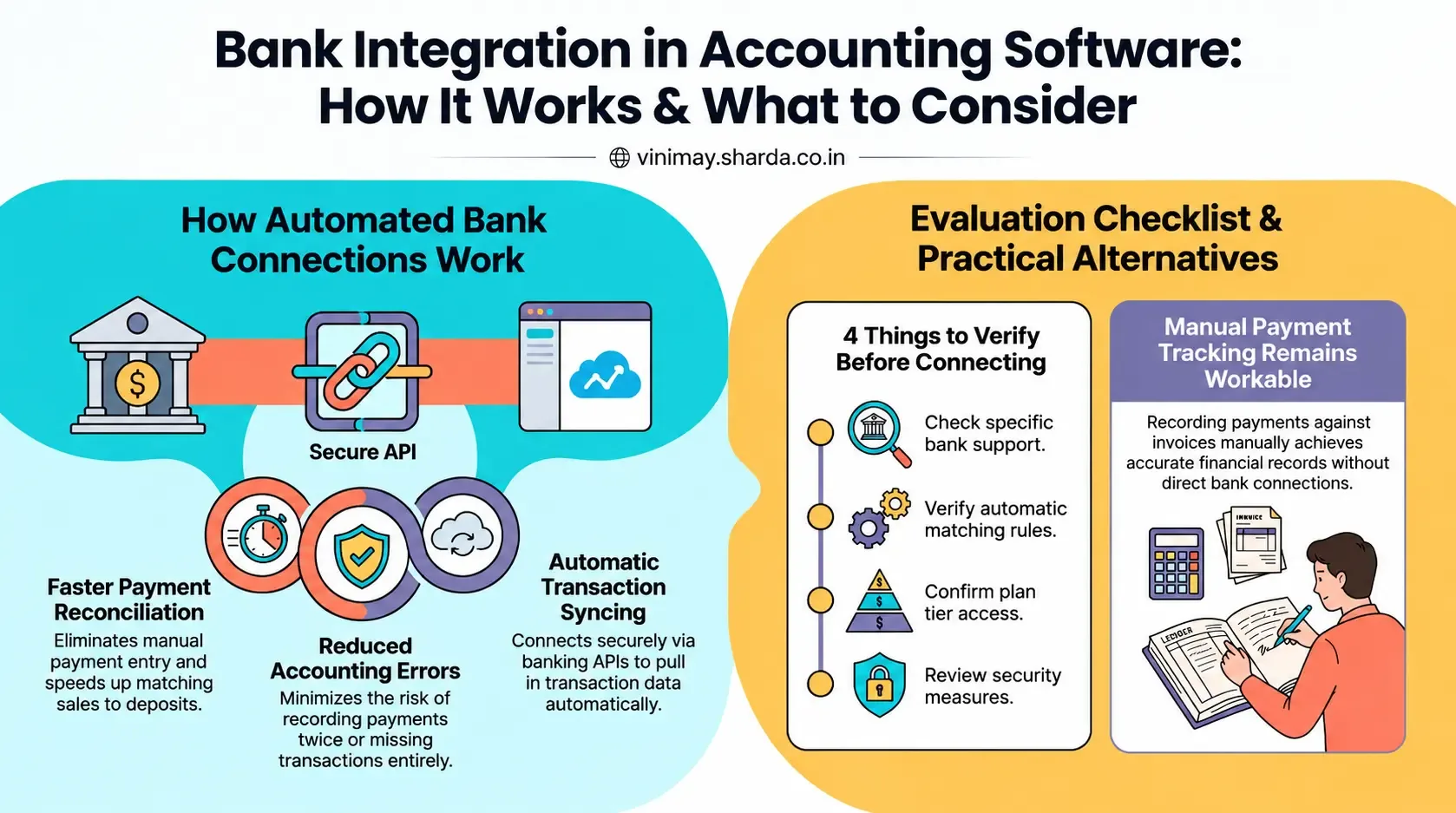
When genuinely supported, this typically means the software connects to your bank account (often through a secure banking API) and pulls in transaction data automatically, allowing you to match incoming payments against specific invoices without manually checking your bank statement and entering each payment by hand.
Why This Is More Complex Than It Sounds
Bank integration requires secure authentication with your bank, ongoing data syncing, and a reliable way to match an incoming bank transaction to the correct invoice — which isn't always obvious, since a bank statement often just shows an amount and a vague description, not a clear invoice reference.
What This Solves When It Works Well
Removes manual entry of payments received via bank transfer
Speeds up reconciliation between recorded sales and actual bank deposits
Reduces the chance of a payment being recorded twice or missed entirely
What to Verify If This Feature Matters to You
The Manual Alternative Still Works
Without direct bank integration, manually recording a payment against an invoice once you see it in your bank statement achieves the same end result — just with an added step. This is genuinely workable for most small businesses with a manageable transaction volume, even if it's less automated.
Where Vinimay Stands on This
Direct bank account integration is not currently part of Vinimay's confirmed feature set. Vinimay's payment tracking allows you to record payments against specific invoices manually, keeping your receivables and payables accurate without requiring a direct bank connection. For businesses where this specific automation is a priority, it's worth confirming current capability directly.
Frequently Asked Questions
1. Can Accounting Software Connect With Banks?
Yes, some accounting software can connect with supported bank accounts through bank feeds or integrations. This can help businesses import transaction data and keep accounting records more up-to-date.
2. How Does Bank Integration Work With Accounting Software?
Bank integration generally allows transaction information from a connected bank account to be imported into the accounting system. The transactions can then be reviewed, categorised, and matched with existing accounting records.
3. Can Bank Transactions Be Imported Automatically?
Depending on the software and supported bank, transactions may be imported automatically at scheduled intervals. Availability varies by bank, software provider, country, and integration method.
4. Can Accounting Software Help Reconcile Bank Transactions?
Yes. Bank-connected accounting software can help compare imported bank transactions with recorded sales, expenses, invoices, and payments, making bank reconciliation more organised.
5. Can Businesses Connect Multiple Bank Accounts?
Some accounting platforms allow businesses to connect multiple bank accounts. This can be useful when a business maintains separate accounts for different branches, purposes, or business operations.
6. Is Bank Integration Available With Every Accounting Software?
No. Bank connectivity depends on the accounting software's features and the banks or financial institutions it supports. Businesses should check the software's current integration list before setting it up.
7. Can Bank Integration Reduce Manual Data Entry?
Yes, importing bank transactions can reduce the need to manually enter every transaction. However, businesses should still review and categorise imported transactions to ensure their accounting records are accurate.
8. Is Bank Data Secure When Using Accounting Software?
Security depends on the accounting software, bank, and integration method. Businesses should use reputable providers, secure login methods, encryption where available, and appropriate user-access controls.
9. Can Accounting Software Track Payments From Bank Accounts?
Yes, connected bank transactions can help businesses identify received and outgoing payments. When matched with invoices or bills, this can make customer and supplier payment tracking easier.
10. What Should Businesses Check Before Connecting a Bank Account?
Businesses should check whether their bank is supported, what data can be imported, how frequently transactions are updated, what security measures are used, and whether additional fees or subscription requirements apply.
Related Topics
Published by Team Vinimay
Our editorial and compliance specialists create practical guides, tax calculation rules, and operational strategies to empower Indian small business owners and accountants.