Businesses can automate bookkeeping by using accounting software that reduces manual data entry and organizes financial records in a structured way. Automation helps manage tasks such as recording transactions, generating invoices, tracking payments, updating accounts, and preparing reports with greater accuracy and efficiency. Vinimay helps businesses streamline billing, accounting, and transaction management by keeping financial data organized in one system, allowing business owners and accountants to spend less time on repetitive tasks and focus more on financial decisions.
Step One: Identify What's Actually Repetitive
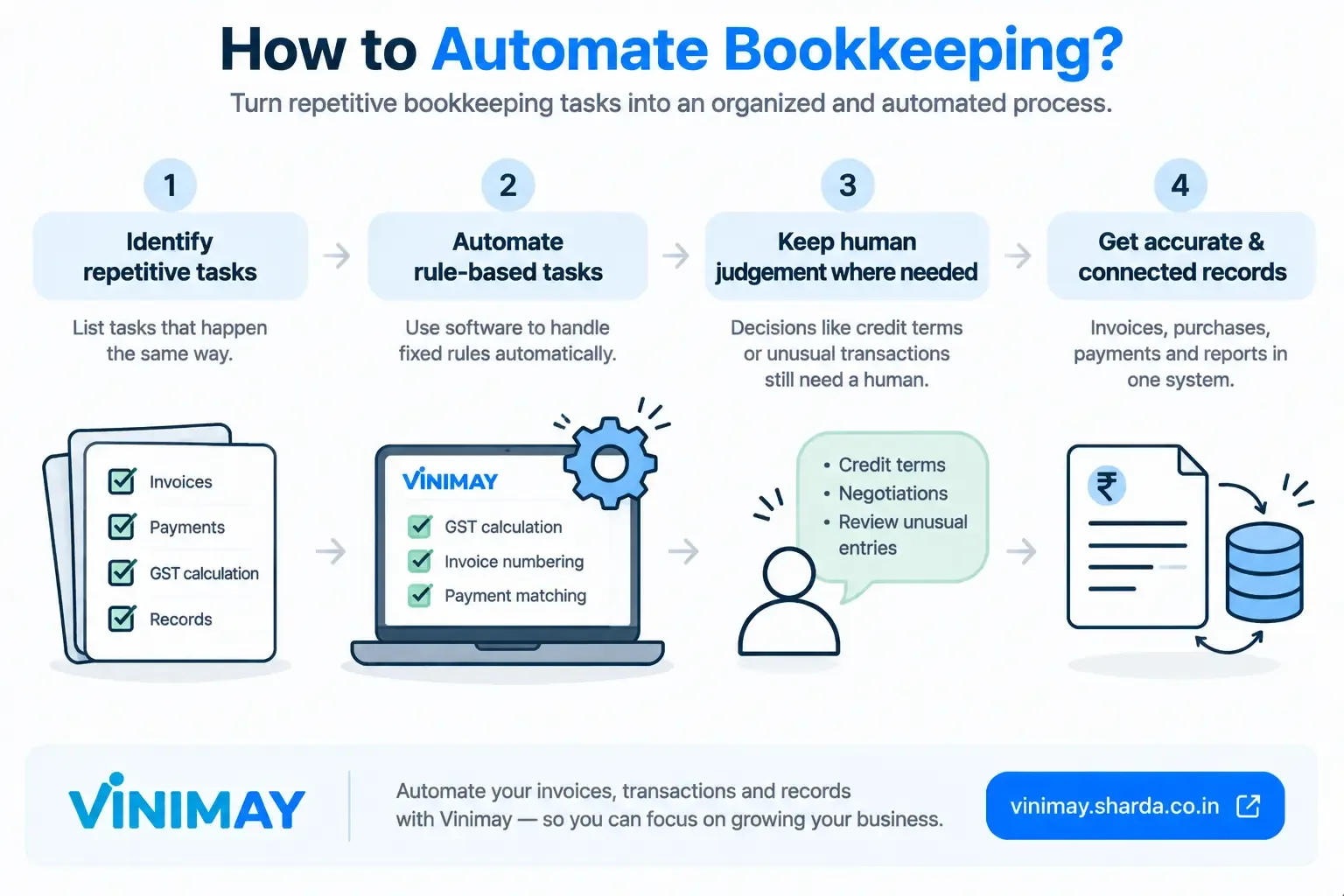
Before automating anything, list out the bookkeeping tasks that happen the same way, over and over, without requiring a fresh decision each time—GST calculation, invoice numbering, and matching a payment to its invoice. These are the strongest automation candidates, since a fixed rule can replace the manual repetition entirely.
Step Two: Separate Rule-Based Tasks from Judgment-Based Ones
Rule-based (automatable): GST tax splits, sequential invoice numbering, and connecting a payment to the invoice it settles.
Judgment-based (not automatable): Deciding credit terms for a new customer, negotiating with a supplier, reviewing records for something that looks unusual.
Step Three: Start With the Highest-Error, Highest-Frequency Task
Automating your least frequent task first delivers the smallest benefit. Start instead with whichever repetitive task currently causes the most errors or consumes the most time—for most Indian small businesses, this is GST calculation, given how often it repeats and how easy it is to get wrong under time pressure.
Step Four: Keep the Human Step Where It Belongs
Automating the calculation and matching layer doesn't remove the need to actually enter each transaction—someone still needs to confirm that a sale happened or a purchase was made. Expecting this step to disappear too sets an unrealistic bar that no bookkeeping automation currently clears.
Where Vinimay Fits Into This Process
Vinimay automates exactly the rule-based layer described in steps one through three: GST is applied correctly (CGST, SGST, or IGST) based on the transaction, invoice numbering runs sequentially without manual tracking, and payments are recorded against the same customer and vendor accounts as their invoices, removing manual reconciliation. What stays manual, as with any bookkeeping system, is entering each transaction as it happens—Vinimay makes that entry structured and quick, without pretending to removeit entirely.
Conclusion
Automating bookkeeping works best as a series of targeted fixes to specific repetitive tasks, not a single sweeping change. Start with the rule-based, high-frequency tasks—GST calculation, invoice numbering, payment matching—and leave judgment-based decisions where they belong: with you.
Frequently Asked Questions
1. How Can Businesses Automate Bookkeeping?
Businesses can automate bookkeeping by using accounting software to record sales, purchases, expenses, invoices, payments, and other transactions. Automation reduces repetitive data entry and keeps financial records organized.
2. Can Accounting Software Automatically Record Business Transactions?
Yes, accounting software can help record and organize business transactions such as sales, purchases, expenses, receipts, and payments. This reduces manual bookkeeping and makes it easier to maintain updated financial records.
3. How Does Accounting Software Reduce Manual Bookkeeping Work?
Accounting software reduces manual work by automating calculations, transaction recording, invoice creation, payment tracking, and report generation. Businesses can spend less time on repetitive accounting tasks and more time managing their operations.
4. Can Businesses Automate Sales and Expense Entries?
Yes, businesses can use accounting software to record sales and expenses systematically. Depending on the software and integrations available, transaction information can also be imported or captured automatically, reducing the need for repeated manual entries.
5. How Can Automated Bookkeeping Help Reduce Accounting Errors?
Automated bookkeeping can reduce errors caused by repetitive manual calculations and data entry. Features such as automatic calculations, organized transaction records, and standardized invoice formats can help businesses maintain more consistent accounting information.
6. Can Accounting Software Automatically Generate Financial Reports?
Yes, many accounting software solutions can generate reports based on recorded transactions. Businesses may be able to create reports for sales, expenses, receivables, payables, profit and loss, and other financial information.
7. How Can Businesses Automate Invoice and Payment Tracking?
Businesses can use accounting software to create invoices, record payments, monitor outstanding amounts, and track due dates. Payment reminders and organized invoice histories can also make it easier to follow up on pending customer payments.
8. Can Small Businesses Automate Bookkeeping Without Hiring a Full-Time Accountant?
Small businesses can automate many routine bookkeeping tasks using accounting software. However, software does not replace professional accounting advice for matters such as tax compliance, complex financial decisions, audits, or specialized accounting requirements.
9. How Does Automated Bookkeeping Help With GST and Tax Records?
Accounting software can help organize sales, purchases, invoices, expenses, and GST-related transaction records. Maintaining accurate records can make tax-related reporting and reconciliation more manageable, although businesses should verify compliance requirements with a qualified professional.
10. Can Free Accounting Software Automate Daily Bookkeeping Tasks?
Yes, some free accounting software can automate or simplify basic bookkeeping tasks such as invoicing, sales and expense recording, payment tracking, and financial reports. The features available depend on the specific software and its free plan.
Related Topics
Published by Team Vinimay
Our editorial and compliance specialists create practical guides, tax calculation rules, and operational strategies to empower Indian small business owners and accountants.