Acounting Software for Businesses: Benefits, Features, and Best Practices for Smart Financial Management
Accounting softwareoften gets reduced to "the thing that makes invoices," which undersells what it's actually meant to do. At its core, it's a system for accurately recording every financial transaction a business makes — sales, purchases, payments, expenses — and turning that raw data into something a business owner can actually use to make decisions, stay compliant, and grow with confidence.
The benefits only show up, though, when the software is chosen and used well. Picking software with the right features for a specific business, and following a few consistent practices around it, is what separates a system that genuinely saves time and prevents errors from one that just adds another tool to manage on top of everything else.
This guide covers what accounting software genuinely does for a business, the features that matter most when evaluating one, and the best practices that make it actually effective — not just installed.
What Does Accounting Software Actually Do for a Business?
Direct answer: Accounting software records financial transactions accurately, connects them into a single system (rather than scattered documents), and generates reports that give a business owner a clear, current view of their finances — replacing manual, error-prone bookkeeping methods.
It reduces manual data entry by connecting invoicing, payments, and records automatically
It improves accuracy by applying consistent calculations (like GST tax rates) every time
It gives real-time visibility into what's owed, what's due, and how the business is performing
It supports compliance by keeping records organised and ready for tax filing or audits
Why Manual Financial Management Becomes a Liability Over Time
Manual bookkeeping—spreadsheets, notebooks, disconnected files — tends to work reasonably well at very low transaction volume, which is exactly why so many businesses start this way and don't reconsider until something goes visibly wrong. The problem isn't a single dramatic failure; it's the slow accumulation of small inconsistencies that manual systems are especially prone to, since every entry depends entirely on someone remembering to make it correctly and on time. A missed expense here, a payment tracked in someone's memory there, a tax calculation that was correct last year but never updated — none of these feel urgent individually, but together they create a financial picture that's increasingly unreliable exactly when the business needs it to be accurate: during a loan application, a tax audit, or simply trying to understand whether the business is actually profitable.
Core Features to Look for in Accounting Software
Best Practices for Getting the Most Out of Accounting Software
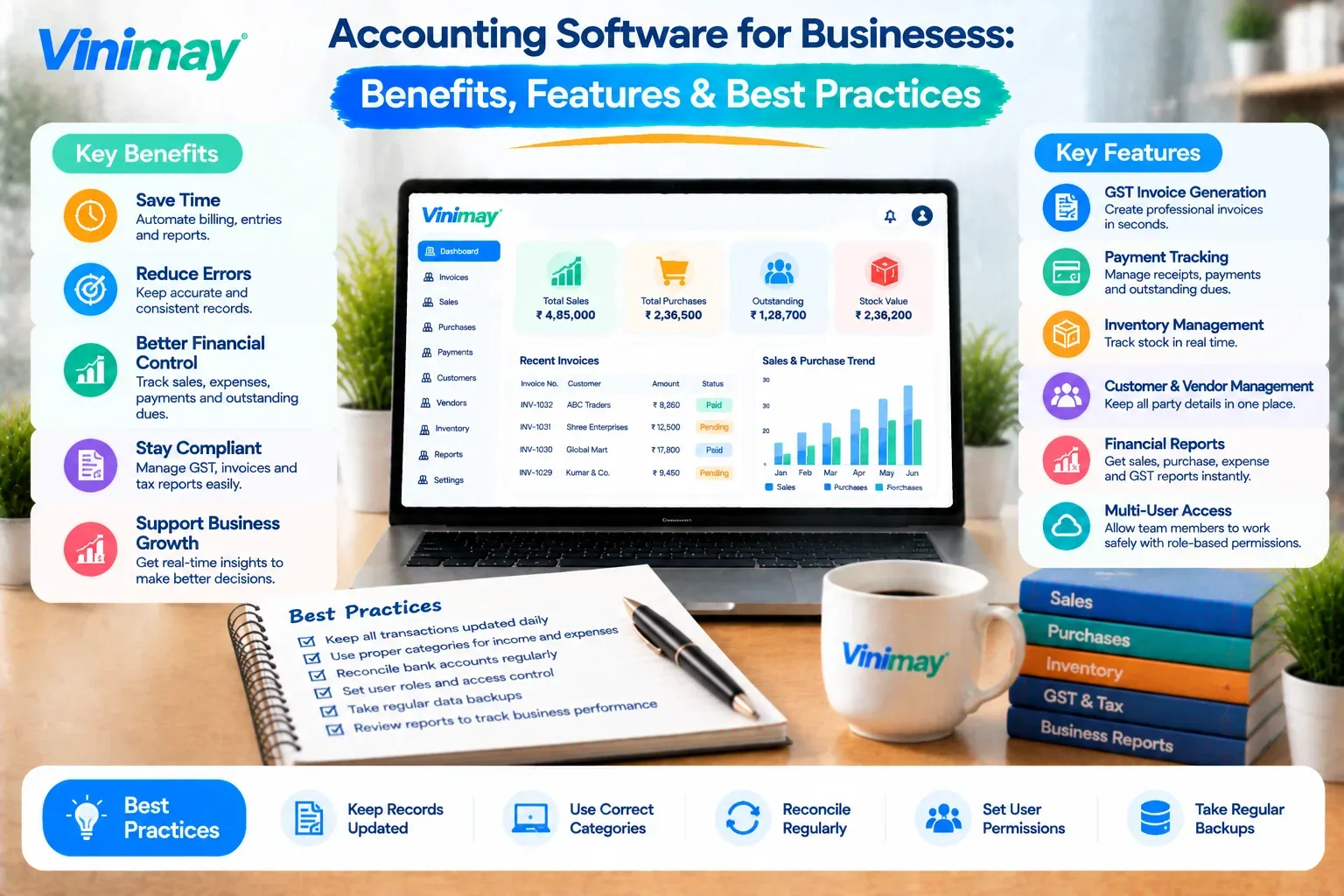
Record transactions as they happen, not in a weekly or monthly batch — delayed entry is where accuracy gaps start
Use one connected system rather than several disconnected tools — a separate app for invoicing and a different one for expenses recreates the same scattering problem software is meant to solve
Review reports regularly, not just at tax time — a monthly check catches an error while it's still small
Keep customer and vendor records updated — outdated contact or GST details create downstream billing errors
Reconcile receivables and payables periodically — an accurate outstanding balance is only useful if it's checked against reality now and then
Back up data automatically, not manually — a system depending on someone remembering to back up will eventually fail to
Where Vinimay Brings This Together
Generates GST-compliant invoices with accurate tax calculation applied automatically
Keeps sales records, purchase records, and payment tracking connected in one system, rather than scattered across tools
Tracks receivables and payables accurately, giving a current view of outstanding amounts
Includes inventory and product management for businesses that need stock connected to billing
Provides ledger management and reports, turning daily transactions into a dependable financial picture
Supports multiple company management for businesses managing more than one entity or branch
Conclusion
Accounting software's real value is in connecting transactions accurately, not just producing invoices
Manual bookkeeping fails quietly over time, with small inconsistencies building into unreliable records
The features that matter most are the ones that keep data connected and accurate, not the longest feature list
Consistent practices — recording transactions promptly, reviewing reports regularly — determine whether software actually delivers its benefits
Vinimay brings GST invoicing, records,and payment tracking together for small and growing businesses
FAQs
What are the main benefits of using accounting software?
Accounting software improves accuracy, saves time on manual data entry, gives real-time visibility into finances, and supports compliance by keeping records organised.
What features should I look for in accounting software?
Prioritise GST-compliant invoicing, connected sales and purchase records, receivables and payables tracking, and reliable reports over a long feature list.
Is accounting software necessary for a very small business?
It becomes genuinely useful once manual tracking starts creating errors or takes noticeably long, even for a small business with modest transaction volume.
What's the biggest mistake businesses make when using accounting software?
Using it inconsistently — recording transactions in batches instead of as they happen — which recreates the same accuracy gaps manual bookkeeping had.
How often should I review reports from my accounting software?
A monthly review is a practical baseline for most small businesses, catching inconsistencies while they're still small and easy to correct.
Does accounting software replace the need for a CA or bookkeeper?
No, it handles accurate day-to-day recording, while a CA or bookkeeper provides judgment, tax strategy, and review that software alone doesn't offer.
Can accounting software help with GST compliance? Yes, software that applies GST rates and formats automatically helps keep invoices accurate and compliant without manual calculation.
Should small businesses use multiple tools for invoicing and expense tracking?
Generally not — using one connected system keeps records consistent, rather than reconciling data across separate, disconnected tools.
What's the best practice for keeping receivables accurate?
Reconcile outstanding balances periodically against actual customer payments, rather than assuming the recorded balance is always current.
Does inventory tracking matter for every business using accounting software?
Only for businesses that sell physical products — service businesses typically don't need this feature, while product-based businesses benefit significantly from it.
Related Topics
Published by Team Vinimay
Our editorial and compliance specialists create practical guides, tax calculation rules, and operational strategies to empower Indian small business owners and accountants.