How Does Accounting Software Help With Year-End Closing?
Year-end closing is the point where a business needs its records to add up cleanly — every invoice accounted for, every stock figure verified, every outstanding balance confirmed — before moving into a new financial year. For a business relying on scattered manual records, this often becomes a stressful scramble in the final weeks. For one using structured software throughout the year, much of this work has effectively already been happening in the background.
The honest expectation to set here is that software doesn't eliminate year-end closing as a task, it makes the underlying data more reliable and accessible, so the closing process itself becomes faster and less error-prone rather than something requiring weeks of manual reconstruction. What software genuinely accelerates, and what still needs a human review, are two very different lists.
This article separates those two lists clearly, flags the mistakes that most commonly delay a smooth close, and ends with a practical checklist to follow as year-end approaches.
What "Year-End Closing" Actually Involves
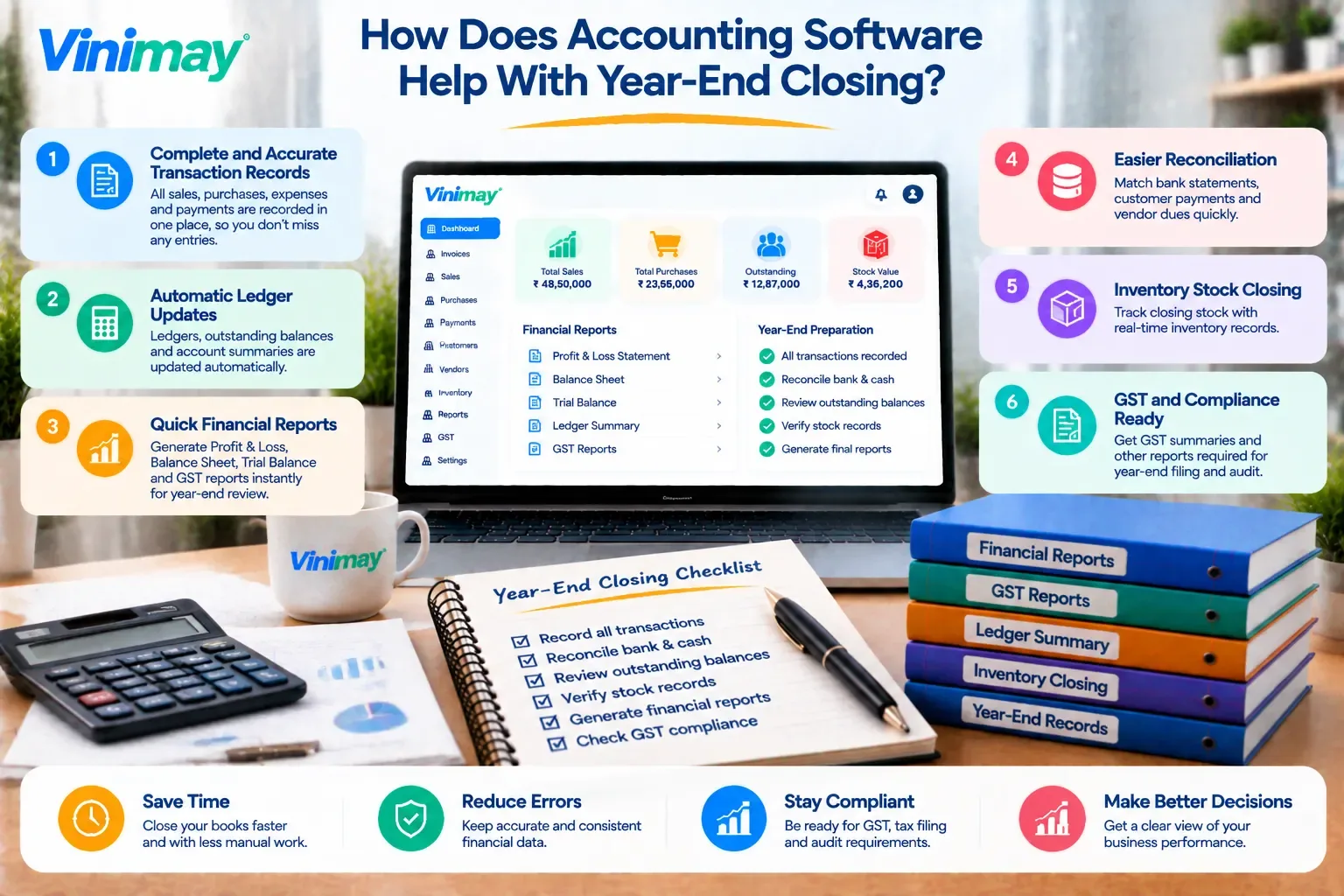
At a basic level, closing a financial year typically means confirming all sales and purchase transactions for the year are recorded, reconciling stock levels against physical counts, verifying outstanding receivables and payables are accurate, reviewing and finalizing reports needed for tax filing, and carrying forward opening balances correctly into the new year. Each of these depends on the ones before it — inaccurate stock reconciliation, for instance, makes any report built on top of it unreliable too.
Where Software Genuinely Speeds This Up
What Still Requires Manual Review
Physical stock verification — software shows recorded stock, but a physical count is still needed to confirm accuracy
Reviewing unusual or disputed transactions — a human eye is still needed to catch anything that looks off
Confirming receivables that may need to be written off — this is a business judgment call, not something software decides
Double-checking GST figures against filed returns — ensuring recorded figures match what was actually filed during the year
Common Mistakes That Delay a Smooth Close
Discovering unrecorded or delayed transactions only during the closing process itself, instead of throughout the year
Skipping the physical stock count entirely and relying only on system numbers
Leaving old, disputed receivables unreviewed until the very last week
Not comparing recorded GST figures against actual filed returns until closing forces the comparison
A Practical Year-End Closing Checklist
Confirm all invoices and purchase entries for the year are recorded
Conduct a physical stock count and compare against system records
Review the outstanding receivables list and follow up on old balances
Review the outstanding payables list and confirm vendor balances
Generate and review year-end sales, purchase, and stock reports
Confirm GST figures align with what was filed throughout the year
Carry forward opening stock and balances into the new financial year
A Clear Answer for Vinimay Users
Vinimay maintains sales, purchase, stock, and receivables/payables records continuously as part of its confirmed features, which supports a smoother year-end close by keeping this data organized and current throughout the year, rather than requiring it to be reconstructed at closing time. Physical stock verification and final business judgment calls, like reviewing old receivables, remain manual steps regardless of the software used.
Conclusion
Accounting software makes year-end closing faster and less error-prone by keeping sales, purchase, stock, and receivable records organized throughout the year, but it doesn't remove the need for physical stock verification, human judgment on old balances, or a final review against filed GST figures. The real determining factor for a smooth close is consistent, accurate data entry all year, not a single feature activated in the final week
1. Does accounting software automatically close the financial year for me?
No, software organizes and maintains the data needed for closing, but confirming physical stock, reviewing disputed transactions, and finalizing reports still requires manual review and decision-making.
2. Why is a physical stock count still necessary if the software tracks stock automatically?
Software reflects recorded transactions, but it can't detect physical discrepancies like damaged, lost, or miscounted stock, so a physical verification remains an essential year-end step.
3. How far in advance should year-end closing preparation start?
Starting a few weeks before the actual deadline is generally advisable, giving enough time to catch and correct any discrepancies without the pressure of a last-minute scramble.
4. What's the most common mistake businesses make during year-end closing?
A common mistake is discovering unrecorded or delayed transactions only during the closing process itself, which usually traces back to inconsistent entry habits throughout the year rather than a closing-specific error.
5. Does software help reconcile GST figures with what was actually filed during the year?
It helps by keeping recorded sales and purchase figures organized and accessible, making it easier to compare against filed returns, though the actual comparison and reconciliation step still requires manual review.
Related Topics
Published by Team Vinimay
Our editorial and compliance specialists create practical guides, tax calculation rules, and operational strategies to empower Indian small business owners and accountants.