How to Choose the Best Accounting Software for Your Business (2026)
Every "best accounting software" list ends the same way: with a disclaimer that the right choice "depends on your business." That disclaimer is usually the most accurate part of the whole article, but it rarely comes with an actual way to work out what that means for your specific situation.
Choosing well isn't about finding the single most popular tool — it's about matching software to the transactions, compliance needs, and workflow your business actually has today, while leaving enough room to grow without a disruptive switch a year later. A tool that's perfect for a service consultant billing five clients a month is the wrong fit for a retail shop managing daily stock, even if both searches technically start with "best accounting software."
This guide gives a direct, structured way to evaluate accounting software against your own business—not a ranked list of names — so the decision holds up beyond the first few months of use.
What's the Right Way to Approach This Decision?
Direct answer: Choose accounting software by first defining your actual transaction volume, compliance needs (like GST), and daily workflow — then evaluating specific tools against those requirements, rather than starting from a "best overall" list and hoping it happens to fit.
Start with your business's specific needs, not a general ranking
Weigh accuracy and reliability for daily use over an impressive feature list
Check for scalability, so the same tool still fits a year of growth later
Why Choosing Based on Popularity Alone Backfires
The most popular accounting software isn't wrong for being popular — it's simply built to serve the widest possible range of businesses reasonably well, which often means it's not built precisely for any one of them. A retail shop that picks a tool because "everyone uses it" may end up with strong reporting features it never touches, while missing straightforward stock-linked billing it actually needed from day one. A service consultant might pay for inventory modules that sit unused, simply because the popular option bundles everything together. This mismatch usually isn't obvious immediately — it shows up months later as a recurring workaround, a manual step the software should have handled, or a quiet realisation that half the subscription is being paid for features that never get opened.
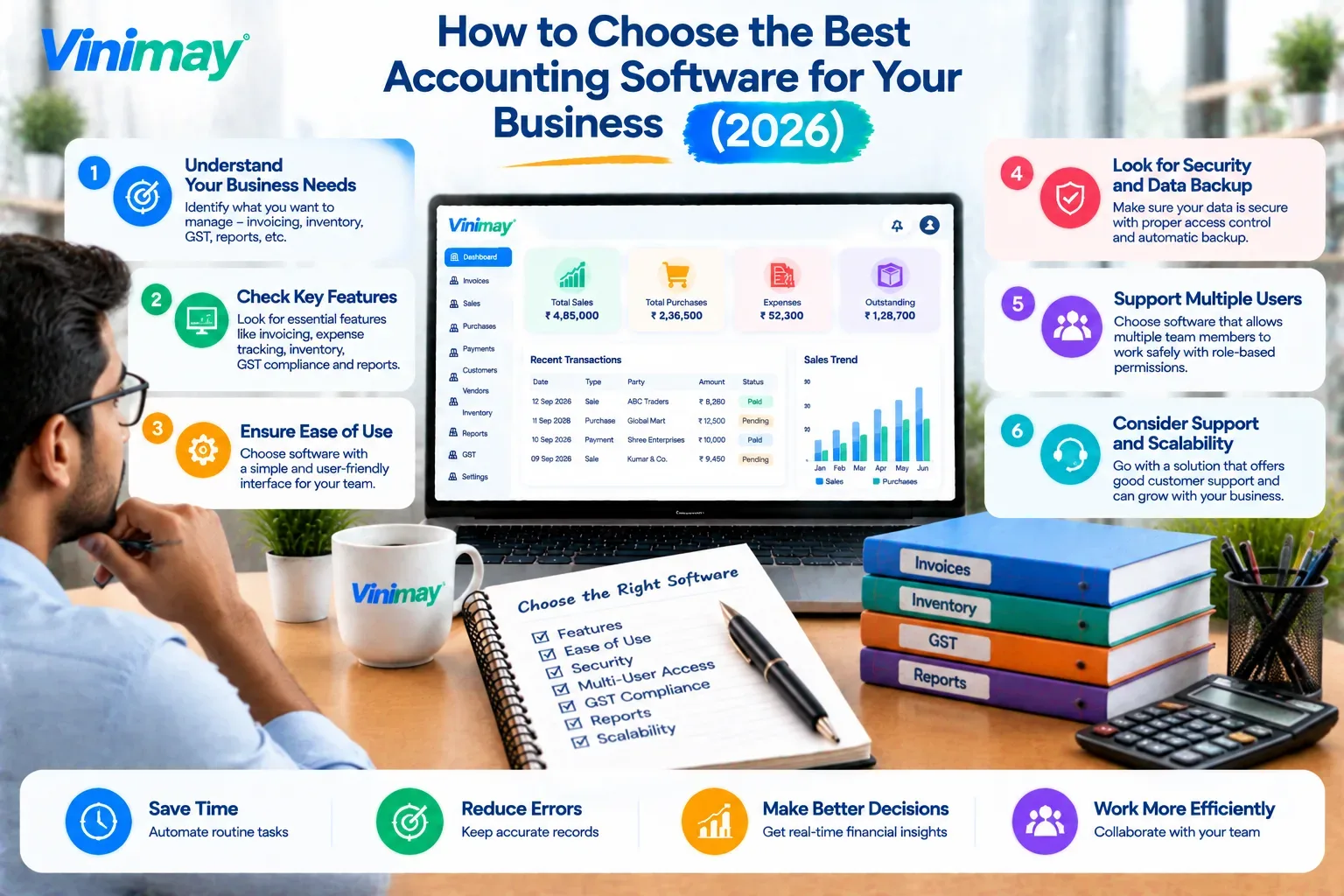
Criteria to Evaluate Before Choosing Accounting Software
Step-by-Step Decision Process
Write down your actual monthly transaction volume — not an estimate, your real recent numbers.
List your must-have features — GST invoicing, stock tracking, receivables, multiple company management — based on what you use daily, not what sounds useful.
Rule out anything that doesn't match your workflow type—retail, service, or wholesale each need different priorities.
Check free/entry-tier limits against your actual volume — not just today's volume, but where it's headed.
Confirm data export and account continuity — so switching later, if needed, doesn't mean starting from zero.
Test it on real transactions before committing fully — a short trial with actual invoices reveals more than any feature list.
How Vinimay Simplifies This Choice
Applies GST invoicingaccurately from the start, covering the compliance requirement most businesses need first
Connects sales records, purchase records, and payment tracking, matching daily billing workflow rather than sitting as separate modules
Includes inventory and product management for businesses that need stock connected to billing, without forcing it on those that don't
Supports multiple company management for businesses that expand into more than one entity or branch
Provides ledger management and reports built directly from recorded transactions, for accurate, ready-to-use records
Conclusion
The right accounting software match comes from your own transaction volume, compliance needs, and workflow — not a generic popularity ranking
Popular tools can create mismatches: unused features on one side, missing essentials on the other
A structured evaluation — volume, must-haves, workflow fit, scalability, data ownership — leads to a more durable choice
Vinimay is built around the compliance and workflow needs most small and growing businesses actually have day to day
FAQs
How do I choose the best accounting software for my business?
Start by defining your actual transaction volume, compliance needs, and daily billing workflow, then evaluate specific software against those requirements rather than a general ranking.
Is the most popular accounting software always the best choice?
Not necessarily — popular tools are built to serve a wide range o fbusinesses reasonably well, which can mean unused features on one side and missing essentials on the other.
What's the most important factor when choosing accounting software?
Accurate handling of your compliance needs (like GST) and a fit with your daily billing workflow typically matter more than a long feature list.
Should I choose software based on price or features first?
Neither alone — match features to your actual needs first, then compare pricing across the tools that genuinely fit, rather than starting from price.
How do I know if accounting software will scale with my business?
Check its transaction, user, and feature limits against where your business is likely to be in a year, not just its current volume.
Is it risky to switch accounting software after choosing the wrong one?
Yes, switching means migrating historical records, so checking data export options upfront reduces this risk if a switch is needed later.
Do retail and service businesses need different accounting software features?
Often yes—retail businesses typically prioritise stock tracking, while service businesses prioritise client invoicing and receivables.
Should I test accounting software before committing to a plan?
Yes, testing with real transactions on a trial or free tier reveals workflow fit far better than reading a feature list alone.
How many features should I prioritise when choosing accounting software?
Focus on a short list of must-haves based on daily use, rather than trying to match every feature a provider advertises.
Does business size change how I should choose accounting software?
Yes, transaction volume and team size significantly affect which features and plan tiers actually make sense for a given business.
Related Topics
Published by Team Vinimay
Our editorial and compliance specialists create practical guides, tax calculation rules, and operational strategies to empower Indian small business owners and accountants.