A retainer client. A monthly service contract. A subscription-style arrangement where the same amount, or close to it, gets billed to the same customer on a regular schedule. Any business with this kind of repeat billing eventually asks the same question: is there a better way to handle this than typing out the same recurring invoices from scratch every single cycle? There are a few genuinely different approaches, each with its own trade-offs, and which one fits depends on how many recurring clients you have and how much the billing details change from cycle to cycle.
What Counts as a "Recurring Invoice" Problem?
Recurring billing generally shows up in a few forms:
The exact same amount billed to the same customer on a fixed schedule
A mostly similar invoice with small variations each time—different quantities, occasional extra line items
Multiple different clients, each on their own separate recurring schedule
The right approach can differ depending on which of these describes your situation.
Method 1: Rebuilding the Invoice Each Time
The most basic approach is simply creating a new invoice from scratch every cycle, selecting the customer, re-entering products or services, and generating the bill. This works, but it's repetitive, and repetition is exactly where small mistakes creep in—a wrong quantity, a missed line item, or an inconsistent invoice date.
Method 2: Using a Saved Template or Past Invoice as a Starting Point
A more efficient approach is starting from a previous invoice to the same customer—copying it, adjusting the date and any changed details, and issuing it as a new invoice. This cuts down on repetitive data entry since the customer, products, and pricing are already largely correct, and only needs a quick review before sending.
What this requires:
Being able to quickly locate the customer's previous invoice
Having their saved details (via customer management) so you're not retyping contact information each time
A consistent product list (via product management) so line items stay accurate without rebuilding them
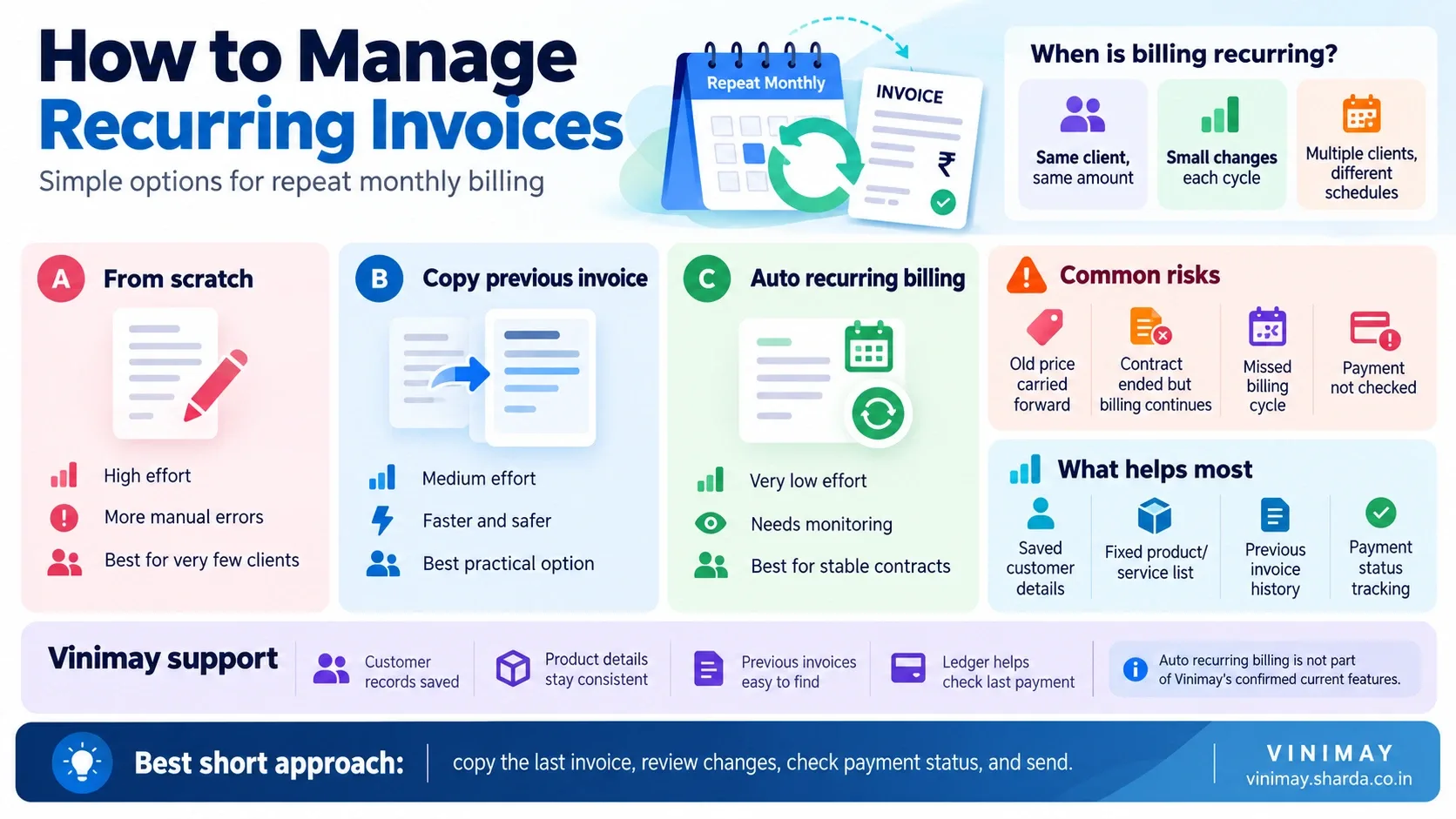
Method 3: Automated Recurring Billing
Some accounting and billing tools in the market offer a dedicated recurring invoice feature—you set up the schedule once, and the software automatically generates (and sometimes sends) the invoice at each interval without manual action. This removes the most repetitive part of the process entirely, but it comes with its own responsibility: if a client relationship changes, pricing shifts, or a contract ends, the automated schedule needs to be actively updated or paused, or it will continue generating invoices based on outdated terms.
Comparing the Three Methods
What Can Go Wrong With Any of These Methods?
Regardless of which approach is used, a few risks apply across the board:
An outdated price or quantity carried forward without being caught
A client relationship ending without the recurring billing process being stopped
Inconsistent invoice numbering if templates or copies aren't handled carefully
Missing a cycle entirely if there's no reminder system in place, whichever method is used
A Practical Middle Ground for Growing Businesses
For many small and growing businesses, the copy-from-previous-invoice approach (Method 2) offers a genuinely practical middle ground—far less repetitive than starting from scratch, but without the risk of an automated system quietly continuing after a contract has changed. This works especially well when customer and product details are already saved and consistent, since the bulk of a recurring invoice's content—who it's for, what's being billed—doesn't need to be rebuilt each time.
This is where Vinimay's confirmed features support the process directly:
Customer and vendor management keeps each recurring client's details saved, so they don't need retyping
Product management keeps pricing and item details consistent across repeat invoices
Sales records let you locate a customer's previous invoice quickly, as a starting point for the next one
Ledger management shows whether the last cycle's invoice was actually paid before you issue the next one
Automated recurring invoice generation isn't part of Vinimay's current confirmed feature set, so for businesses relying on that specific capability, it's worth checking directly whether that's a need Vinimay meets today or one to plan around using the copy-based approach instead.
Frequently Asked Questions
1. What's the easiest way to manage recurring invoices without automation?
Copying a customer's previous invoice and updating the date and any changed details is generally faster and less error-prone than starting from scratch each time.
2. Does automated recurring billing remove all manual work?
It removes most repetitive entry but still requires actively monitoring and updating schedules when client relationships or pricing change.
3. What's the biggest risk with automated recurring invoices?
Continuing to bill based on outdated terms after a contract has ended or changed, if the schedule isn't actively maintained.
4. Is rebuilding each invoice from scratch a bad approach?
It's the most manual and repetitive option, with a higher chance of small errors, but it works for businesses with very few recurring clients.
5. What details should stay consistent for recurring invoices?
Customer contact details, standard pricing, and product or service descriptions should stay consistent to avoid errors each cycle.
6. Can saved customer records help with recurring billing?
Yes—having customer details saved once removes the need to retype them for every recurring invoice.
7. Should I check payment status before issuing the next recurring invoice?
Yes—confirming the previous cycle's invoice was paid helps catch issues before they compound across multiple cycles.
8. How often should a recurring billing schedule be reviewed?
Reviewing active recurring arrangements periodically—especially when pricing or contract terms change—helps avoid billing errors.
9. Is copying a previous invoice a common practice?
Yes—many businesses without automated recurring billing use this as a practical, lower-risk middle ground.
10. Does managing recurring invoices require special software?
Not necessarily—consistent customer and product records, plus access to past invoices, cover most of what's needed even without dedicated automation.
Related Topics
Published by Team Vinimay
Our editorial and compliance specialists create practical guides, tax calculation rules, and operational strategies to empower Indian small business owners and accountants.