What Is a Proforma Invoice? Meaning, Format, and Example
Sometimes a customer wants to know the price, tax, and total before placing an order. Sometimes you need an advance before you send the goods. What In both cases you need a document that looks like an invoice but is not yet the final bill. That document is a proforma invoice.
This guide explains what a proforma invoice is, how it differs from a tax invoice, when to use it and what it should contain. You will see a simple example and then follow a step-by-step walkthrough of creating a proforma invoice in Vinimay, with a numbered screenshot for every screen. Common mistakes and ten FAQs are at the end.
Using the right document at the right time keeps your GST records clean. Vinimay is free GST billing and accounting software built for small businesses. It has a Proforma Invoice button right on the Dashboard and a Proforma tab in Transactions, so quoting a customer takes only a few clicks.
What Is a Proforma Invoice?
A proforma invoice is a preliminary invoice that a seller sends to a buyer before the goods or services are supplied. It lists the items, quantity, price, tax and total, so the buyer knows what the final bill will be. It is not a tax invoice and it is not a final bill. It should be clearly marked “Proforma Invoice: Not a Tax Invoice”.
When Do You Use a Proforma Invoice?
To give a customer a price and tax estimate before they confirm the order.
To ask for an advance payment before supply.
For customs and export shipments, where a document is needed before the final invoice.
When the buyer needs an internal approval or a bank loan against the order.
For large or custom orders where details may still change.
How to Create a Proforma Invoice in Vinimay
Step 1: Click Proforma Invoice on the Dashboard.
After you log in, you land on the Dashboard. In the Quick Actions box at the top right, click Proforma Invoice (image 1).
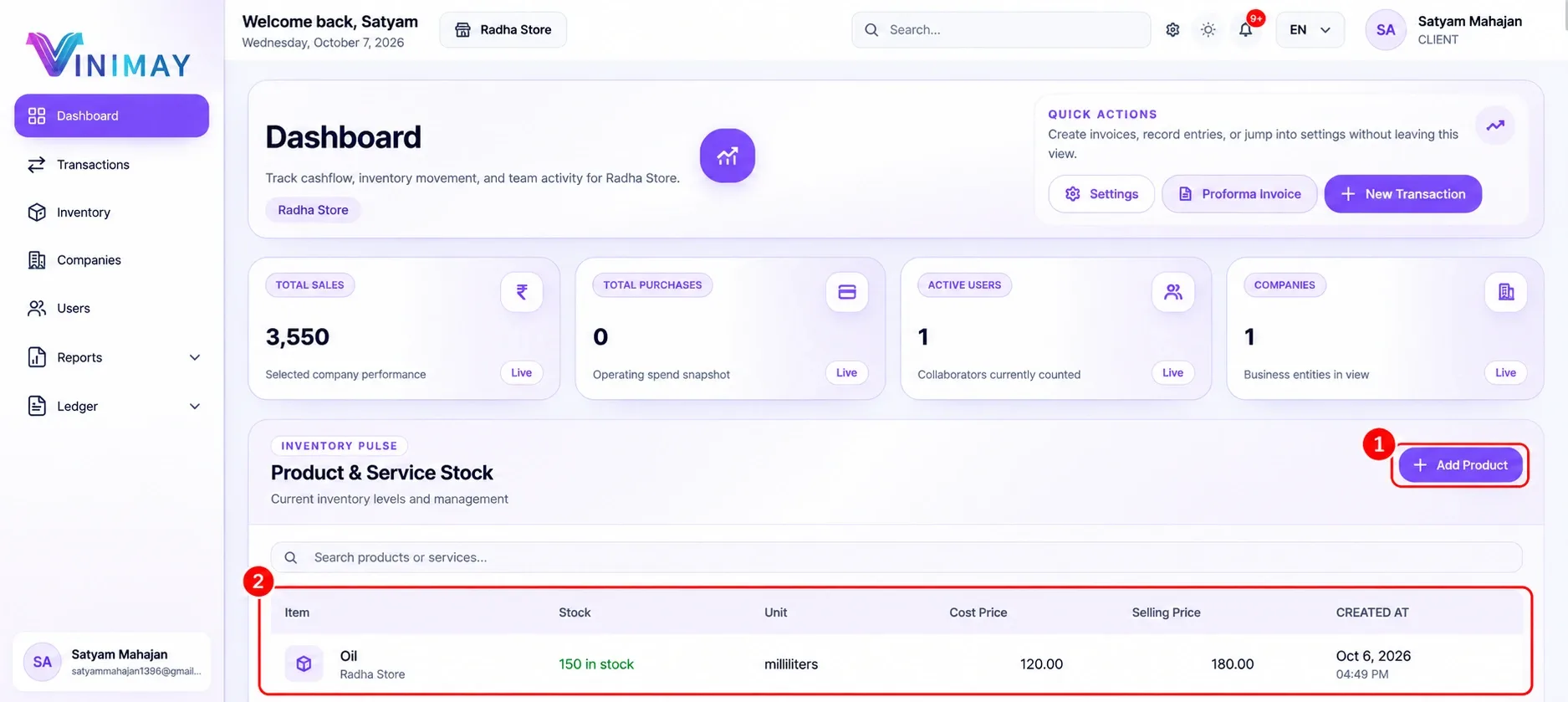
Vinimay Dashboard with the Proforma Invoice button in Quick Actions
Proforma Invoice button on the Dashboard
Step 2: Or open it from Transactions.
You can also click Transactions (image 2) in the left menu. Open the Proforma tab (image 3) to see your proforma invoices. To make a new one, click the Create Proforma button (image 4) at the top right.
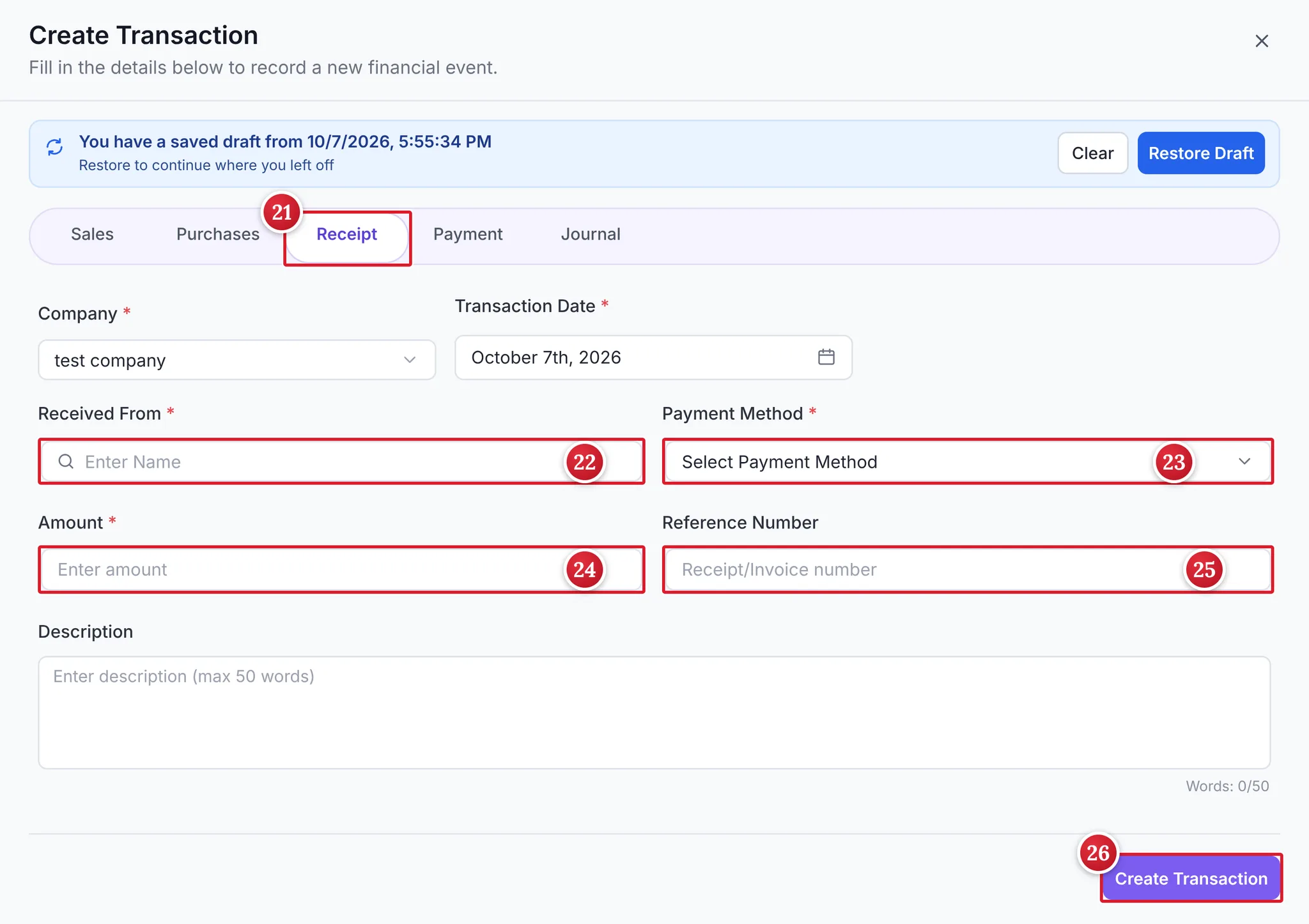
Vinimay Transactions page with the Proforma tab and Create Proforma button
Step 3: Create a proforma invoice form: company, dates and customer
The Create Proforma Invoice window opens. Check the Company (image 5). Set the Transaction Date (image 6) and, if you want, a Due Date (image 7), which is optional. Under Customer Details, type the Customer Name (image 8). You can add a Reference Number (image 9), such as a purchase order number, which is optional.
Shipping Address is required. By default, Same as billing address (image 10) is ticked, which uses the customer’s billing address for shipping.
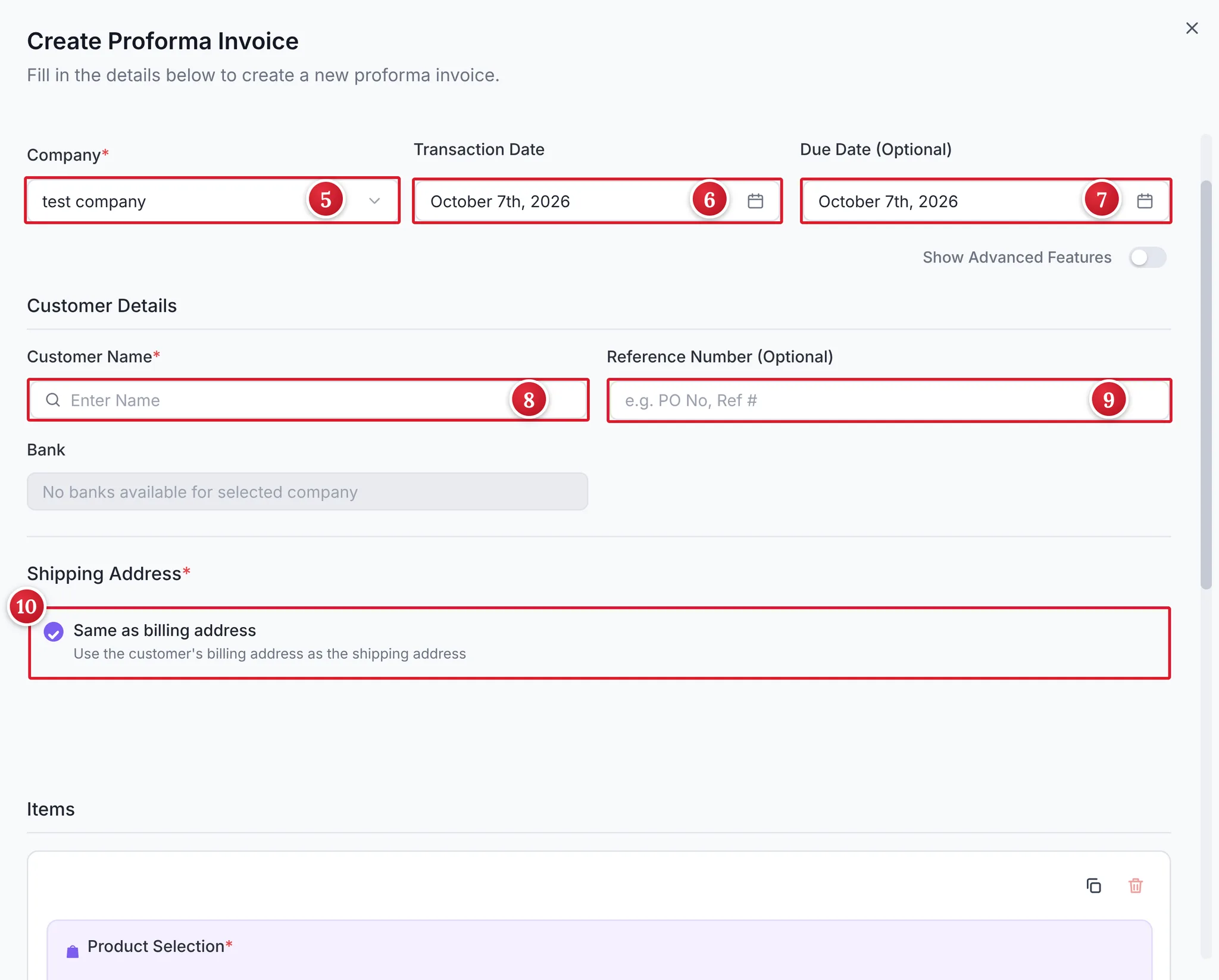
Vinimay Create Proforma Invoice form with company, dates, customer name and shipping address
Step 4: Add the items
Scroll down to Items. Use Product Selection (image 11) to search for your product. Enter the Qty (image 12), check the Unit (image 13) and enter the Price/Unit (image 14). The row also has an HSN Code field (image 15). To add more lines, click Add Product (image 16) for goods or Add Service (image 17) for services.
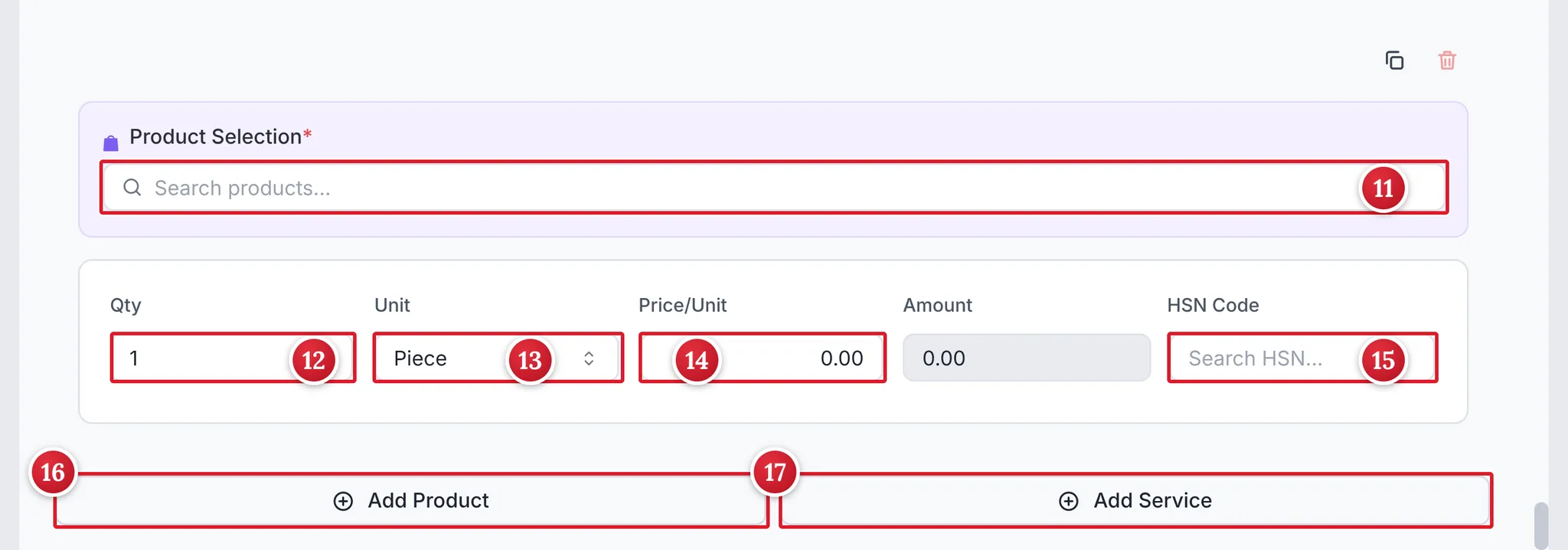
Vinimay proforma invoice item row with product search, quantity, unit, price, HSN code, Add Product and Add Service
Item row in the proforma invoice
Step 5: Check the notes and total, then create it
Scroll to Additional Details. The Notes box (image 18) already holds Terms and Conditions that say the proforma invoice is valid for 7 days from the date of issue. You can edit the text to suit your terms. Check the Subtotal and Invoice Total (image 19), then click Create Proforma Invoice (image 20).
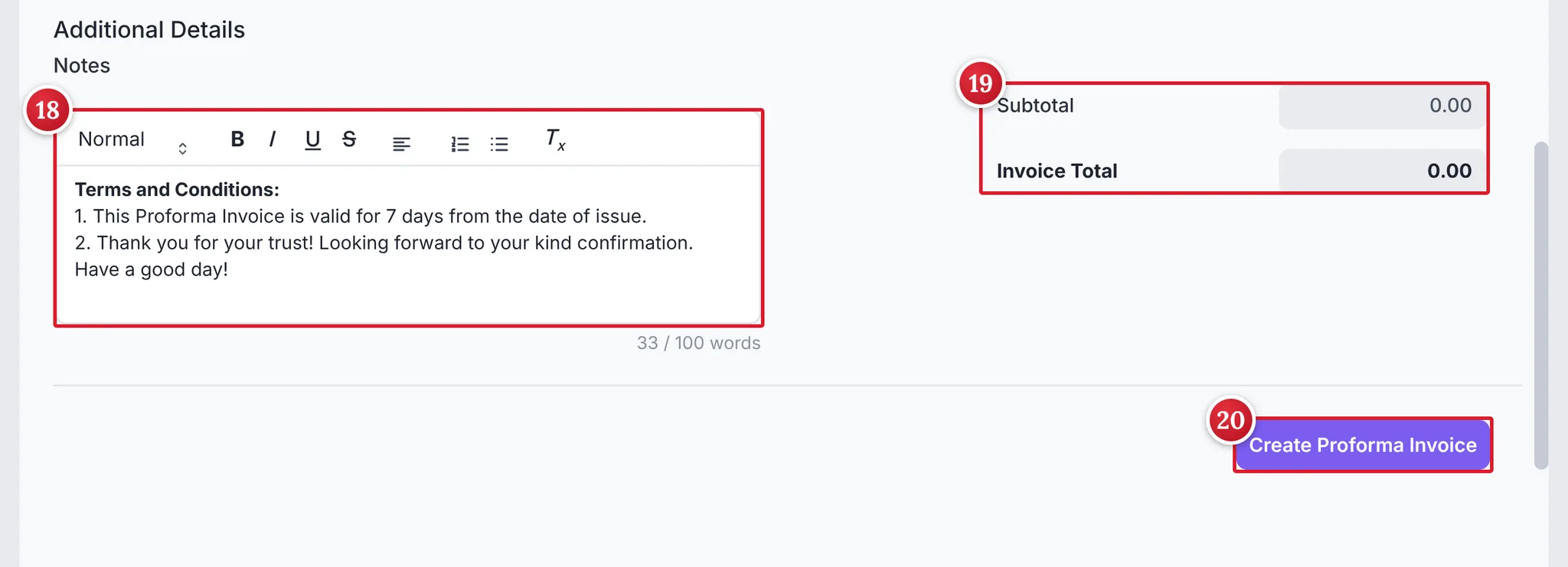
Common Mistakes to Avoid
Not marking the document as “Proforma Invoice” and “Not a Tax Invoice”.
Recording a proforma invoice as a sale in your books.
Collecting GST on a proforma invoice as if it were a tax invoice.
Forgetting to issue the tax invoice when the supply is made.
Not mentioning how long the quoted price is valid.
Tips for Using Proforma Invoices
Mention the validity period of the quote in the notes.
Add your customer’s purchase order number as the Reference Number.
Convert it into a tax invoice only when the supply is made.
Record any advance as a receipt, with the proforma number as the reference.
Check the GST treatment of advance payments with your CA.
Conclusion
A proforma invoice lets you show a customer the price, tax and total before the sale, without creating a GST liability. Mark it clearly, keep it out of your sales records, record any advance as a receipt and issue the tax invoice when the supply is made.
Try Vinimay free and create proforma invoices and GST invoices from one Dashboard.
FAQs
Q1. What is a proforma invoice in simple words?
It is a preliminary invoice sent before the sale, showing the price, tax and total, so the buyer knows what the final bill will be.
Q2. Is a proforma invoice a tax invoice?
No. It is only an estimate or quote and does not create a GST liability.
Q3. Can the buyer claim input tax credit on a proforma invoice?
No. Input tax credit can be claimed only on a valid tax invoice.
Q4. Do I record a proforma invoice in my books as a sale?
No. Record the sale when you issue the tax invoice.
Q5. What is the difference between a proforma invoice and a quotation?
A quotation offers a price. A proforma invoice is laid out like an invoice, with the details and tax in invoice format, so it can be used for advances, customs or approvals.
Q6. Can I ask for payment against a proforma invoice?
Yes, many businesses ask for an advance against it, but the document itself is not a tax invoice.
Q7. Is a proforma invoice needed for exports?
It is commonly used for customs and for the buyer’s bank or import formalities, though requirements depend on the country and shipment.
Q8. Can a proforma invoice be changed?
Yes. Since it is not final, you can revise it before the supply and send a new one.
Related Topics
Published by prachi kahar
Our editorial and compliance specialists create practical guides, tax calculation rules, and operational strategies to empower Indian small business owners and accountants.