accounding software7 min readPublished 5 October 2026
What Mistakes Should I Avoid While Creating a GST Bill Manually?
Learn the 10 common GST billing mistakes businesses make and how GST software like Vinimay can help reduce errors and simplify invoicing.
A
admin
Financial Insights & Compliance Desk
Share:
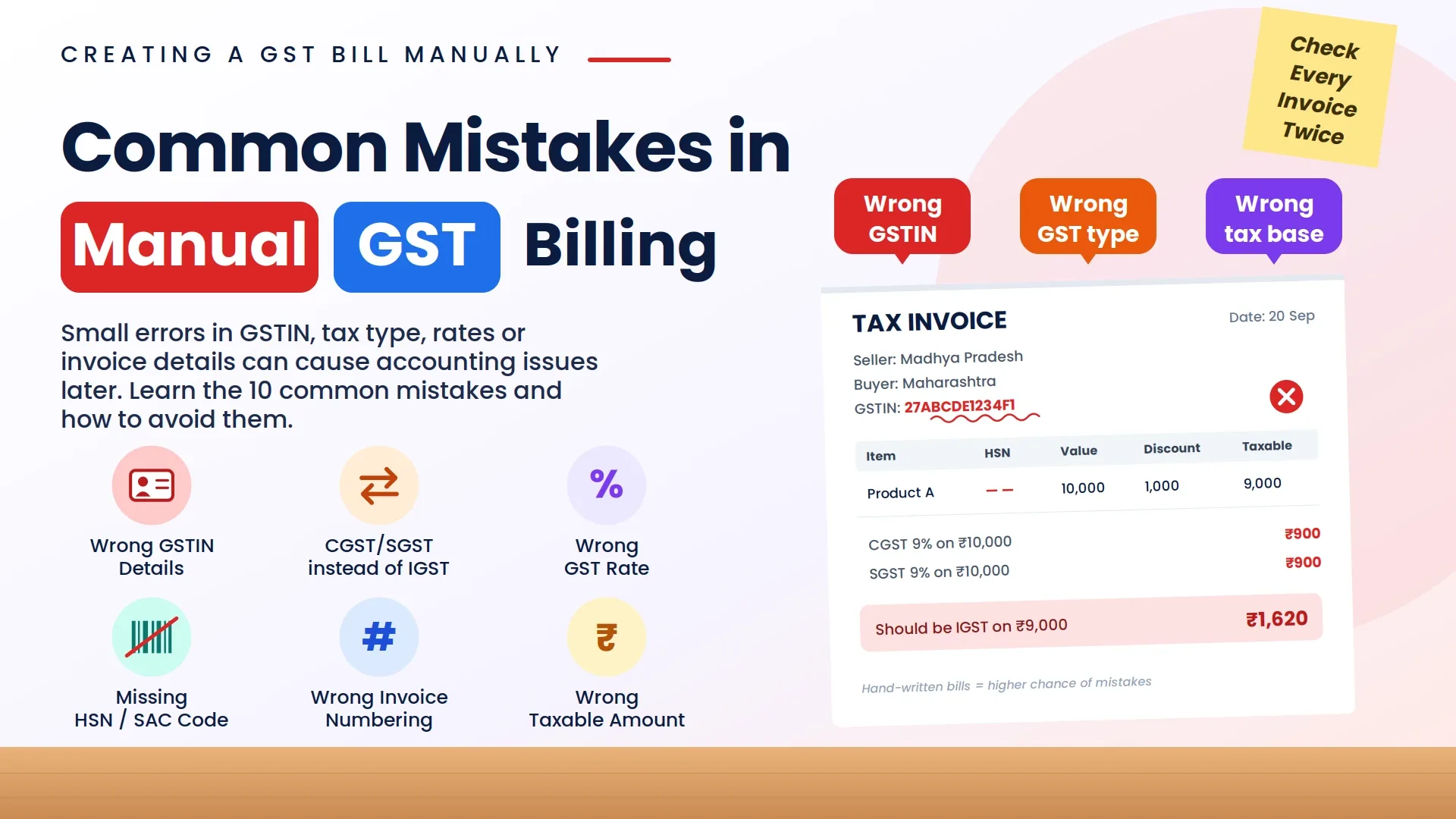
Creating GSTbills manually may look simple for businesses with fewer transactions, but common GST billing mistakes can create accounting and compliance problems later. Errors in GSTIN details, tax calculations, GST rates, HSN/SAC codes, invoice numbering, or customer information may appear small on one invoice but can become difficult to manage when a business creates dozens or hundreds of invoices. This is why small businesses, retailers, traders, manufacturers, and service providers need a consistent process for checking GST bills before they are issued. Manual GST billing often involves repeatedly entering customer details, selecting tax rates, calculating GST, applying discounts, maintaining invoice numbers, and storing transaction records. As transaction volume increases, the possibility of human error also increases. A wrong CGST, SGST, or IGST selection, incorrect GST rate, or missing invoice detail can require additional correction and reconciliation later.
Common GST billing mistakes can be reduced by maintaining accurate customer and product information, using the appropriate GST rate, checking HSN/SAC details, reviewing invoice calculations, and maintaining organized invoice records. GST billing software can further simplify this process by automating calculations and keeping billing information structured.
Vinimay helps businesses manage GST invoicing, customer and vendor records, payments, inventory, and accounting information through an organized digital workflow, reducing dependence on repetitive manual billing tasks.Common Mistakes to Avoid While Creating a GST Bill Manually1. Entering Incorrect GSTIN Details
One of the most common mistakes in GST invoicing is entering the wrong GSTIN of the seller or buyer.
A GSTIN is a unique identification number linked with a registered business. Incorrect GSTIN details can create problems during reconciliation and may affect the buyer's ability to claim Input Tax Credit (ITC).
Common GSTIN mistakes:
Wrong GSTIN number
Incorrect state code
Typing errors
Using outdated customer details
How to avoid it:
Always verify GSTIN details before creating the invoice. Maintain updated customer records to avoid repeated manual entry mistakes.
How Vinimay Helps:
Vinimay helps businesses maintain customer and vendor details in an organized manner, reducing the need to enter the same information repeatedly for every invoice.
2. Applying the Wrong GST Type (CGST/SGST Instead of IGST)
GST calculation depends on whether the transaction is within the same state or between different states.
A common mistake businesses make is selecting the wrong tax type.
Example:
A business located in Madhya Pradesh sells goods to a customer in Maharashtra.
Correct tax:
IGST applies
Incorrect calculation:
CGST + SGST applied
This can create incorrect tax reporting.
How to avoid it:
Check:
Seller's state
Customer's state
Place of supply
before applying GST.
How Vinimay Helps:
Vinimay helps businesses manage GST invoices by considering transaction details and supporting correct GST calculation workflows, reducing manual confusion between CGST, SGST, and IGST.
3. Selecting the Wrong GST Rate
Different products and services have different GST rates. Applying the wrong GST percentage can result in incorrect invoice values.
For example:
A product taxable at 12% GST should not be billed at 18% GST.
Common reasons for wrong GST rates:
Manual calculation errors
Incorrect product classification
Forgetting updated tax rates
Entering wrong percentage during billing
How to avoid it:
Maintain proper product details with applicable GST rates.
How Vinimay Helps:
Vinimay allows businesses to manage product information and GST-related details, making invoice creation faster and reducing repeated manual calculations.
4. Missing Mandatory GST Invoice Details
A GST invoice must contain specific details. Missing important information can make the invoice incomplete.
Important GST invoice details include:
Seller name and address
GSTIN
Invoice number
Invoice date
Buyer details
Product/service description
HSN/SAC code
Quantity
Taxable value
GST rate
Tax amount
Total invoice value
How to avoid it:
Use a proper GST invoice format containing all required fields.
How Vinimay Helps:
Vinimay provides structured GST invoice creation where important invoice fields can be maintained systematically, helping businesses create professional invoices.
5. Incorrect HSN or SAC Code
HSN codes are used for goods, while SAC codes are used for services.
Incorrect classification may create issues in GST records.
Common mistakes:
Wrong HSN code
Missing HSN details
Using outdated classification
How to avoid it:
Verify the correct HSN/SAC code before billing.
How Vinimay Helps:
Vinimay helps businesses maintain product and service details, making it easier to organize billing information.
6. Wrong Invoice Numbering
GST invoices should follow a proper invoice numbering sequence.
Common mistakes include:
Duplicate invoice numbers
Missing invoice numbers
Changing invoice formats frequently
Proper invoice numbering helps businesses maintain transaction records.
How Vinimay Helps:
Vinimay helps businesses generate and maintain organized invoice records, making invoice tracking easier.
7. Incorrect Calculation of Taxable Amount
GST is calculated on the taxable value after considering applicable discounts and adjustments.
A common mistake is calculating GST on the wrong amount.
Businesses need to maintain invoice records for accounting and GST compliance.
Manual records can create problems such as:
Lost invoices
Difficulty searching old bills
Missing transaction details
Data duplication
How Vinimay Helps:
Vinimay stores transaction records digitally, helping businesses manage invoices, sales, purchases, and accounting information in one place.
9. Ignoring Credit Notes and Debit Notes
Businesses often forget to properly record adjustments after invoice creation.
Examples:
Product returns
Price corrections
Additional charges
These adjustments require proper documentation through credit notes or debit notes.
How Vinimay Helps:
Vinimay helps businesses maintain proper transaction records, making adjustments and accounting management easier.
10. Not Checking Invoice Before Sharing With Customer
Before sending a GST invoice, businesses should verify:
Customer details
Product details
Tax calculation
Total amount
GST breakup
A wrong invoice may require correction later.
How Vinimay Helps:
Vinimay helps businesses create structured invoices with organized details, making invoice checking easier before sharing.
Why Businesses Should Move From Manual GST Billing to Software?
Manual GST billing requires continuous checking and increases dependency on human calculations. As businesses grow, maintaining hundreds of invoices manually becomes difficult.
GST billing software helps businesses:
Automatically calculate taxes
Create professional invoices
Maintain customer records
Track payments
Manage inventory
Generate reports
For small businesses and MSMEs, software reduces daily accounting workload and improves accuracy.
Frequently Asked Questions (FAQs)
1. What is the most common mistake while creating a GST bill manually?
The most common mistakes include incorrect GST calculation, wrong GST type selection (CGST/SGST/IGST), incorrect GSTIN details, and missing mandatory invoice information.
How Vinimay Helps:
Vinimay helps businesses create structured GST invoices and manage customer, product, and transaction details in one system, reducing common manual billing errors.
2. How can I avoid wrong CGST, SGST and IGST calculation?
To avoid wrong GST calculation, check seller and buyer locations, verify GST rates, and ensure correct transaction details before creating invoices.
How Vinimay Helps:
Vinimay supports GST invoice workflows where businesses can manage applicable GST calculations without manually calculating every tax component.
3. Can GST billing software reduce invoice mistakes?
Yes, GST billing software reduces manual errors by automating calculations, maintaining records, and standardizing invoice formats.
How Vinimay Helps:
Vinimay helps automate billing processes, maintain transaction history, and organize accounting records for businesses.
4. What details are mandatory in a GST invoice?
A GST invoice generally requires GSTIN, invoice number, date, customer details, HSN/SAC code, taxable value, GST rate, tax amount, and total invoice value.
How Vinimay Helps:
Vinimay provides structured invoice creation to help businesses include important billing information systematically.
5. Is GST software better than Excel for creating invoices?
For businesses with regular transactions, GST software provides better automation, accuracy, and record management compared to manual Excel billing.
How Vinimay Helps:
Vinimay combines GST billing, customer management, payments, inventory, and reports, helping businesses move from manual accounting to a more organized workflow.
Conclusion
Creating GST bills manually requires careful attention because small mistakes in GSTIN details, tax rates, invoice numbers, or GST calculations can create accounting problems. Businesses should follow proper invoice practices and maintain accurate transaction records.
As business transactions increase, GST billing software becomes useful because it reduces manual work, improves accuracy, and helps manage accounting operations efficiently.
Vinimay helps businesses simplify GST billing by combining invoice creation, GST management, customer records, payment tracking, inventory, and accounting features in one platform.
Our editorial and compliance specialists create practical guides, tax calculation rules, and operational strategies to empower Indian small business owners and accountants.