How Can Accounting Software Help Reduce Human Errors in Financial Management?
"Accounting software reduces human error" is one of the most repeated claims in this space, and also one of the least explained. Most articles stop at the sentence itself, without saying which errors, or how the software actually catches them.
The honest version is more specific: accounting software reduces certain, well-defined categories of mistakes — calculation errors, duplicate entries, missing tax fields, inconsistent labelling — because these are mechanical mistakes that a structured system is built to prevent. It does not, on its own, catch a business decision that was simply wrong, or a number that was entered incorrectly at the source.
Vinimay helps businesses manage GST invoicing, sales and purchase records, and payment tracking in one connected system. This guide breaks down exactly which human errors accounting software helps prevent, how each mechanism works, and where the responsibility still sits with the person entering the data.
How Does Accounting Software Actually Reduce Human Errors?
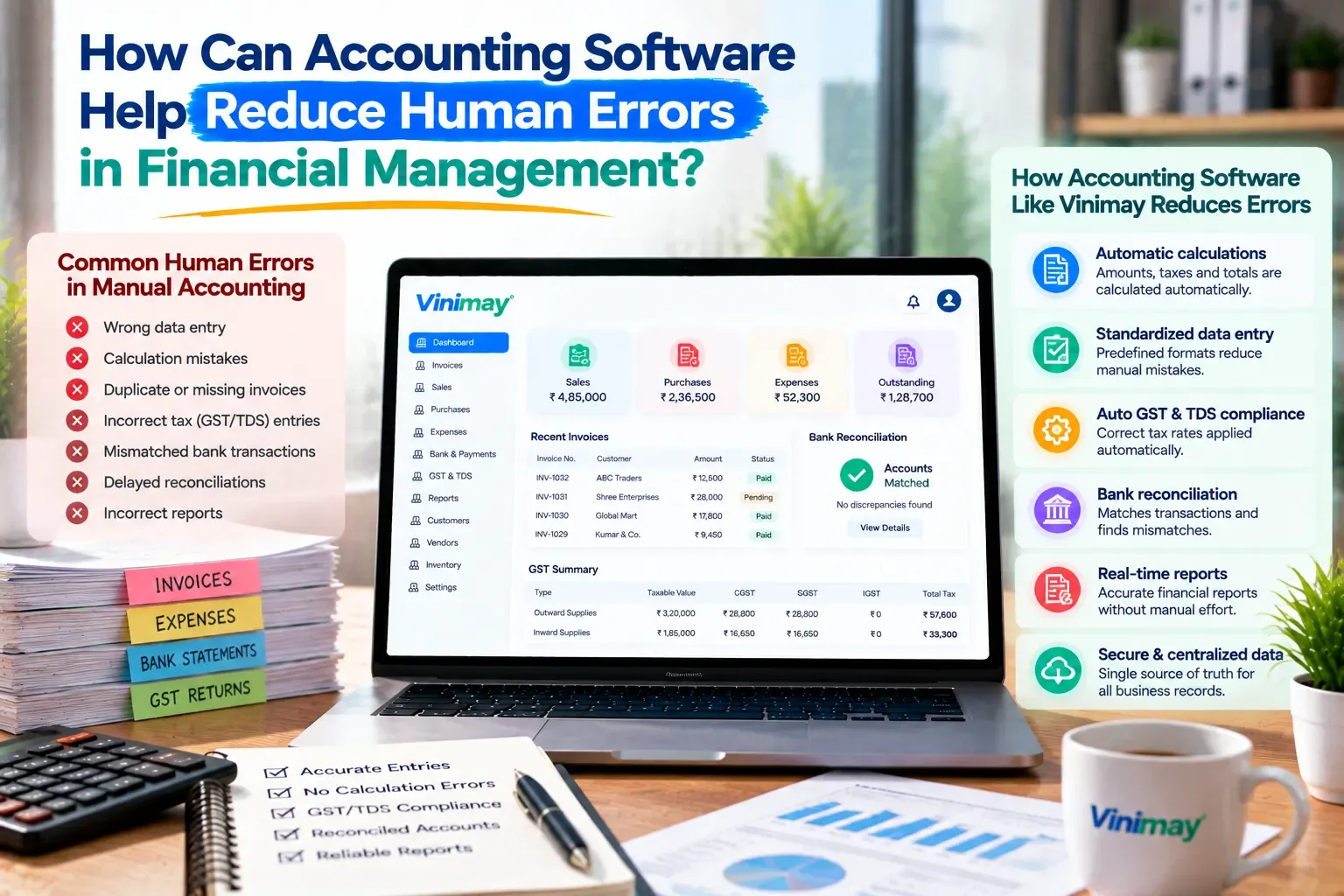
It reduces errors by removing manual, repetitive steps where mistakes typically happen—calculations, retyped totals, and repeated data entry across multiple records—and replacing them with a single entry that the system carries forward automatically.
The table below breaks this down by specific error type, since "fewer errors" as a blanket claim doesn't tell you much on its own.
Each row represents a specific point where manual entry commonly breaks down — and a specific, mechanical reason software closes that gap.
Calculation Errors
A handwritten bill depends on someone adding tax and totals correctly every single time, without a calculator error or a missed digit. Software removes this step entirely — once a rate and quantity are entered, the tax and total are computed the same way every time, regardless of how tired or rushed the person entering it is.
Duplicate or Missed Entries
When invoices come from more than one book, counter, or person, numbering gaps and duplicates are almost inevitable. A connected system assigns numbers sequentially from one place, so two staff members can't accidentally issue the same invoice number, and a skipped number is visible immediately rather than discovered months later during reconciliation.
Incomplete or Incorrect Tax Details
GST fields—CGST, SGST, IGST, HSN codes, and buyer GSTIN—are easy to forget under manual pressure at a busy counter. Software can require these fields before an invoice is saved, which shifts the mistake from "discovered during a GST return" to "caught before the bill is even issued."
Inconsistent Categorization
When expenses or products are labelled freely by whoever enters them, the same cost can end up recorded three different ways across a month—"electricity," "power bill," "EB charges." This makes reports unreliable even when every number is individually correct. Preset, reusable categories close this gap by giving everyone the same limited set of labels to choose from.
What Software Cannot Fully Prevent
Software cannot catch an error at the source — if a sale is entered as ₹5,000 instead of ₹500, the system will calculate correctly from a wrong number and produce a confidently wrong result. It also can't judge whether a business decision behind a number was sound, or replace a second pair of eyes reviewing unusual entries. Reducing manual, mechanical mistakes is different from guaranteeing every number is correct — that still depends on careful entry at the point of billing.
How This Plays Out in Vinimay
In Vinimay,this shows up in specific, everyday ways: GST tax fields are applied based on the transaction rather than selected freely each time, invoice numbers follow in sequence automatically, and a sale entry updates stock and payment records together instead of needing to be re-entered in separate places. Customer and vendor details, once saved, don't need to be retyped and potentially altered on every new bill.
This reflects the same principle covered above—Vinimay closes the specific, mechanical gaps that cause most billing errors, while the accuracy of what's typed in at the very first step still depends on the person entering it.
Conclusion
Accounting software reduces human error in specific, mechanical ways—automatic calculations, sequential numbering, required tax fields, and consistent categorization—not through some general sense of being "more accurate." Knowing exactly which mistakes get prevented and which still depend on careful entry, sets realistic expectations rather than blind trust in automation. Vinimay applies this at the invoicing and record-keeping level, closing the everyday gaps that cause most billing errors, while the accuracy of the very first entry remains in the hands of whoever is billing.
Frequently Asked Questions
1. Does accounting software eliminate all human error?
No. It prevents mechanical mistakes like calculation and duplication errors, but not errors made at the point of initial data entry.
2. How does software prevent GST-related mistakes?
By applying tax rules automatically and requiring fields like GSTIN or HSN codes before an invoice can be saved.
3. Can software catch a wrong amount entered by a staff member?
Not directly—it will calculate correctly from whatever number is entered, so the initial entry still needs to be accurate.
4. Why do handwritten invoices have more numbering errors?
Because numbering is tracked manually across possibly multiple books or counters, making duplicates and gaps common.
5. Does Vinimay reduce billing errors?
Yes, through automatic tax field application, sequential invoice numbering, and connected sales, stock, and payment records.
6. What's the most common manual accounting mistake?
Calculation errors and inconsistent categorization are among the most frequent, since both depend entirely on manual consistency.
7. Can software fix errors that already happened?
It can make errors easier to locate and correct, since data is centralized, but it doesn't retroactively fix incorrect data on its own.
8. Is manual double-checking still needed with accounting software?
Yes, particularly for verifying figures at the point of entry—software reduces mechanical error, not judgment error.
9. Does automatic tax calculation replace the need to understand GST rules?
No, understanding the rules still helps catch cases where automation might be set up incorrectly.
10. Why do inconsistent expense categories cause problems?
Because they make reports unreliable even when individual numbers are correct, since related costs get scattered across different labels.
Published by Team Vinimay
Our editorial and compliance specialists create practical guides, tax calculation rules, and operational strategies to empower Indian small business owners and accountants.