Businesses operating from multiple warehouses need accurate tracking of stock movement between different locations. Managing warehouse transfers manually can make it difficult to know where products are available, maintain correct stock levels, and identify differences between physical inventory and records. Accounting software with inventory management features can help businesses record stock transfers, update warehouse-wise inventory, and maintain a clear history of product movement. It allows businesses to track when stock is moved from one location to another without affecting the overall inventory accuracy.
Vinimay helps businesses manage inventory records, monitor stock movements, and keep sales, purchases, and stock data connected in one system. This guide explains how warehouse stock transfers work through accounting software and how businesses can improve inventory control across multiple locations.
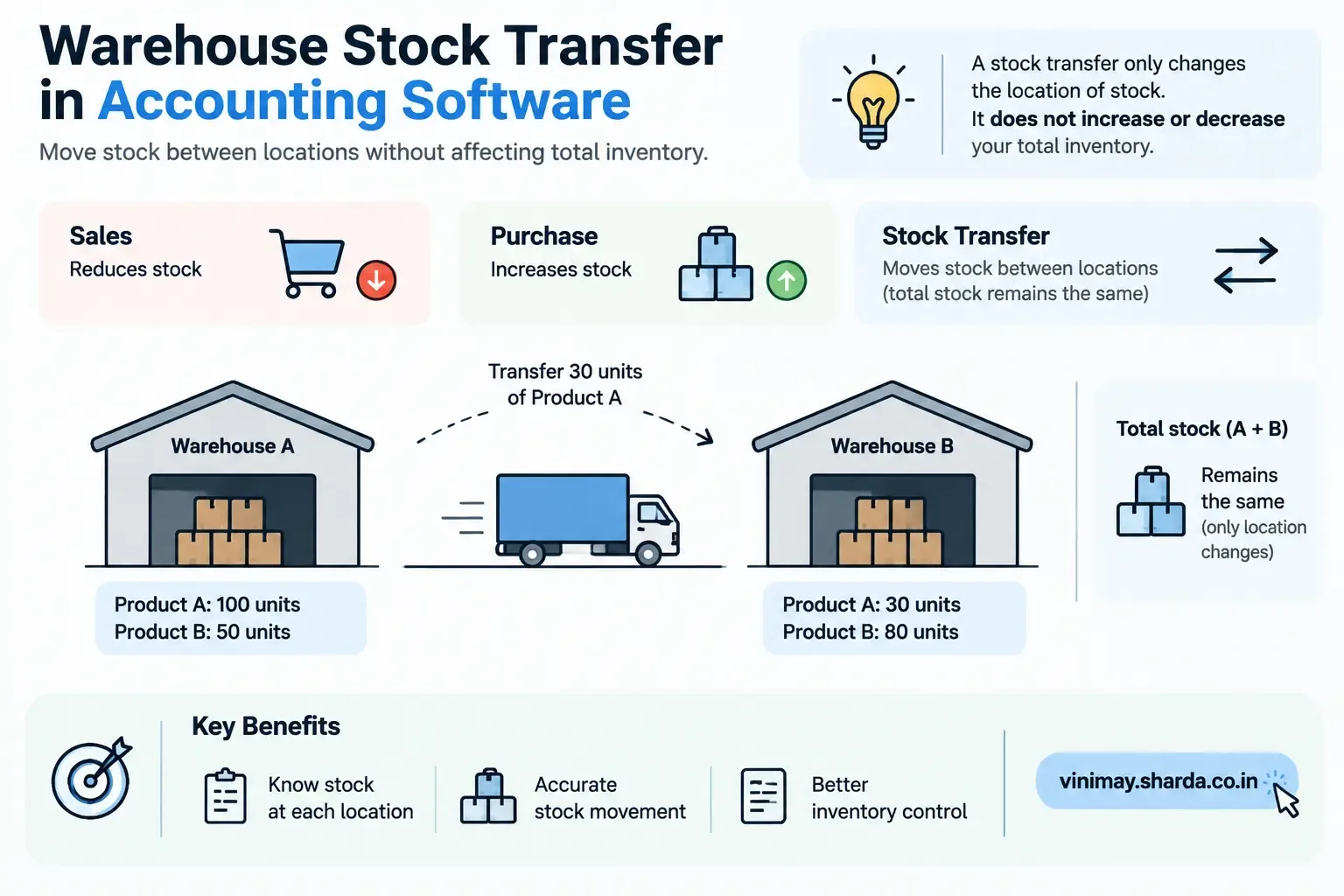
A Transfer Is Not a Sale or a Purchase
A sale reduces stock: When products are sold, the overall inventory of the business decreases.
A purchase increases stock: When products are purchased, the overall inventory increases.
A transfer only changes location: Moving stock between warehouses, branches, or locations does not change the total quantity owned by the business.
Separate tracking is required: Software that only records sales and purchases may not automatically capture internal stock movements between locations.
What Single-Location Stock Tracking Covers
Standard stock tracking, the kind most small business billing software includes, generally handles:
A single, combined stock quantity per product
Reductions when a sale is recorded
Increases when a purchase is recorded
This works well for a business operating from one location, where "how much stock do I have" has one clear answer.
What Multi-Warehouse Tracking Additionally Requires
Once a business operates from more than one warehouse, branch, or storage location, proper tracking needs to go further:
Stock quantities recorded separately per location, not just as one combined total
A specific transfer transaction type—distinct from sales or purchases—that moves quantity from one location's total to another's
The ability to see, at a glance, how much of a product is at each specific location, not just how much exists across the business overall
Why This Distinction Trips Up a Lot of Growing Businesses
A business that starts with one location and later opens a second often continues using software built around a single combined stock total, simply adding the new location's inventory into the same overall number. This works until someone needs to know specifically how much stock is at the new location versus the original one—at which point the combined total stops being useful, and the gap in proper multi-warehouse support becomes obvious.
What Happens Without Proper Transfer Tracking
Without a dedicated way to record transfers, businesses often resort to workarounds—recording a "sale" from one location and a "purchase" at the other to simulate a transfer, which distorts actual sales and purchase figures, or simply tracking each location's stock in a separate, disconnected spreadsheet, losing the benefit of having everything in one system.
How to Manage This if Dedicated Transfer Tracking Isn't Available
Decide on a consistent way to note transfers even without a formal feature—a clearly labelled entry distinguishing it from a real sale or purchase
Keep a simple running note of what's been moved between locations and when, even if it lives outside the main stock records temporarily
Periodically reconcile physical stock at each location against whatever records you're keeping, since this is more error-prone without dedicated support
If multi-location operations are a permanent, growing part of the business, treat proper multi-warehouse tracking as a genuine requirement to look for, rather than something to keep working around indefinitely
What Vinimay Supports Today
Vinimay's confirmed features include product management and stock tracking, which cover accurate, connected stock levels tied to sales and purchases. Dedicated, formal tracking of stock transfers between multiple separate warehouses or locations isn't currently part of Vinimay's confirmed feature set. For a business operating from a single location or treating all locations as one combined stock pool, this standard stock tracking covers the core need. For a business that specifically requires per-location stock visibility and formal inter-warehouse transfer recording, that's a distinct requirement worth confirming directly, since it's a more specialized capability than single-pool stock tracking.
Frequently Asked Questions
1. Is a stock transfer the same as a sale or purchase in accounting software?
No—a transfer moves existing stock between locations without changing the total amount owned, unlike a sale or purchase.
2. Does standard inventory tracking handle multiple warehouse locations?
Basic stock tracking often handles a single combined quantity; tracking stock separately by specific location is a more specialized requirement.
3. What happens if I don't have dedicated transfer tracking?
Businesses often resort to workarounds like simulating a sale and purchase, which can distort actual sales and purchase figures.
4. How do I know if I need multi-warehouse stock tracking?
If you operate from more than one storage location and need to know how much stock is at each specific place, this becomes a genuine requirement.
5. Can I track transfers manually without dedicated software support?
Yes, with a consistent, clearly labelled process—though this is more error-prone than a proper built-in feature.
6. Does a stock transfer affect total inventory numbers?
No—the total stock stays the same; only the location of that stock changes.
7. What's the risk of using "fake" sales and purchases to simulate transfers?
It distorts your actual sales and purchase records, making reports and analysis based on that data inaccurate.
8. Is multi-warehouse tracking only relevant for large businesses?
No—any business operating from more than one location, regardless of size, can benefit from this kind of tracking.
9. How often should I reconcile stock across multiple locations?
Periodic physical checks against your records help catch discrepancies, especially important if transfers are being tracked manually.
10. What should a growing multi-location business look for in inventory software?
Confirm specifically whether the software supports per-location stock visibility and a dedicated transfer transaction type, rather than assuming standard stock tracking covers this.
Related Topics
Published by Team Vinimay
Our editorial and compliance specialists create practical guides, tax calculation rules, and operational strategies to empower Indian small business owners and accountants.