Manual accounting processes can lead to errors in calculations, data entry, invoice preparation, and record maintenance, especially when business transactions increase. Accounting software helps reduce such mistakes by automating calculations, maintaining consistent records, and connecting different financial activities within a single system. Vinimay helps businesses manage billing, transactions, and accounting records more accurately by organising financial data in one place. This guide explains how accounting software reduces common accounting errors and how businesses can improve accuracy in their daily financial operations.
Before: What the Errors Actually Looked Like
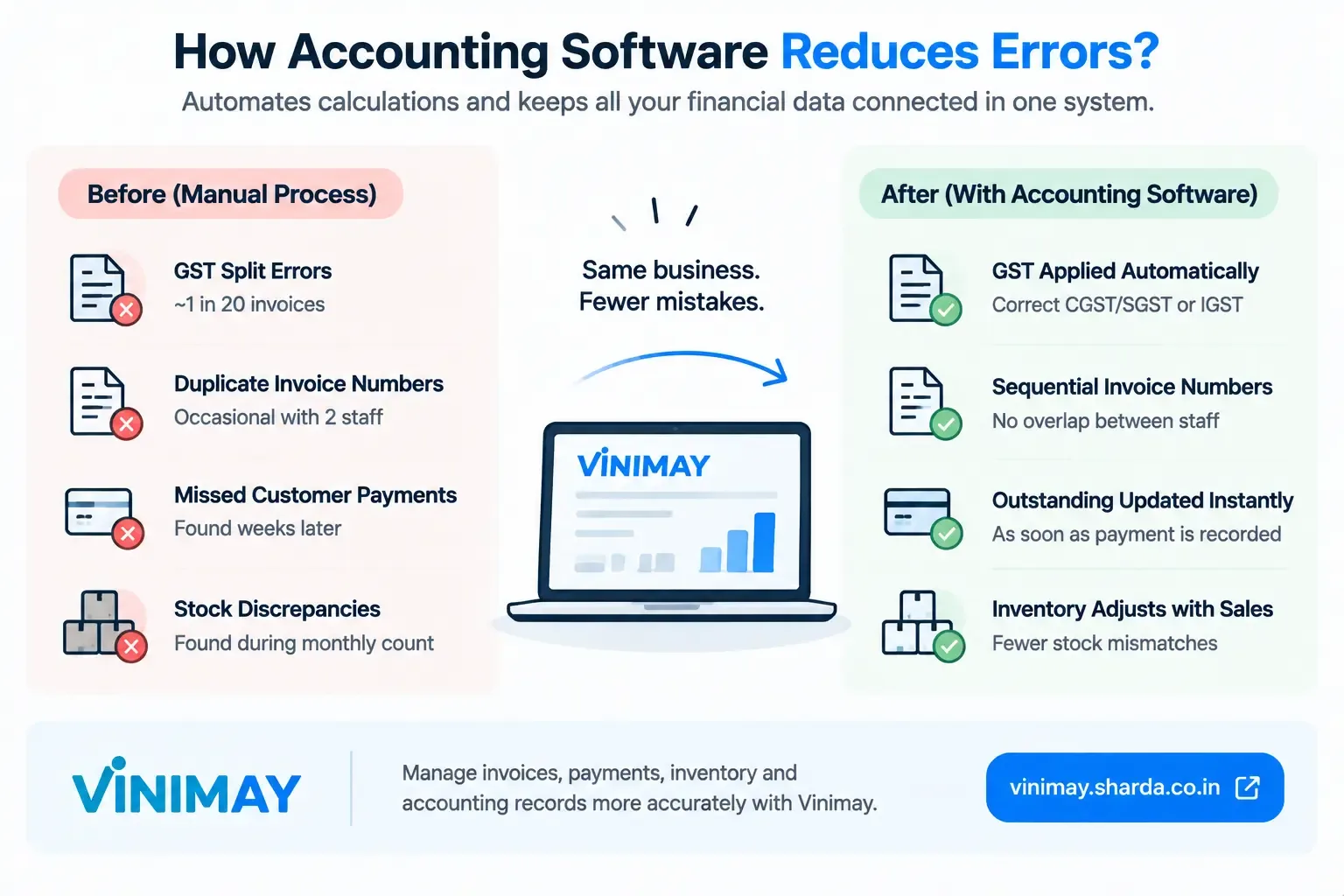
GST splits. Roughly one invoice in twenty had the wrong split — CGST/SGST applied when IGST was needed, or the reverse — usually during a rushed afternoon.
Invoice numbers. Two staff members occasionally created invoices with overlapping numbers, since each kept their own rough count.
Outstanding balances. The owner regularly discovered a customer had actually paid weeks earlier, because the payment was noted in a different book than the invoice.
Stock counts. Monthly physical counts routinely turned up discrepancies traced back to sales billed without inventory being adjusted.
After: What Specifically Changed
GST splits stopped being a manual decision — the software applied CGST/SGST or IGST automatically based on the customer's state, removing that one-in-twenty error entirely.
Invoice numbering became sequential across both staff members automatically, ending the overlap problem.
Outstanding balances updated the moment a payment was recorded against its invoice, so the owner stopped discovering old, unrecorded payments weeks later.
Stock discrepancies shrank noticeably, since inventory adjusted with each sale instead of only being checked monthly.
What Didn't Change
The business still occasionally forgot to log a cash purchase from a supplier — software didn't fix this, because it can only work with transactions it's actually given. This remained a discipline issue, not a software one, and is worth naming honestly rather than implying software solves everything.
Where Vinimay Fits This Scenario
The before-and-after above reflects exactly the categories Vinimay addresses within its confirmed scope: GST is applied automatically based on the transaction, sequential invoice numbering, and payments recorded against the same customer/vendor accounts as their invoices, keeping outstanding balances accurate. Inventory adjusting with billing addresses the stock discrepancy pattern as well. What it doesn't solve — and what no software solves — is a transaction that's never entered in the first place; that remains a matter of consistent recording habits.
Conclusion
Accounting software reduces a specific, well-defined category of errors — the ones caused by repeated manual calculation and disconnected records. It doesn't reduce errors caused by skipped or forgotten transactions, since that's a discipline issue no system can fully solve on its own. Judging software honestly means checking which category your recurring errors actually fall into.
Frequently Asked Questions
1. Can accounting software reduce accounting errors?
Yes. Accounting software can reduce common errors by automating calculations, organising transactions, and maintaining records in a structured system.
2. What types of accounting errors can software help prevent?
It can help reduce calculation mistakes, duplicate entries, missing transaction records, incorrect totals, and errors caused by repetitive manual data entry.
3. Can accounting software automatically calculate totals?
Yes. Most accounting software automatically calculates invoice totals, taxes, discounts, payments, and outstanding amounts based on the information entered.
4. Can accounting software reduce duplicate entries?
It can help reduce duplicate entries by keeping transactions in a centralised system and providing transaction history for review.
5. Can accounting software help with GST errors?
Accounting software can calculate GST based on configured rates and record GST details on invoices and transactions. Correct tax settings and accurate entries are still important.
6. Can accounting software detect incorrect entries?
Some software can identify inconsistencies, unusual transactions, duplicate records, or missing information. The exact checking features depend on the software.
7. Does accounting software eliminate all accounting mistakes?
No. Software cannot prevent every error. Incorrect data entry, wrong tax settings, missing transactions, or incorrect business information can still produce inaccurate records.
8. How does accounting software improve record accuracy?
It keeps invoices, purchases, expenses, payments, customer records, vendor records, and other transactions organised in one system, making records easier to maintain and review.
9. Can accounting software help accountants review errors?
Yes. Accountants can use transaction history, reports, ledgers, and reconciliation features to review records and identify discrepancies more efficiently.
10. How can businesses get the most accurate results from accounting software?
Businesses should enter transactions correctly, maintain updated customer and vendor information, configure tax settings properly, regularly review records, and reconcile financial data.
Related Topics
Published by Team Vinimay
Our editorial and compliance specialists create practical guides, tax calculation rules, and operational strategies to empower Indian small business owners and accountants.