Learn how to calculate product-wise profit margin using COGS, landed cost, selling price, discounts and inventory costing methods.
A
admin
Financial Insights & Compliance Desk
Share:
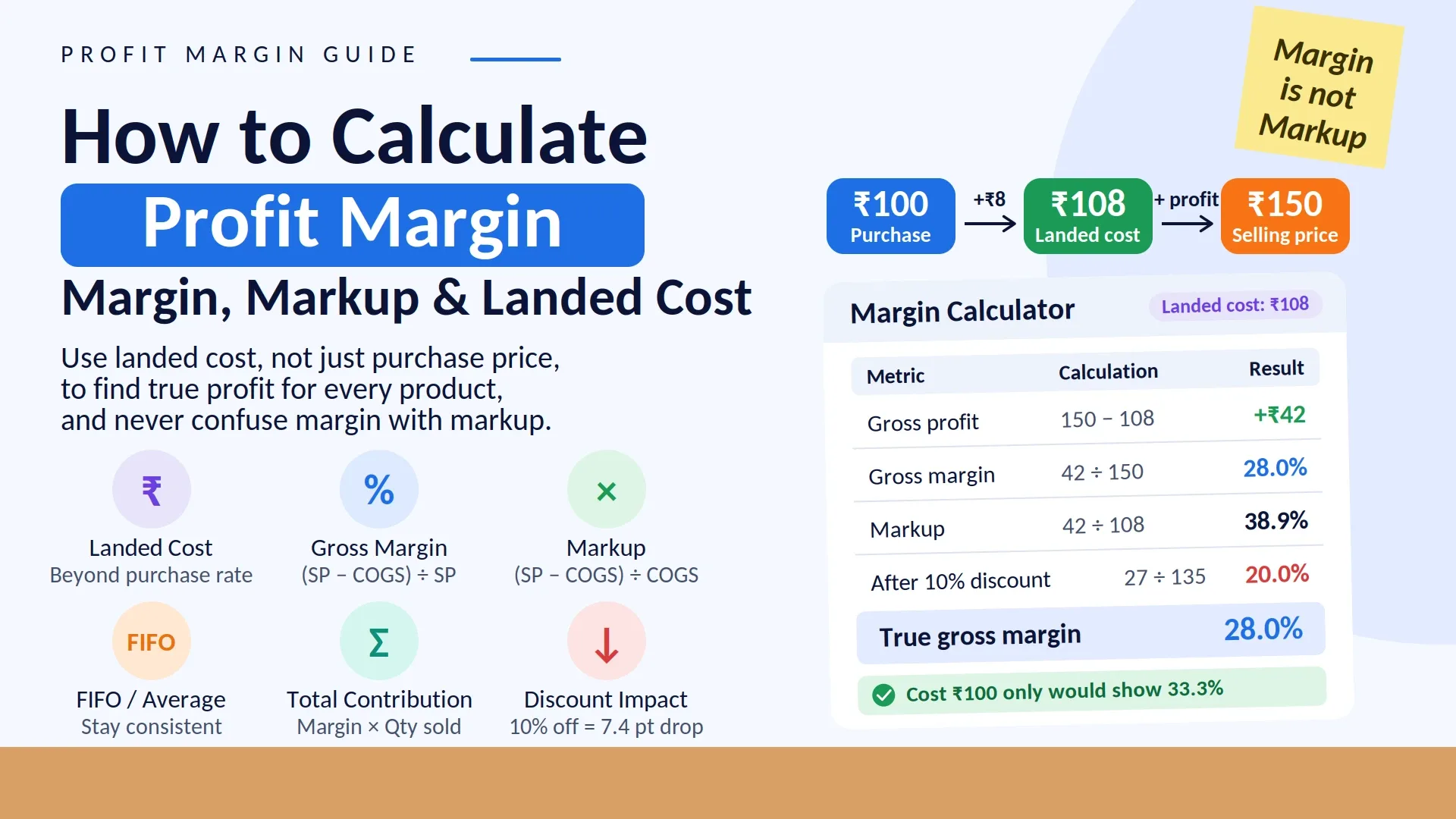
Business mein sirf sales amount dekhna enough nahi hota. Product-wise profit margin pata hona zaroori hai taaki business owner samajh sake ki kisi particular product ko bechne par actual kitna profit generate ho raha hai. Agar ek product ₹100 mein purchase hua aur ₹150 mein sell hua, to simple calculation se profit ₹50 dikhta hai. Lekin actual margin calculate karte waqt freight, packaging, wastage aur other direct costs ko bhi consider karna pad sakta hai.
Product ki profitability samajhne ke liye sabse important calculation Selling Price aur Cost of Goods Sold (COGS) ke beech ka difference hai. Source material ke according, accurate gross margin ke liye COGS mein sirf purchase price nahi, balki relevant direct costs such as freight, packaging, wastage allocation, import duty aur handling charges ko bhi consider karna chahiye. Pasted markdown
Isliye business owner ko har product ke liye actual landed cost, selling price aur applicable costing method ko samajhna chahiye before deciding whether a product is genuinely profitable.
Product-Wise Profit Margin Kya Hota Hai?
Product-wise profit margin batata hai ki kisi product ki selling price mein se product ki cost nikalne ke baad selling price ka kitna percentage profit ke roop mein bachta hai.
Dono percentages same transaction ke hain, lekin calculation ka base alag hai. Pasted markdown
Isliye pricing decisions lete waqt business ko clearly define karna chahiye ki woh margin ki baat kar raha hai ya markup ki.
COGS Mein Kya-Kya Include Karna Chahiye?
Product-wise profit margin calculate karte waqt sabse important step accurate COGS calculate karna hai.
Sirf supplier invoice ka purchase price use karna har situation mein sufficient nahi hota.
Relevant direct costs may include:
Basic purchase price
Freight or transportation
Packaging material
Import duty, where applicable
Normal wastage allocation
Loading and handling charges
Pasted markdown
Example
Suppose:
Purchase price = ₹100/unit
Freight = ₹5/unit
Packaging = ₹3/unit
Actual landed cost:
₹100 + ₹5 + ₹3 = ₹108/unit
Therefore, actual COGS is ₹108 rather than simply ₹100. Pasted markdown
Agar business ₹100 ko cost maan kar margin calculate karega, to profitability actual se higher appear ho sakti hai.
Product-Wise Profit Margin Kaise Calculate Kare?
Aap following process follow kar sakte hain:
Step 1: Product Ka Landed Cost Calculate Karein
Purchase price ke saath applicable direct costs add karein.
Step 2: Actual Selling Price Identify Karein
Agar product different customers ko different prices par sell hota hai, to retail, wholesale ya customer-specific selling price separately analyse ki ja sakti hai.
Har product ka selling price, cost aur margin percentage compare karein.
Step 5: Category-Wise Analysis Karein
Products ko categories mein group karke broader profitability pattern dekhein.
Step 6: Different Periods Compare Karein
Current month ko previous month ke saath compare karne se purchase-price changes aur margin fluctuations identify karna easier hota hai. Pasted markdown
FIFO Aur Weighted Average Se Margin Kaise Change Ho Sakta Hai?
Agar same product different dates par different prices par purchase hua hai, to COGS calculation method product margin ko affect kar sakta hai.
Example:
Batch 1: 50 units @ ₹100
Batch 2: 50 units @ ₹120
Sale: 60 units @ ₹150
FIFO Method
First purchased stock ko pehle sold maana jata hai.
COGS:
50 × ₹100 + 10 × ₹120 = ₹6,200
Approximate COGS per unit:
₹103.3
Margin:
(₹150 − ₹103.3) ÷ ₹150 = 31.1%
Weighted Average Method
Average cost:
(50 × ₹100 + 50 × ₹120) ÷ 100 = ₹110
Margin:
(₹150 − ₹110) ÷ ₹150 = 26.7%
Source material highlights that both methods can produce different margin figures, making consistent application important for meaningful trend comparison. Pasted markdown
Sirf Margin Percentage Dekhna Enough Hai?
Nahi. Product profitability samajhne ke liye margin percentage ke saath total margin contribution bhi dekhna useful hai.
Metric
Formula
Meaning
Margin Percentage
(SP − CP) ÷ SP × 100
Per-unit profitability
Total Margin Contribution
Margin per unit × Quantity Sold
Overall contribution
For example:
Product A: 40% margin × 10 units
Product B: 15% margin × 500 units
Product A ka percentage margin higher hai, lekin Product B ki higher sales quantity ki wajah se total contribution greater ho sakta hai. Pasted markdown
Isliye inventory, sales aur marketing decisions ke liye sirf percentage margin par depend karna incomplete analysis ho sakta hai.
Discount Se Product Margin Kaise Affect Hota Hai?
Discount ka impact margin percentage par significant ho sakta hai.
Example:
Cost = ₹100
Original Selling Price = ₹150
Original Margin = 33.3%
Agar 10% discount diya:
New Selling Price = ₹135
New margin:
(₹135 − ₹100) ÷ ₹135 × 100 = 25.9%
Yaani 10% discount ke baad margin 33.3% se approximately 25.9% ho gaya. Pasted markdown
Isliye discount decide karne se pehle actual post-discount margin calculate karna important hai.
Purchase Price Change Hone Par Margin Ka Kya Hota Hai?
Product ka margin static nahi hota.
Agar supplier purchase price increase karta hai aur selling price same rehti hai, to margin reduce ho sakta hai.
Isliye businesses ko periodically updated cost data ke basis par margin review karna chahiye.
Source material specifically notes that continuously changing purchase rates and negotiated selling prices make a static margin figure insufficient; dynamic or rolling analysis can provide more current insight. Pasted markdown
Agar business mein hundreds of products hain, to har product individually analyse karna difficult ho sakta hai.
Isliye products ko categories mein group karna useful hai.
For example:
Electronics
Accessories
Grocery
Clothing
Hardware
Personal Care
Category-wise analysis se business ko broader profitability pattern samajhne mein help mil sakti hai.
For example, agar Accessories category consistently higher contribution generate kar rahi hai, to business owner us category ke stock movement aur sales performance ko separately review kar sakta hai.
Industry-Wise Margin Ko Kaise Samjhein?
Different industries mein margin structures significantly vary kar sakte hain.
The provided source gives the following reference ranges, while also noting that actual margins depend on the business model, competition and location:
Business Type
Reference Gross Margin Range
Grocery/FMCG Retail
8–15%
Electronics Retail
5–15%
Clothing/Fashion
40–60%
Restaurant/Food
60–70%
Manufacturing
15–40%
Service-Based Business
30–70%
These figures should be treated as reference ranges rather than universal targets. The source recommends focusing on a business's own historical trend because businesses can operate under very different conditions. Pasted markdown
Common Mistakes While Calculating Product Profit Margin
1. Sirf Purchase Price Ko COGS Maan Lena
Freight, packaging and other relevant direct costs ignore karne se margin artificially high appear ho sakta hai.
2. Margin Aur Markup Ko Same Samajhna
Margin selling price ke against calculate hota hai, while markup cost ke against.
3. Sirf Percentage Dekhna
High-margin product necessarily highest total contribution wala product nahi hota.
4. Costing Method Frequently Change Karna
FIFO aur weighted average ke beech inconsistent switching se historical margin comparison difficult ho sakta hai.
Supplier prices change hone par old cost ke basis par margin calculate karna current profitability ko accurately reflect nahi karega. Pasted markdown
Practical Example: Electronics Retailer
Suppose ek electronics retailer ek mobile accessory sell karta hai.
Initial calculation:
Purchase Cost = ₹100
Selling Price = ₹154
Assumed Margin = approximately 35%
Lekin actual landed cost calculate karne par:
Purchase = ₹100
Freight = ₹8
Packaging = ₹4
Actual Landed Cost = ₹112
Ab actual margin:
(₹154 − ₹112) ÷ ₹154 × 100 = 27.3%
Is example se clear hota hai ki sirf purchase invoice price use karne se product profitability overestimated ho sakti hai. Pasted markdown
How Vinimay Helps With Product-Wise Profit Analysis
Vinimay purchase entries mein item cost ko organized manner mein maintain karne mein help karta hai. Purchase, sales aur inventory records ko structured form mein maintain karna product profitability analysis ke liye useful data provide karta hai. Pasted markdown
Vinimay ke workflow mein businesses can manage:
Product Records: Products ko organized form mein maintain karna.
Purchase Records: Purchase transactions aur item costs record karna.
Sales Records: Actual selling prices aur quantities track karna.
Inventory: Stock-related information maintain karna.
Reports: Product aur transaction data review karna.
Accounting Records: Sales, purchases aur other financial information ko connected workflow mein maintain karna.
For businesses requiring a specific automatic margin report or landed-cost calculator, the exact feature availability should be confirmed with the Vinimay team according to the required workflow. Pasted markdown
Product-Wise Profit Margin Check Karne Ka Simple Format
A business can maintain a simple analysis table like this:
Product
Landed Cost
Selling Price
Gross Profit
Margin
Product A
₹100
₹150
₹50
33.3%
Product B
₹200
₹280
₹80
28.6%
Product C
₹500
₹700
₹200
28.6%
Is table se business owner ko immediately pata chal sakta hai:
Kaunsa product higher percentage margin de raha hai
Kaunsa product higher absolute profit de raha hai
Kis product ki cost increase hui hai
Kis product ki selling price review karni chahiye
Frequently Asked Questions (FAQs)
1. Product-wise profit margin kaise pata kare?
Product-wise gross margin calculate karne ka formula hai:
(Selling Price − COGS) ÷ Selling Price × 100
COGS mein relevant direct costs such as purchase price, freight, packaging aur applicable wastage allocation include kiye ja sakte hain. Pasted markdown
How Vinimay Helps: Vinimay purchase aur sales records ko organized rakhta hai, jo product margin analysis ke liye useful base data provide karta hai.
2. Margin aur markup mein kya difference hai?
Margin selling price ko base maan kar calculate hota hai, jabki markup cost ko base maan kar calculate hota hai.
For example, ₹100 cost aur ₹150 selling price par:
Margin = 33.3%
Markup = 50%
Pasted markdown
How Vinimay Helps: Organized purchase aur sales data dono calculations ke liye required base information maintain karne mein help karta hai.
3. COGS mein kya-kya include karna chahiye?
COGS calculation mein basic purchase price ke saath relevant direct costs such as freight, packaging, import duty where applicable, wastage allocation and handling charges consider kiye ja sakte hain. Pasted markdown
How Vinimay Helps: Vinimay purchase-related information ko organized form mein maintain karne mein help karta hai.
4. FIFO aur Weighted Average mein kaunsa costing method use karna chahiye?
Provided source ke according, dono methods margin calculation ko different results de sakte hain. Important point hai ki selected method ko consistently apply kiya jaye so that period-to-period comparison meaningful rahe. Pasted markdown
How Vinimay Helps: Vinimay inventory information ko organized costing workflow ke liye maintain karta hai.
5. Discount dene se profit margin kitna affect hota hai?
Discount ke baad selling price reduce hoti hai, isliye same cost par margin percentage bhi reduce hota hai. Example mein ₹150 se ₹135 selling price hone par margin 33.3% se 25.9% ho gaya. Pasted markdown
How Vinimay Helps: Vinimay sale records mein actual selling price maintain karta hai, jo post-discount profitability analysis ke liye useful ho sakta hai.
6. Kya sirf percentage margin dekhna enough hai?
Nahi. Margin percentage ke saath total margin contribution bhi dekhna useful hai.
Total Margin Contribution = Margin Per Unit × Quantity Sold
Ek high-margin product low quantity mein sell ho sakta hai, jabki lower-margin product high quantity mein sell hokar greater overall contribution de sakta hai. Pasted markdown
How Vinimay Helps: Vinimay ke transaction records quantity aur value-based analysis ke liye useful information maintain karte hain.
Category-wise analysis se business ko broader profitability pattern samajhne mein help milti hai. Isse different product groups ke performance ko separately review kiya ja sakta hai. Pasted markdown
How Vinimay Helps: Vinimay structured item categorization aur transaction records ke through product data organize karne mein help karta hai.
8. Product margin ko kitni baar review karna chahiye?
Margin ko regularly review karna useful hai, especially jab supplier purchase prices change ho rahe hon. Purani cost ke basis par calculated margin current profitability ko accurately represent nahi kar sakta. Pasted markdown
How Vinimay Helps: Vinimay purchase aur sales transactions ko organized form mein maintain karta hai, allowing businesses to review updated transaction data.
Conclusion
Product-wise profit margin pata karna sirf selling price minus purchase price karne tak limited nahi hai. Accurate analysis ke liye business ko relevant COGS, landed cost, selling price, discounts, inventory costing method aur sales quantity ko consider karna chahiye.
Gross margin aur markup ko alag samajhna bhi important hai. Similarly, sirf margin percentage dekhne ke bajay total margin contribution ko bhi review karna chahiye. Jab purchase rates frequently change hote hain, to current cost data ke basis par margin ko regularly review karna aur bhi important ho jata hai.
Vinimay businesses ko purchase, sales, product aur inventory records ko organized workflow mein maintain karne mein help karta hai, jo product profitability analysis ke liye useful foundation provide karta hai.
Our editorial and compliance specialists create practical guides, tax calculation rules, and operational strategies to empower Indian small business owners and accountants.