How Can a Business Set Up Recurring or Repeat Invoices?
A consultant billing the same retainer client every month, a landlord collecting the same rent amount, or a business with an ongoing maintenance contract all face the same small but recurring task: recreating what is essentially the same invoice, cycle after cycle. Doing this manually each time isn't difficult, but it's repetitive, and repetition is exactly where small mistakes—a wrong date, a missed cycle, an outdated amount — start creeping in.
Recurring invoicing exists to solve this specific repetition, either through a structured manual template or through software that generates the invoice automatically on a set schedule. The idea is straightforward, but setting it up well requires deciding a few things clearly upfront, and automating it carries its own risks if amounts or terms are ever expected to change.
This article walks through what a recurring invoice setup should define, how automated versions typically work, where that automation can create new problems, and a manual approach that remains genuinely reliable for businesses that prefer more control over each cycle.
Who Actually Needs Recurring Invoicing
Recurring invoicing makes sense specifically when the same client is billed a predictable amount on a predictable schedule:
Retainer-based consulting or service work
Subscription-style services billed monthly or annually
Rent or lease payments collected on a fixed cycle
Maintenance or support contracts with a fixed recurring fee
If amounts or line items change meaningfully every cycle, a "recurring" setup becomes more of a hassle than a help, since it needs to be edited each time anyway.
What a Recurring Invoice Setup Should Define
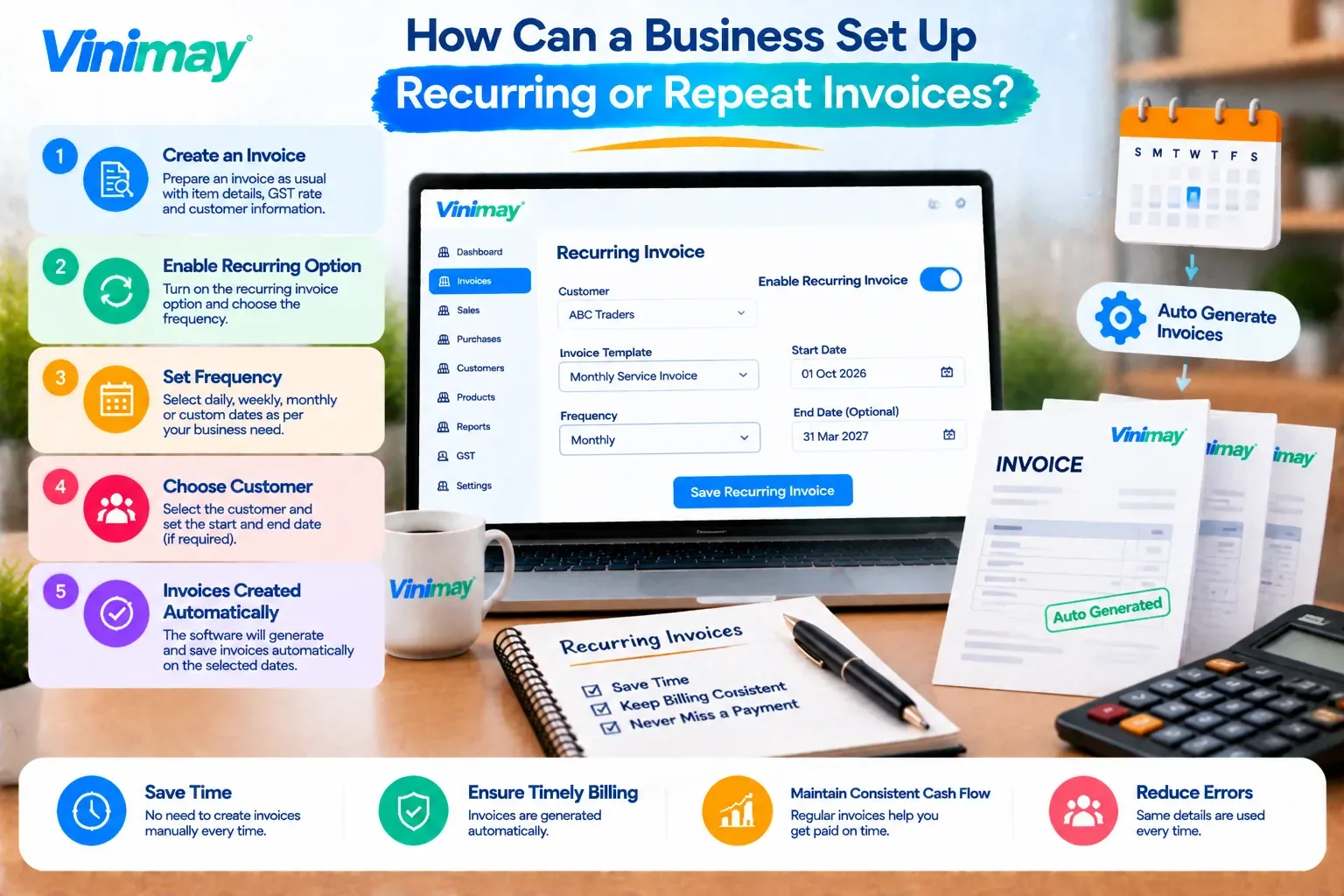
Before creating any repeat invoice, whether manually or through automation, a few things need to be fixed clearly:
How Automated Recurring Billing Typically Works
Where software offers this as a built-in feature, the general process looks like this:
A template invoice is created once, with fixed line items and amount
A recurrence schedule is set (e.g., 1st of every month)
The software automatically generates a new invoice on each scheduled date
The invoice is either sent automatically or held for manual review before sending
This removes the need to manually recreate the invoice each cycle, but it also means less manual oversight over what actually gets billed.
Where Automation Can Introduce New Problems
Automating something repetitive doesn't automatically make it error-free—it can introduce a different kind of risk:
An outdated amount keeps auto-billing if a price change was agreed with the client but never updated in the system
An invoice is auto-sent for a cycle that shouldn't have been billed, such as after a contract has already ended
GST rate changes aren't reflected automatically unless someone updates the template
A client dispute goes unnoticed if invoices continue generating without anyone reviewing them each cycle
The convenience of automation depends entirely on someone still periodically checking that the template reflects the current, correct terms.
A Manual Alternative That's Still Reliable
For businesses that prefer more control or whose software doesn't support automatic recurrence, a structured manual approach works just as well:
Keep a saved template invoice with the fixed line items and amount
Set a personal reminder for the billing date each cycle
Copy the template, update only the date and invoice number, and issue it
Review the template every few months to confirm nothing has changed
This takes a few extra minutes each cycle compared to full automation, but it keeps a human check in place before every invoice goes out.
What to Check Before Automating Recurring Invoices
Can the recurring amount be edited without disrupting the schedule?
Is there a review step before an auto-generated invoice is sent, or does it send immediately?
Can the recurrence be paused or stopped easily if a contract ends?
Does GST update correctly if rates or details change mid-contract?
Is there a log showing exactly which invoices were auto-generated and when?
A Clear Answer for Vinimay Users
Vinimay's confirmed features cover GST invoicing,billing, sales and purchase records, and receivables and payables tracking, but automatic recurring invoice generation on a set schedule isn't part of Vinimay's current confirmed feature set. For retainer, subscription, or rent-style billing in Vinimay, the more reliable approach is the manual template method described above—creating the invoice each cycle from a saved reference, so GST details and amounts can be reviewed and confirmed before every invoice goes out.
Conclusion
Recurring invoicing solves a real, repetitive problem for businesses billing the same client on a fixed schedule, but whether it's automated or handled through a consistent manual template, the underlying need is the same: a reliable, correct invoice generated on time, every cycle, without errors quietly repeating. Automation removes manual effort but shifts the risk toward outdated terms continuing unnoticed, which is why periodic review of the template, automated or not, remains an important part of the process either way.
FAQs
1. Is recurring invoicing only useful for subscription-based businesses?
No, it applies to any billing relationship with a fixed, predictable amount on a set schedule, including retainers, rent, and maintenance contracts, not just subscription services specifically.
2. What's the biggest risk of fully automated recurring invoices?
The biggest risk is an outdated amount or term continuing to auto-bill after something has actually changed, such as a price update or contract ending, since automation doesn't know about changes that weren't entered into the system.
3. Should GST details be checked before setting up a recurring invoice template?
Yes, GST details should be confirmed as correct at setup and rechecked periodically, since ratechanges or registration updates won't be reflected automatically in an existing template.
4. Is a manual recurring invoice approach less reliable than an automated one?
Not necessarily — a manual approach with a saved template and a scheduled reminder can be just as reliable, and it adds a human review step before each invoice is sent, which full automation sometimes skips.
5. What should happen to a recurring invoice setup when a contract ends?
The recurrence needs to be actively paused or stopped, since an automated setup will otherwise continue generating invoices for a contract that's no longer active unless someone intervenes.
6. Can recurring invoices handle small amount changes each cycle, like variable usage-based billing?
Not well — recurring invoicing is best suited to genuinely fixed amounts, since variable billing usually requires manual adjustment each cycle regardless of whether the base invoice is templated.
Related Topics
Published by Team Vinimay
Our editorial and compliance specialists create practical guides, tax calculation rules, and operational strategies to empower Indian small business owners and accountants.