Digital payments have become an important part of business transactions, and many businesses use payment apps to receive customer payments and manage collections. However, when payment records are maintained separately from accounting records, businesses may face difficulties in tracking received amounts, pending payments, and transaction history.
Accounting software integrations with payment apps help businesses connect payment information with their financial records, making transaction tracking more organized. Depending on the software capabilities, businesses can manage payment updates, reconcile records, and maintain better visibility of cash flow. Vinimay helps businesses manage billing, payments, and accounting records together in one system, allowing businesses to maintain more accurate financial data and smoother payment management.
What This Kind of Integration Typically Looks Like
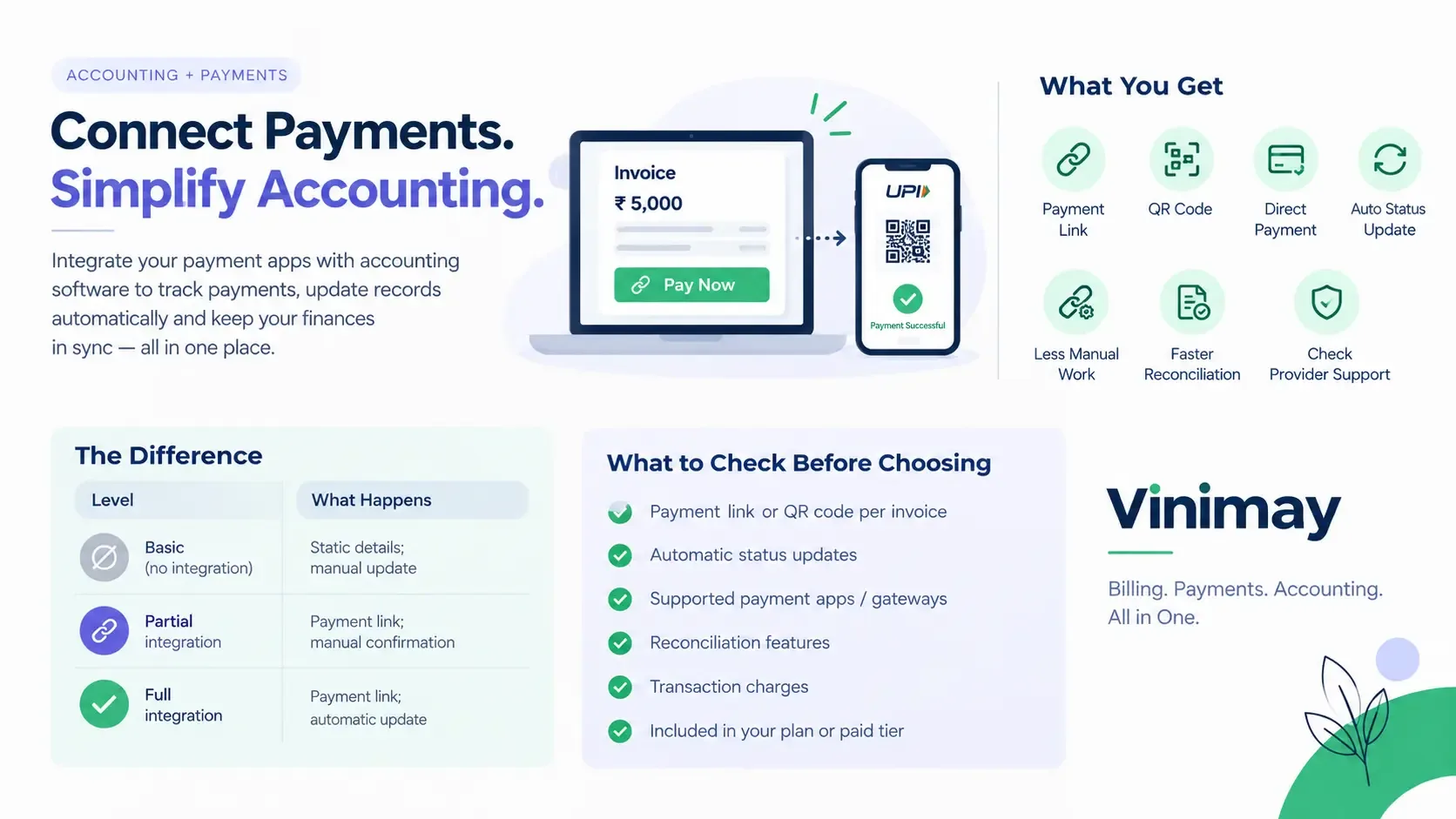
Payment Link: Aninvoice can include a direct payment link for the customer.
QR Code: Some systems can display a QR code on the invoice for easier payment.
Direct Payment: Customers can pay through the supported payment method without a separate manual process.
Automatic Status Update: When genuinely supported, the payment status can update automatically after payment is received.
Reduced Manual Work: Businesses may not need to manually check a separate payment app and record the payment afterward.
Faster Reconciliation: Connected payment records can make it easier to match invoices with received payments.
Check Provider Support: Integration features vary, so businesses should verify whether their accounting software supports the required payment app or gateway.
Why This Requires More Than Just Displaying a QR Code
A basic version of this might simply put a static payment QR code on an invoice—useful, but not truly integrated, since the software has no way of knowing when that payment is actually received. Genuine integration means the software and the payment app communicate, so payment status updates automatically rather than requiring manual confirmation.
What to Check If This Feature Matters to You
Before choosing accounting software with payment integration, check whether each invoice can generate a transaction-specific payment link or QR code. Also verify whether the payment status updates automatically after the customer pays or whether you still need to check the payment separately and enter the transaction manually.
It is also important to confirm which payment apps, gateways, or payment methods are supported. Finally, check whether the integration is included in the plan you are considering or available only on a higher-tier or paid plan.
The Difference Between Convenience and Automation
Where Vinimay Stands on This
Direct payment app integration, specifically automatic payment status updates through a connected payment app, is not currently part of Vinimay's confirmed feature set. Vinimay's payment tracking allows manual recording of payments against invoices, which keeps outstanding balances accurate even without automated payment app syncing. If this specific integration is essential for your workflow, confirming current availability directly is worthwhile, since this is an area that can evolve.
Frequently Asked Questions
1. Can accounting software integrate with payment apps?
Yes, some accounting software can integrate with payment apps or payment gateways, allowing businesses to connect invoices, payment collection, and transaction records.
2. Can invoices include a payment link?
Some software allows payment links to be added to invoices so customers can pay directly using a supported payment method.
3. Can accounting software generate a payment QR code?
Certain accounting systems can generate or display QR codes on invoices. Availability depends on the software and supported payment provider.
4. Does payment status update automatically?
When an integration supports automatic synchronization, the payment status can update after a successful payment. Some systems may still require manual confirmation or entry.
5. Which payment apps can accounting software connect with?
Supported payment apps and gateways vary by software. Businesses should check the provider's current list of supported payment methods before choosing a plan.
6. Can payment integration reduce manual accounting work?
Yes. When payment information is automatically recorded, it can reduce the need to manually check payment apps and update invoice records.
7. Can payment integration help with invoice reconciliation?
It can make reconciliation easier by connecting received payments with the relevant invoices, where the software supports this functionality.
8. Is payment integration available on free accounting software?
It depends on the software. Some providers include payment integration in free plans, while others may restrict it to paid or higher-tier plans.
9. Are payment integration features the same across all accounting software?
No. Features can differsignificantly. Some may only provide payment links, while others may support automatic payment updates and reconciliation.
10. What should businesses check before choosing payment-integrated accounting software?
Check supported payment apps, payment links, QR codes, automatic status updates, reconciliation features, transaction charges, and whether these features are included in the plan you intend to
Related Topics
Published by Team Vinimay
Our editorial and compliance specialists create practical guides, tax calculation rules, and operational strategies to empower Indian small business owners and accountants.