How Can I Track Customers Who Have Not Paid Me?
Track Customers Almost every business owner has had this moment: a customer calls asking why they're being reminded about a bill they insist they already paid — and there's no quick way to check who's right. This isn't usually a trust problem. It's a tracking problem.
Tracking customers who haven't paid you comes down to one core habit: recording every invoice with its payment status, and updating that status the moment money actually changes hands—not relying on memory, verbal promises, or a rough mental tally. Once that habit exists, "who owes me money" becomes a question you can answer in seconds rather than something you have to reconstruct.
Vinimay helps businesses track payments, receivables, and payables alongside GST invoicing and customer records. This guide walks through what you need to track for every unpaid invoice, how to do it manually if you're not using software yet, and how a connected system automates the same process.
Why Tracking Unpaid Customers Gets Hard Without a System
The difficulty isn't usually the first unpaid invoice—it's the fortieth. Individually, each unpaid amount is easy to remember. Collectively, across dozens of customers and weeks or months, memory becomes unreliable, and a rough total starts to feel accurate even when it isn't. Add partial payments — a customer paying half now and the rest later — and manual tracking gets genuinely error-prone, not just inconvenient.
What You Need to Track for Every Unpaid Invoice
Regardless of whether you're doing this manually or through software, the same core details matter for every invoice: the customer's name and contact details, the invoice number and date it was issued, the total amount billed, any partial payment already received, the remaining balance, and the due date if one was agreed. Missing any one of these turns a simple follow-up into a guessing game—particularly the partial payment detail, which is the single most common source of confusion in manual tracking.
Manual Ways to Track Dues (And Their Limits)
If you're not yet using software, a basic but workable manual system involves keeping a dedicated notebook or spreadsheet specifically for dues—separate from your general sales register—with one row per invoice and columns for the details listed above. Updating this immediately after any partial or full payment, rather than at the end of the day or week, is what keeps it accurate.
The limits of this approach show up predictably as volume grows:
Cross-referencing a payment against the right invoice becomes slower with more entries
Partial payments require manual subtraction each time, increasing the chance of arithmetic errors
The notebook or sheet becomes a single point of failure if lost or damaged
There's no automatic flag for overdue amounts—you have to remember to check
For a handful of customers, this is manageable. Past a certain volume, it becomes one of the most time-consuming parts of running the business.
How Software Tracks This Automatically
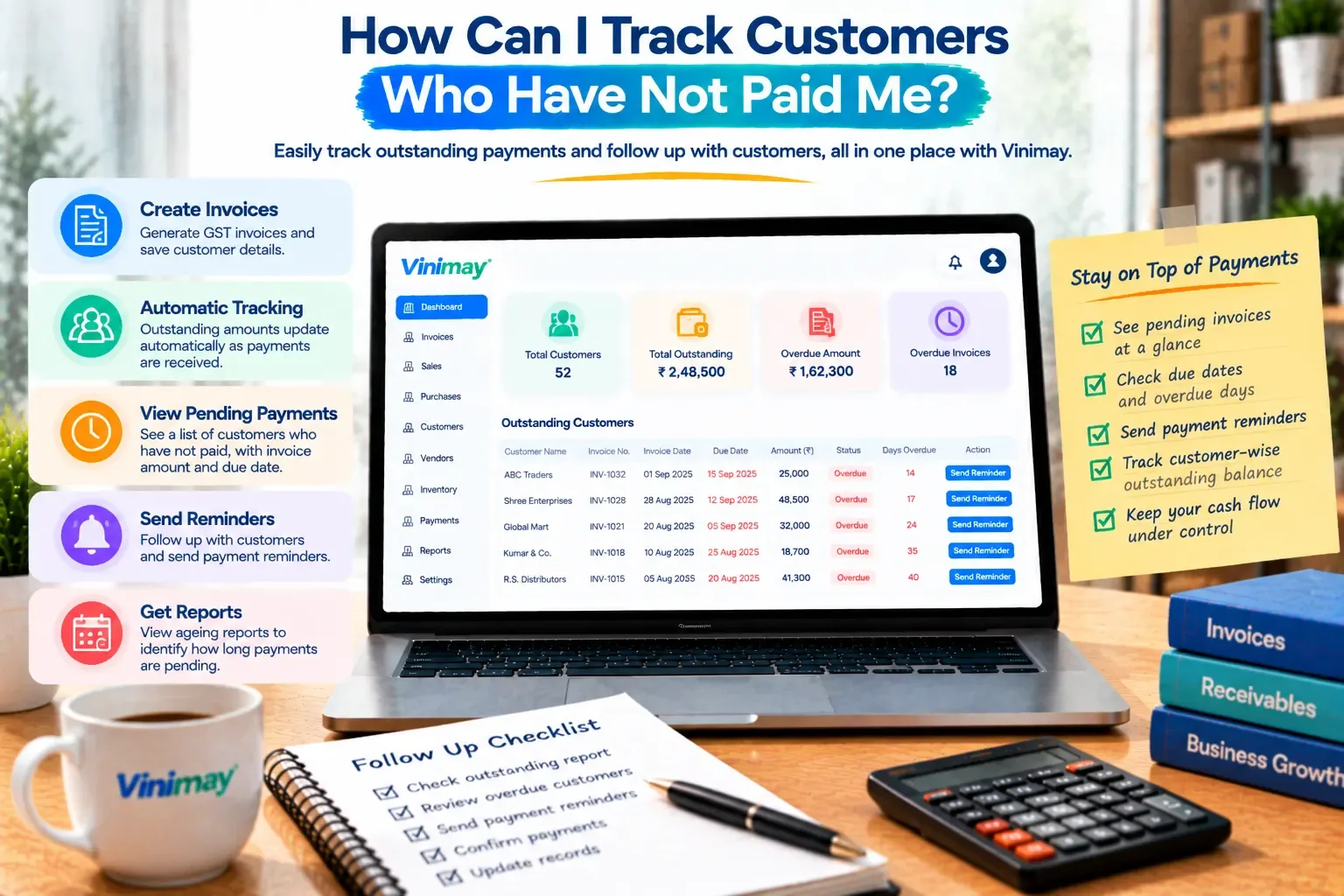
In a connected system, tracking unpaid customers works differently because the invoice and the payment are linked from the start. When an invoice is created, it's automatically marked as unpaid until a payment is recorded against it specifically—not against the customer generally, but against that exact invoice. A partial payment reduces the outstanding balance on that invoice directly, without manual subtraction. And because every invoice carries its own status, a single view can show every unpaid or partially paid invoice across all customers, sorted by amount or by how long it's been outstanding.
This is the practical difference between manual and software-based tracking: manual tracking requires you to calculate the outstanding picture each time you want to check it; software tracking maintains that picture continuously, updating with every entry.
Setting Up a Simple Follow-Up Rhythm
Tracking dues is only half the job—following up on them consistently is what actually recovers the money. A practical rhythm many small businesses use is reviewing outstanding invoices weekly, rather than only at month-end, so smaller overdue amounts don't quietly accumulate into a larger, harder-to-recover total. Prioritising follow-up by amount and by how long a payment has been overdue, rather than contacting customers in random order, also tends to recover money faster.
What to Do About Long-Overdue Payments
For invoices that have gone significantly past their due date, a slightly more structured approach helps: send a clear, polite reminder that references the specific invoice number and amount rather than a general nudge, offer a fixed timeframe for payment rather than leaving it open-ended, and keep a record of every reminder sent, since this becomes useful if the matter needs to be escalated later. None of this requires being confrontational—most overdue payments are genuinely due to oversight, not refusal, and a specific, documented reminder resolves most of them.
How Vinimay Handles This
Vinimay's payment tracking links every invoice to its payment status automatically, so partial payments update the outstanding balance without manual calculation, and a single view shows every customer's pending amount without cross-referencing separate records. Because this connects directly to the invoice itself—the same one created at the point of sale—there's no separate step to remember or a second system to keep updated.
To see this in practice, Vinimay's free invoicetool lets you generate up to 5 GST invoices free, with each one carrying its own payment status from the moment it's created.
Conclusion
Tracking customers who haven't paid you comes down to one consistent habit—recording every invoice's payment status accurately, updating it the moment money changes hands, and reviewing outstanding amounts on a regular rhythm rather than only when a customer disputes a bill. Manual tracking can work at low volume with careful discipline, but it becomes error-prone as customer count grows, particularly with partial payments. Vinimay links payment statusdirectly to each invoice, so the outstanding picture stays accurate automatically, without manual subtraction or cross-referencing.
Frequently Asked Questions
1. What's the most important detail to track for unpaid invoices?
The remaining balance after any partial payment—this is the most common source of confusion in manual tracking.
2. How often should I review outstanding payments?
Weekly is a practical rhythm for most small businesses, rather than waiting until month-end.
3. Can I track unpaid customers without software?
Yes, with a dedicated notebook or spreadsheet, though this becomes harder to maintain accurately as volume grows.
4. Does Vinimay automatically flag unpaid invoices?
Yes, every invoice is tracked against its payment status, and partial payments update the outstanding balance directly.
5. What should I include in a payment reminder?
The specific invoice number, the amount due, and a clear timeframe for payment, rather than a general nudge.
6. How do I handle a customer who claims they already paid?
Check the specific invoice record for any payment logged against it—this is why linking payments to invoices, not just customers, matters.
7. What's the risk of tracking dues by customer name alone rather than by invoice?
It becomes difficult to know exactly which invoice a payment applies to, especially with customers who have multiple pending bills.
8. How many free invoices can I create on Vinimay to test payment tracking?
Vinimay's free invoice tool allows up to 5 GST invoices free, each with its own payment status.
9. Should I follow up on small overdue amounts too?
Yes, small amounts left unchecked tend to accumulate into a larger, harder-to-recover total over time.
10. Is documenting reminders actually necessary?
Yes, it becomes useful evidence if a payment dispute needs to be resolved or escalated later.
Related Topics
Published by Team Vinimay
Our editorial and compliance specialists create practical guides, tax calculation rules, and operational strategies to empower Indian small business owners and accountants.