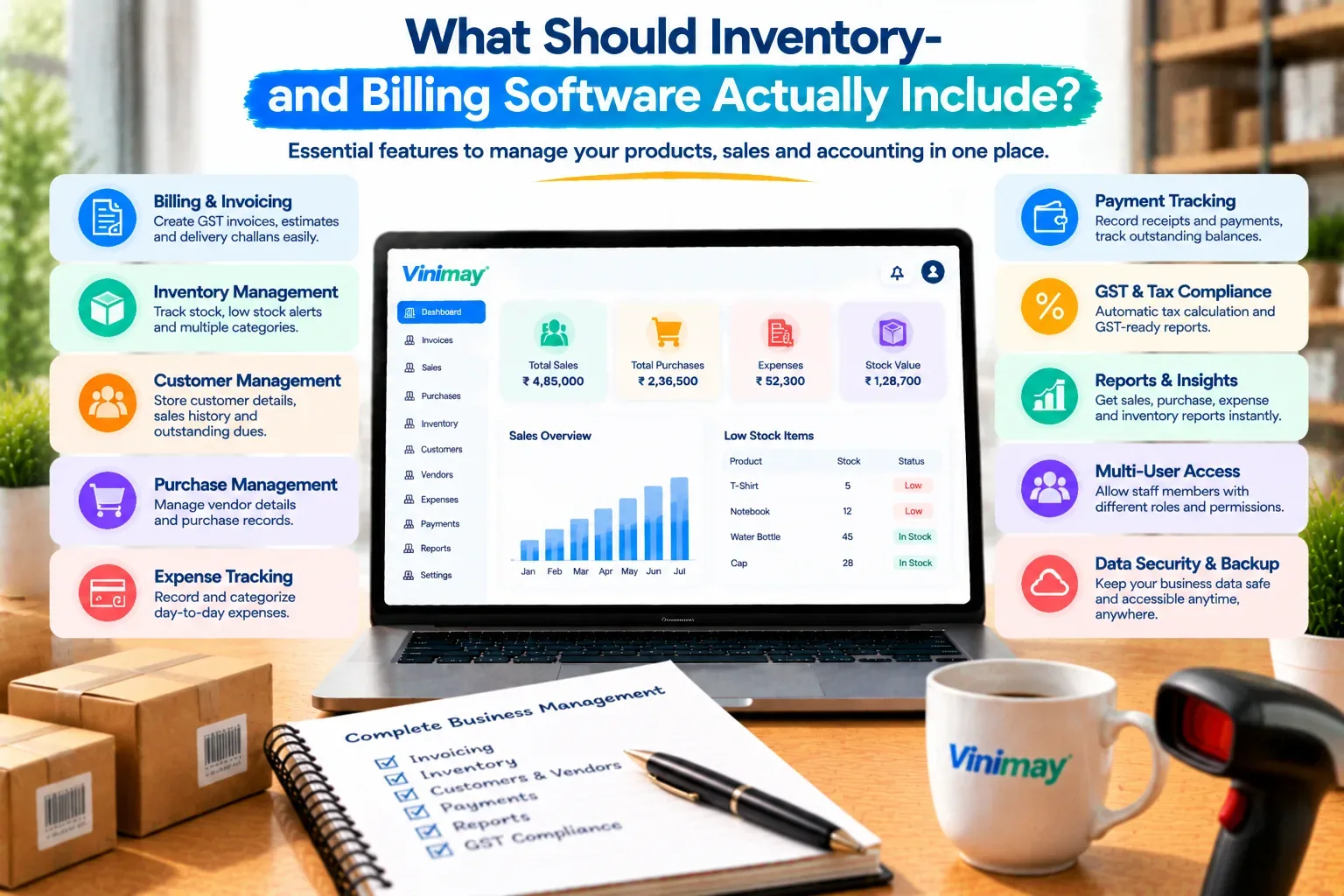
What Should Inventory-and-Billing Software Actually Include?
"Which is the best software for inventory and billing" sounds like it should have a single, confident answer — but it doesn't, and any article that hands you one name without knowing your business is skipping a step. What counts as the right choice for a pharmacy tracking expiry dates is completely different from what a clothing retailer tracking sizes and colours needs, even though both are technically "inventory and billing" businesses.
A more useful question is: what does inventory-and-billing software actually need to do well, regardless of brand? Once you know that, evaluating any specific tool becomes straightforward — you're checking it against a list you understand, rather than trusting a recommendation you can't verify.
Vinimay helps businesses manage GST invoicing, sales and purchase records, and inventory and stock tracking together in one connected system. This guide walks through the core requirements any inventory-and-billing software should meet, how those requirements shift by business type, and how to test a tool yourself before relying on it.
Why "Best" Isn't the Most Useful Question Here
The trouble with "best" is that it implies a single winner across every use case, when in reality, the right fit depends entirely on your product type, sales volume, and how tightly billing and stock need to be connected for your specific business. A tool that's excellent for a high-volume grocery counter might be unnecessarily complex for a small boutique selling twenty items a month. Instead of chasing a ranking, it's more productive to build a clear picture of your own requirements first.
Core Requirement 1: Stock Updates With Every Sale
This is the single most important connection in inventory-and-billing software. When an invoice is created, the relevant product's stock count should reduce automatically, in the same action—not as a separate step performed later. Without this, you're essentially running two parallel records that need manual reconciliation, which defeats much of the point of combining the two functions in one tool.
Core Requirement 2: GST-Correct Billing
Since inventory and billing tools in India almost always double as the primary invoicing system, GST correctness isn't optional. Confirm that CGST, SGST and IGST are applied correctly based on the transaction, that HSN codes attach to products automatically once set up, and that invoice numbering stays sequential even across a high volume of daily bills.
Core Requirement 3: Low-Stock Visibility
A good inventory-and-billing tool should tell you when a product is running low, ideally before you're already out of it at the counter. This doesn't need to be a complex forecasting feature—even a simple, visible flag once stock drops below a set number saves the common problem of discovering a shortage only when a customer asks for something you don't have.
Core Requirement 4: Product-Wise Sales History
Knowing which products sell well and which sit unsold is central to running inventory efficiently. This means the software should let you view sales history by product, not just by overall total — otherwise you're left guessing which items to reorder and which to discount or discontinue.
Core Requirement 5: Purchase-Side Stock Updates
Just as a sale should reduce stock, a purchase entry should increase it—automatically, from the same record used to log the purchase from a vendor. If purchases and stock updates are handled in separate steps, the same reconciliation problem shows up on the incoming side that would otherwise show up on the outgoing side.
Requirements by Business Type
Not every business weighs these five requirements equally. A retail counter selling fast-moving goods cares most about speed and low-stock alerts, since a slow billing process or a stockout directly loses a sale. A wholesaler or distributor cares more about product-wise sales history and purchase-side updates, since their business runs on party-wise volume rather than counter speed. A service business with minimal physical stock may only need GST-correct billing and can treat inventory as a secondary concern. Recognizing which of these profiles fits your business narrows the requirement list considerably before you even start comparing tools.
Testing Any Tool Before Committing
Rather than trusting a feature list, a short practical test reveals more in ten minutes than a comparison chart does in an hour. Create one sale for a specific product and confirm stock drops immediately. Create one purchase entry and confirm stock rises. Check whether a low-stock item is flagged anywhere visible. Pull up sales history for that one product and see if it's accessible without extra steps. If all four work smoothly, the core requirement — stock and billing genuinely connected — is met.
Where Vinimay Sits in This Picture
Vinimay is built around exactly these five requirements rather than treating billing and inventory as separate add-ons. GST invoicing applies correct tax fields automatically, and each invoice reduces the relevant product's stock as part of the same entry. Purchase records add stock back in the same connected way. Product and sales records stay attached to each item, so history is available without cross-referencing separate sheets.
This doesn't make Vinimay universally "the best" for every business type described above — a very high-volume distributor with complex multi-warehouse needs may require more specialised tooling. For most small retail, wholesale and service businesses managing a single location's billing and stock together, though, this connected approach covers the core requirements directly.
To test the core invoicing and stock connection yourself, Vinimay's free tool lets you generate up to 5 GST invoices free, with tax fields applied automatically.
Conclusion
There's no single "best" software for inventory and billing that fits every business—but there is a consistent set of requirements worth checking regardless of which tool you're considering: automatic stock updates on both sales and purchases, GST-correct billing, low-stock visibility, and product-wise sales history. Testing these directly, with one real sale and one real purchase, tells you more in ten minutes than any ranking list. Vinimay covers these core requirements as one connected system, built for small and mid-sized businesses managing billing and stock together in a single location.
Frequently Asked Questions
1. Is there a single best software for inventory and billing?
Not universally — the right fit depends on your product type, sales volume, and how tightly you need billing and stock connected.
2. What's the most important feature to check first?
Whether a sale automatically reduces stock in the same action, without a separate manual update.
3. Do I need low-stock alerts if my product range is small?
It still helps, even with a small range, since it prevents discovering a shortage only when a customer asks.
4. Does Vinimay track stock automatically with billing?
Yes, Vinimay reduces stock as part of the same GST invoice entry, and increases it when a purchase is logged.
5. What should a wholesaler prioritise differently from a retailer?
Wholesalers typically benefit more from product-wise sales history and purchase-side tracking; retailers prioritise speed and low-stock visibility.
6. Can I test inventory-billing integration before committing to a tool?
Yes — create one sale and one purchase, and check whether stock updates automatically for both.
7. Does GST compliance matter even for inventory-focused businesses?
Yes, since billing and inventory tools in India typically double as the primary invoicing system.
8. Is product-wise sales history a common feature?
It varies — confirm specifically that you can view sales by individual product, not just as an overall total.
9. How many free invoices can I try on Vinimay to test this?
Vinimay's free invoice tool allows up to 5 GST invoices free, downloadable as PDF.
10. What's the risk of choosing based on a "best software" ranking?
Rankings often don't account for your specific business type, product range or volume, which matters more than a general popularity lis
Related Topics
Published by Team Vinimay
Our editorial and compliance specialists create practical guides, tax calculation rules, and operational strategies to empower Indian small business owners and accountants.