When you set up Vinimay, you will see two kinds of items: Products and Services. They look similar, but they work differently. Choosing the right one keeps your stock, invoices and tax codes correct.
Quick answer: a product is a physical item you buy, store and sell, so Vinimay tracks its stock. A service is work or time you sell, such as a repair or a consultation, so there is no stock to count.
What Is a Product in Vinimay?
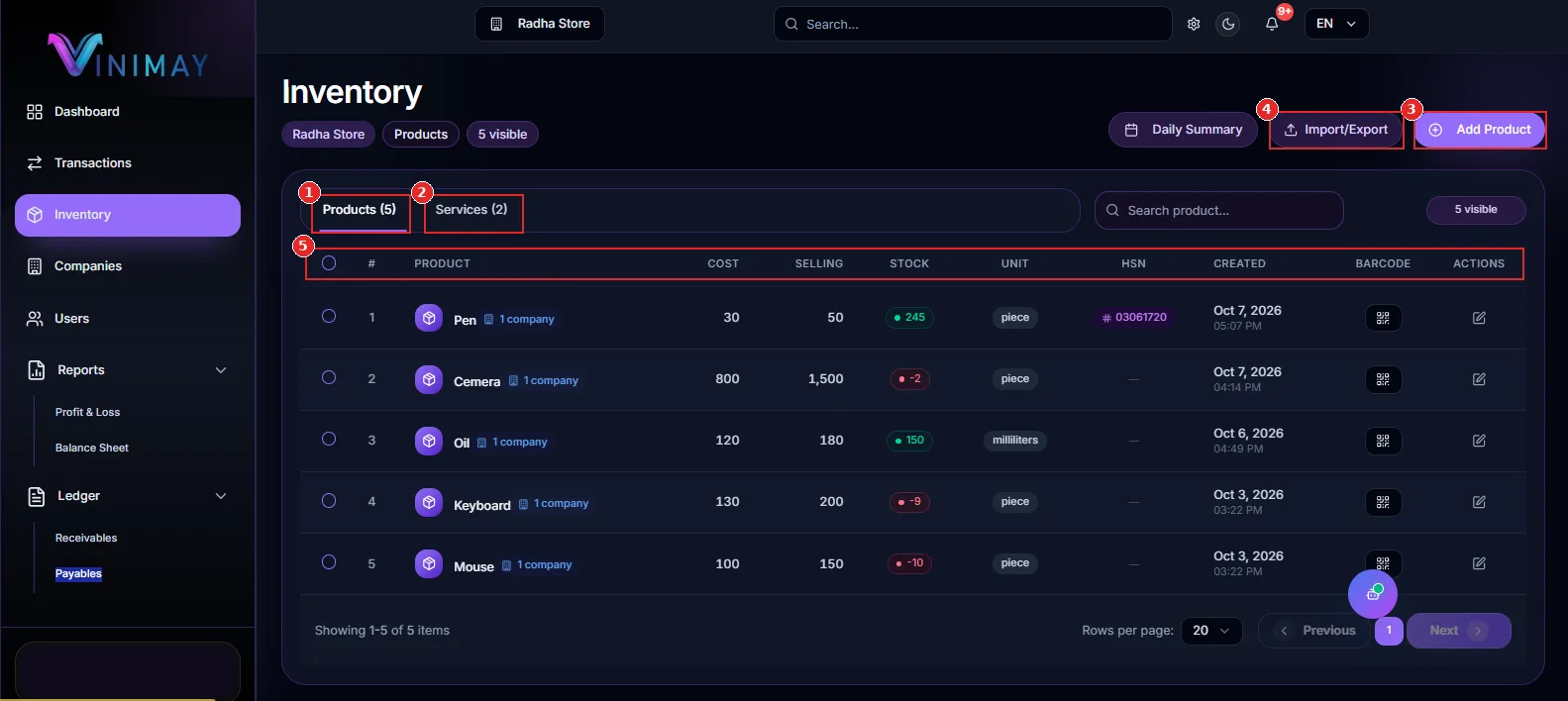
A product is anything you can count on a shelf: a keyboard, a mouse, a litre of oil. Because you hold stock, Vinimay keeps track of how many you have. Open the Inventory page from the sidebar and you will see every product with its cost, selling price, stock, unit, HSN code and barcode.
What Is a Service in Vinimay?
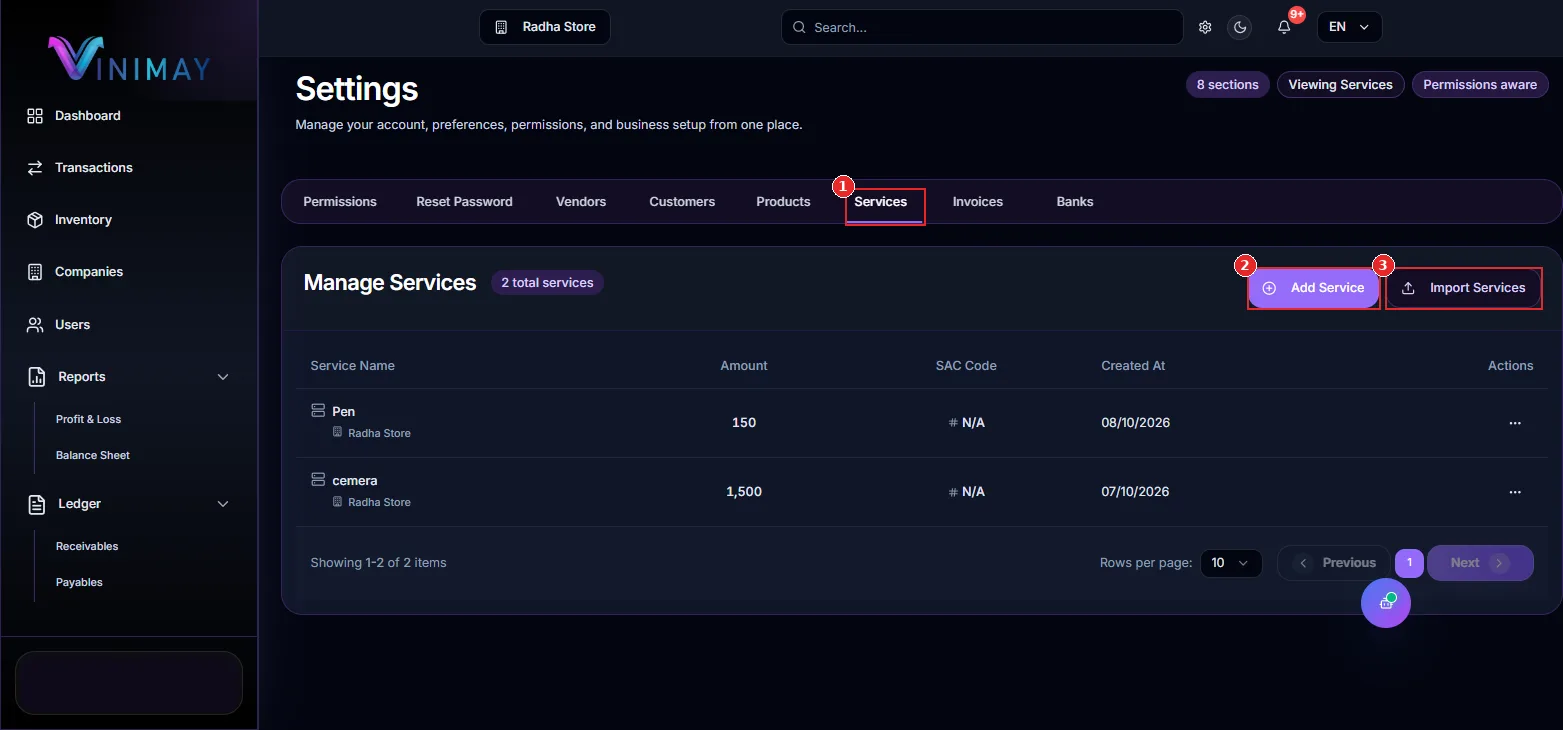
A service is something you do rather than something you hand over: repair work, installation, consulting, delivery. There is nothing to store, so there is no stock to track.
Go to Settings → Services (marker 1). If you haven't added any, you will see "No Services Found" with Add Service (marker 2) and Import Services (marker 3) buttons.
| Feature | Product | Service |
|---|---|---|
| What it is | A physical item you buy, store and sell | Work or time you sell |
| Stock tracking | Yes. Opening stock and a Stock column | No stock column in the Services list |
| Unit (piece, millilitres) | Yes, required | Not shown in the Services list |
| Price | Cost Price and Selling Price | A single Amount |
| Tax code | HSN Code | SAC Code |
| Barcode | Barcode column on the Inventory page | Not shown |
| Where to find it | Inventory → Products, or Settings → Products | Inventory → Services, or Settings → Services |
HSN Code vs SAC Code
Under GST in India, goods and services use different classification codes. HSN (Harmonised System of Nomenclature) is used for goods, and SAC (Services Accounting Code) is used for services. That is why products have an HSN field and services have a SAC code. If you don't know a code, ask your accountant before you fill it in.
How to Add a Product (or a Service)
- Open Inventory from the sidebar and click Add Product.
- The Create New Product form opens. At the top you can switch between Product (marker 1) and Service (marker 2).
- For a product, fill in Product Name (required), Opening Stock, Unit (required), Selling Price, Cost Price and HSN Code.
- Click Create Product (marker 7).
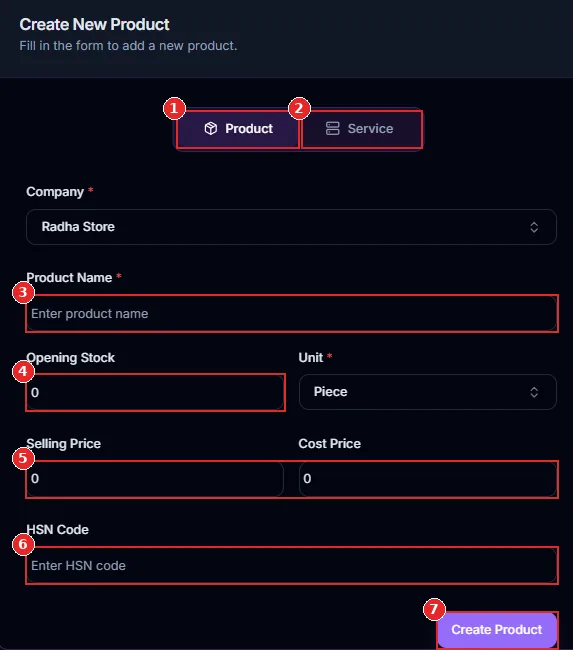
Product option
Service option (switch here to add a service)
Product Name (required)
Opening Stock and Unit (Unit is required)
Selling Price and Cost Price
HSN Code
Create Product button
To add a service instead, choose Service in this form, or go to Settings → Services and click Add Service.
After saving, a success message appears and your new product is added to the Inventory list, with its stock quantity shown.
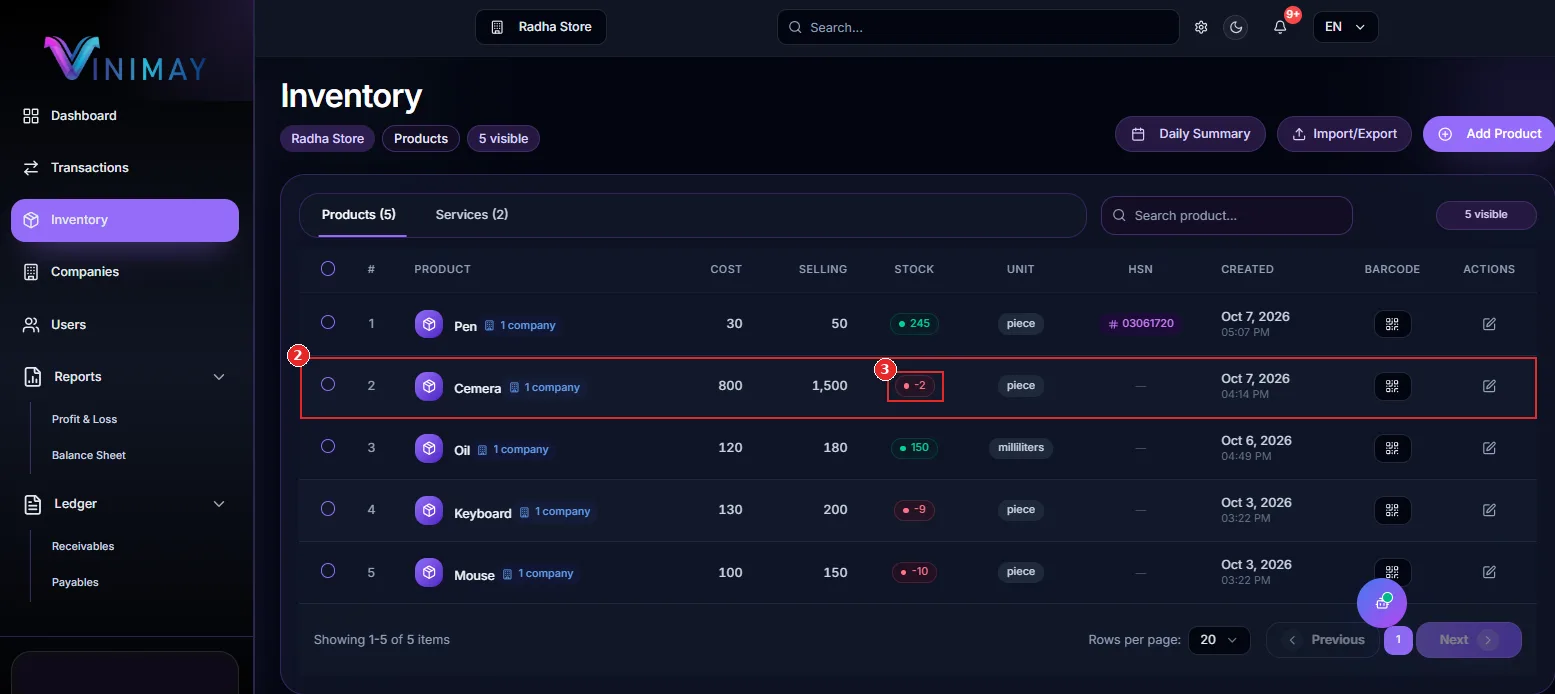
New product row with cost and selling price
Stock quantity badge
Which One Should You Choose?
Do you count it on a shelf? Choose Product.
Do you sell your time or skill? Choose Service.
Do you sell goods with installation? Add the item as a Product and the installation as a Service, so that stock and charges stay separate.
Tips for Setting Up Items Correctly
Use clear names so you can find items quickly in invoices.
Enter opening stock accurately when you add a product.
Fill HSN or SAC codes to keep your tax records complete.
Don't add a service as a product just to avoid stock. It will create stock numbers that don't make sense.
Use Import/Export to add many items at once.
Frequently Asked Questions
1. What is the main difference between a product and a service?
A product is a physical item whose stock is tracked. A service is work or time you sell, with no stock.2. Does Vinimay track stock for services?
No. The Services list shows the name, amount and SAC code, with no stock column.3. What is the difference between HSN and SAC?
HSN is the classification code for goods. SAC is the classification code for services.4. Where can I see all my products and services?
On the Inventory page, use the Products and Services tabs. You can also open Settings and use the Products or Services tab.5. Can I add both from the same form?
Yes. The Create New Product form has a switch for Product and Service.Conclusion
Products are things you stock, and services are work you sell. Keep this one rule in mind and your Inventory page, stock numbers and tax codes will stay clean. Open Inventory, add your items, and let Vinimay do the tracking.
Related Topics
Published by admin
Our editorial and compliance specialists create practical guides, tax calculation rules, and operational strategies to empower Indian small business owners and accountants.