Managing invoices and expenses is an essential part of running any business, as it helps maintain accurate financial records and understand cash flow. Businesses often need to create sales invoices, record expenses, track payments, and maintain transaction history to manage daily operations effectively.
Free accounting software can help businesses handle basic invoicing and expense management tasks without additional costs. However, the available features may vary depending on the software, such as invoice limits, expense tracking options, reporting capabilities, and automation features. Vinimay helps businesses manage invoices, expenses, GST billing, and transaction records together in one system, making financial management more organised and efficient.
What "Managing Invoices" Usually Covers Well on Free Plans
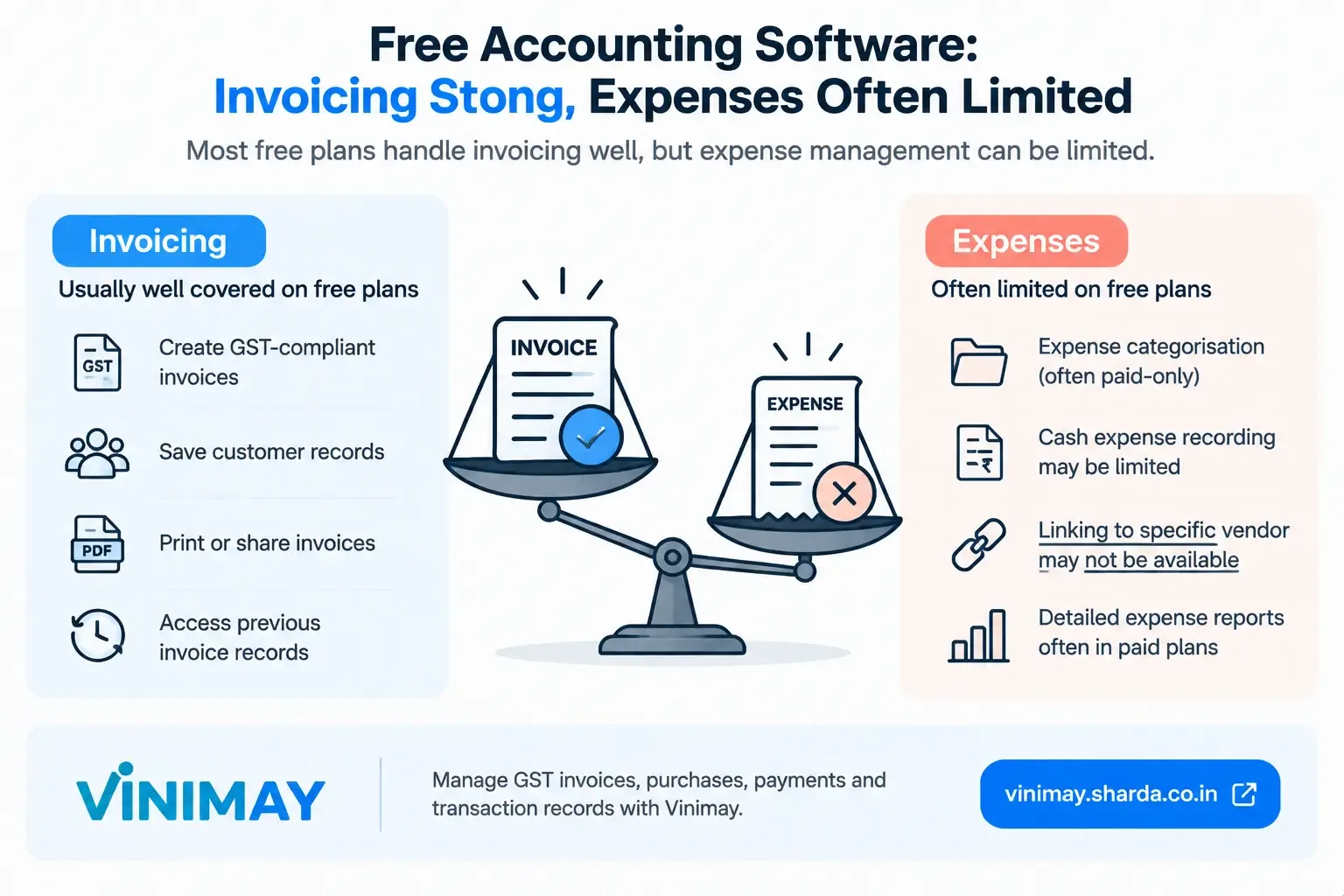
Free accounting and billing plans often provide the basic tools needed to create and manage invoices. Depending on the software, this may include creating GST-compliant invoices, applying the appropriate tax calculations, and generating invoices with required customer and business details.
These plans may also allow businesses to save customer information for repeat billing and access previous invoice records. Many provide options to print or export invoices in a professional format, making them easier to share with customers by email or other channels. Exact features and limits vary by software and plan.
What "Managing Expenses" Often Falls Short On
Categorising expenses into types (rent, utilities, supplies) is frequently a paid-tier feature.
Recording cash expenses specifically often isn't built in as a smooth workflow.
Linking an expense to a specific purchase or vendor may be limited or absent on free tiers.
Why This Gap Matters More Than It Seems
Clear Revenue, Unclear Costs: Invoicing shows how much you earn, but incomplete expense records leave your cost position unclear.
Profit May Be Inaccurate: Without properly recorded expenses, actual profit cannot be determined reliably.
Both Sides Matter: Revenue and expenses need to be tracked together for a complete financial picture.
Invoicing Alone Is Not Enough: Managing sales invoices does not automatically mean expenses are being properly recorded.
Check Expense Features: Before choosing accounting software, verify that it supports the expense tracking your business requires.
Avoid Assumptions: The term “accounting software” does not always mean every accounting function is equally covered.
Review the Full Workflow: Check sales, purchases, expenses, payments, and reports rather than focusing only on invoicing.
Where Vinimay Stands on This Specific Split
Vinimay's confirmed strength sits clearly on the invoicing and transaction side: GST-compliant invoices with correct CGST, SGST, or IGST application, plus purchases and payments recorded against vendor accounts as transactions. This purchase-and-payment tracking covers the vendor-linked spending side directly. What isn't currently confirmed is formal expense categorisation into budget-style categories (rent, utilities, salaries) — if that specific breakdown matters for your business, it's worth confirming directly rather than assuming it's bundled with the invoicing strength.
Conclusion
Free accounting software is rarely equally strong on both invoices and expenses — invoicing usually gets the bulk of the attention, while expense categorisation often stays basic or paid-only. Before assuming both sides of your business are covered, check specifically what the expense side actually includes, since that gap is easy to miss until it matters.
Frequently Asked Questions
Q1. Do free accounting tools usually handle invoicing and expenses equally well?
No — invoicing is typically the stronger, more polished feature on free tiers, while expense categorisation is often basic or reserved for paid plans.
Q2. What does "expense management" typically include on paid plans that's missing from free ones?
Categorisation into types like rent, utilities, or supplies, and sometimes automated expense import from bank statements.
Q3. Can free software track what I pay to suppliers?
Many track basic purchase and payment transactions against vendor records; formal expense categorisation beyond that is less commonly included.
Q4. Why does it matter if expenses aren't tracked as well as invoices?
Because your real profit depends on both sides — clear revenue with fuzzy costs still leaves your actual margin uncertain.
Q5. Does Vinimay categorise expenses into types like rent or utilities?
Not currently confirmed. Vinimay's confirmed strength is invoicing and vendor-linked purchase/payment transactions, not formal expense categorisation.
Q6. Should I use a separate tool for expense tracking if my accounting software is weak there?
This is a reasonable interim approach, though it reintroduces some of the disconnection problems a single connected system is meant to avoid.
Q7. Does Vinimay track cash purchases from suppliers?
Purchases and payments are recorded as transactions against vendor accounts; consistency depends on entering cash transactions as they happen, the same as any system.
Q8. What should I check specifically before assuming a free tool covers expenses well?
Whether it categorises expenses by type, links them to vendors, and includes cash transactions — not just whether it mentions "expenses" in its feature list.
Q9. Is invoicing strength a good indicator of expense-tracking strength?
No — these are often built to different depths within the same product, so one being strong doesn't guarantee the other is.
Q10. Does Vinimay's free invoice tool include any expense tracking?
The free tool is focused specifically on GST-compliant invoice generation; expense and purchase tracking is part of the fuller platform.
Related Topics
Published by Team Vinimay
Our editorial and compliance specialists create practical guides, tax calculation rules, and operational strategies to empower Indian small business owners and accountants.