Can Multiple Staff Members Use the Same Billing Software?
A single-counter shop with one owner billing every sale rarely thinks about this question—until a second counter opens, or a staff member is hired specifically to handle billing during busy hours. At that point, "can more than one person use this software" stops being hypothetical and becomes an immediate, practical need.
Yes, most billing software built for growing businesses supports multiple staff members, but how it's implemented varies significantly—from a genuine multi-user system with individual logins and permissions to a more basic setup where everyone shares one account. That difference matters more than the yes/no answer itself.
Vinimay is built to support billing, inventory, and payment tracking as a connected system that a growing team can rely on. This guide explains how multi-user access typically works, why shared logins cause more problems than they solve, and what to check before assuming a tool supports your team the way you expect.
Can Multiple Staff Use the Same Billing Software?
In most modern billing software, yes—multiple staff members can use the same system, typically through separate logins tied to one business account, though the specific level of access each staff member gets can vary by plan.
The key detail hiding inside that "yes" is whether each staff member gets their own login, or whether "multiple staff" really means one shared password used by several people — a distinction with real practical consequences.
How Multi-User Access Typically Works
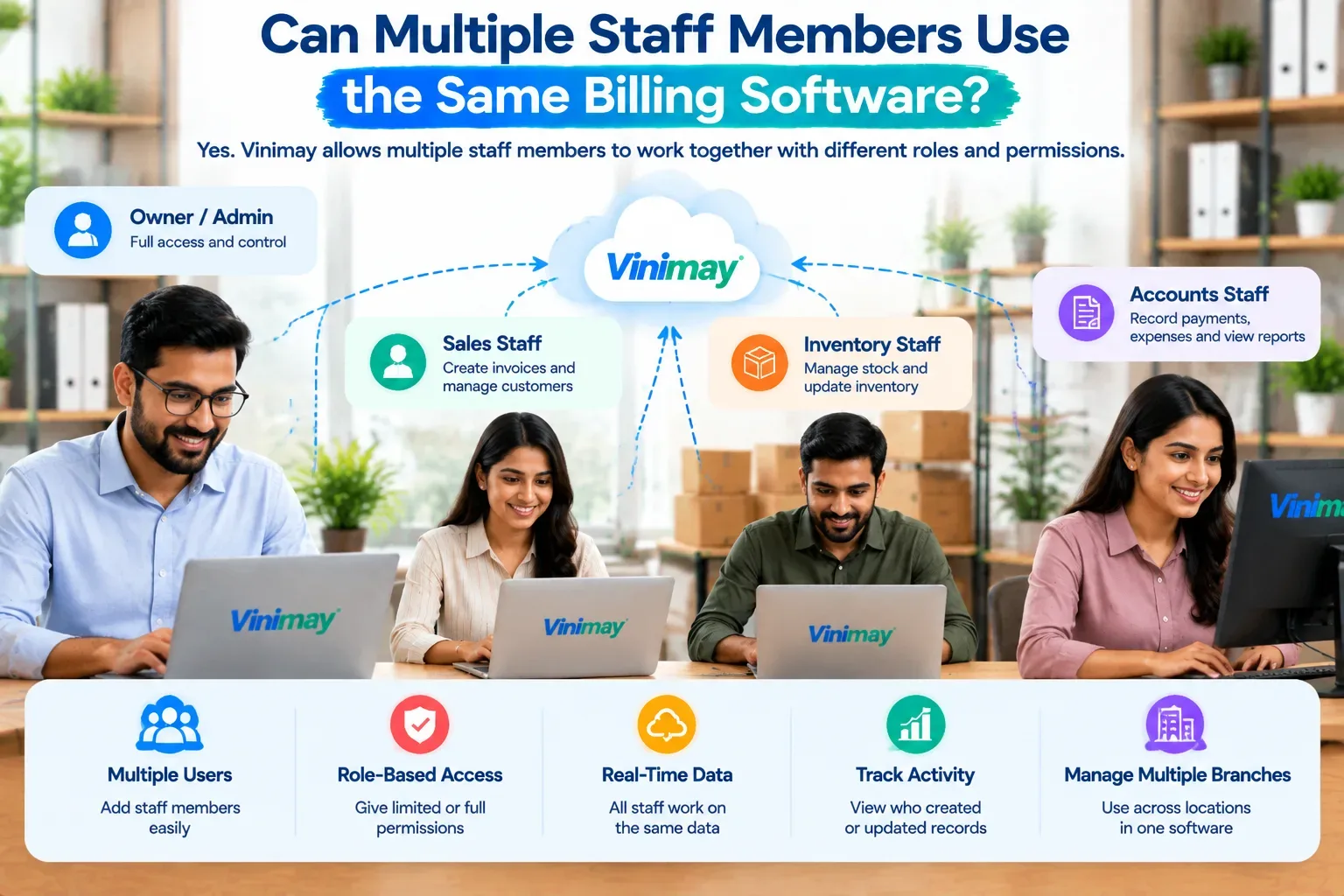
In a properly built multi-user system, each staff member has their own individual login credentials, tied to the same business account and data. This means every bill created, every stock adjustment made, and every payment recorded is traceable to the specific person who did it. The business owner typically retains a level of administrative access that individual staff accounts don't have—such as viewing overall reports, managing other staff accounts, or accessing sensitive financial summaries.
Why Shared Logins Are a Bad Idea, Even If They "Work"
It's technically possible to have multiple people use one shared login, and many small businesses do this out of convenience or because the tool doesn't offer proper multi-user support. This creates specific, avoidable problems: if a bill has an error or a stock adjustment looks wrong, there's no way to know which staff member made it, since the login trail shows only one shared identity. If a staff member leaves, the password has to be changed and communicated to everyone still using it, which is disruptive and easy to mishandle. And if the account is compromised or misused, there's no way to isolate which access point caused it.
A shared login might function day to day, but it removes accountability entirely — which becomes a real cost the moment something needs to be traced back to a specific action.
What Role-Based Access Actually Controls
Genuine multi-user support usually comes with some form of role-based access, meaning different staff members can be given different levels of visibility and control. In practice, this might look like:
Counter staff who can create invoices and record payments but can't view overall business reports
A senior staff member who can also adjust stock levels and view sales summaries
The business owner or admin, who retains full access including financial reports and staff management
This isn't about distrust — it's about giving each person exactly the access their role requires, so sensitive business information isn't unnecessarily visible to everyone with a login.
Common Scenarios Where Multi-User Access Matters
Multi-user access becomes a genuine requirement rather than a nice-to-have in specific, recognisable situations: a shop with more than one billing counter running simultaneously during busy hours, a business with staff who handle deliveries and need to log collections separately from the main counter, a growing team where the owner wants to step back from daily billing without losing oversight, or a business running more than one location that still needs a unified view of overall performance.
If none of these describe your current situation, single-user access may genuinely be enough for now — but it's worth checking whether an upgrade path exists before you actually need it.
What to Check Before Assuming Multi-User Support Exists
Since "supports multiple staff" can mean very different things depending on the tool, it's worth confirming a few specifics directly rather than assuming based on the feature name alone.
Where This Sits in Vinimay's Structure
Vinimay's approach to staff access ties into its broader connected structure—billing, inventory and payment records stay unified regardless of how many people are entering data, so multiple staff working from different counters or roles still contribute to the same underlying business records rather than creating fragmented, separate datasets. For the specific access levels and staff limits available on your plan, it's best to confirm directly, since these details can vary.
To see the core billing experience that any staff member would use day to day, Vinimay's free invoice tool lets you generate up to 5 GST invoices free.
Conclusion
Most billing software built for growing businesses does support multiple staff members, but the meaningful question isn't just "can they," it's "how" — individual logins with role-based access are fundamentally different from one shared password passed around a team. Shared logins might work in the short term, but they quietly remove the accountability that becomes important the moment something needs to be traced back to a specific person. Before relying on any tool for a growing team, confirm the specifics in the table above rather than assuming based on a feature name alone.
Frequently Asked Questions
1. Can more than one person bill on the same software account?
Generally yes, though whether each person gets their own login or shares one account varies by tool and plan.
2. Is it safe for staff to share one login?
It's workable but not ideal — shared logins remove accountability, making it impossible to trace who made a specific entry.
3. What is role-based access in billing software?
It's a system where different staff members are given different levels of access — for example, billing only, versus full reports and admin control.
4. Does multi-user access usually cost extra?
Often yes — it's commonly a feature reserved for paid tiers rather than free plans.
5. Can I remove a staff member's access if they leave?
In a genuine multi-user system, yes, typically instantly and without affecting other staff logins.
6. Do multiple staff members see the same stock and sales data?
Usually yes, since staff work from one connected business account rather than separate, isolated records.
7. Is multi-user access necessary for a single-counter shop?
Not usually — it becomes relevant once a second counter, delivery staff, or growing team requires separate billing access.
8. What's the biggest risk of using a shared login instead of individual ones?
Loss of accountability—there's no way to trace which staff member made a specific bill or stock change.
9. Does Vinimay support staff logging in separately?
Vinimay's structure keeps billing, inventory and payment data connected regardless of who enters it — check current plan details for specific staff access limits.
10. How many free invoices can I test before evaluating multi-user needs?
Vinimay's free invoice tool allows up to 5 GST invoices for free, useful for testing the core billing experience first.
Related Topics
Published by Team Vinimay
Our editorial and compliance specialists create practical guides, tax calculation rules, and operational strategies to empower Indian small business owners and accountants.