What Is a Ledger? Types and Examples (With Vinimay Screenshots)
If you run a
business, you need to know two things at any time: who owes you money and whom
you owe. A ledger answers both. It gathers every transaction of one account in
one place, so you never have to search through bills and notebooks to find a
balance.
This guide
explains what a ledger is, the common types of ledgers and a simple example you
can follow. Then you will go through the Vinimay screen by screen, from login to
the customer ledger, with numbered screenshots, so you know exactly where to
click.
You do not need
an accounting background to keep a proper ledger. Vinimay is free GST billing and accounting software built for small businesses. It updates your balances as
you record sales, purchases, receipts and payments, so your ledger is always
ready when you need it.
What Is a Ledger?
A ledger is a
record that collects all transactions of one account in one place. Your journal
lists every transaction by date. The ledger sorts the same transactions account
by account, so you can see the total and the balance of each customer, vendor
or expense at a glance.
Types of Ledgers
•
General ledger: holds all accounts of the
business, such as sales, purchases, expenses, assets and liabilities.
•
Customer (debtors) ledger: records sales to
customers, money received and the balance due from each.
•
Vendor (creditors) ledger: records purchases
from vendors, payments made and the balance payable to each.
•
Cash and bank records: track money received and
paid through cash or bank.
•
Stock records: track the quantity of goods
bought, sold and in hand.
A Simple Ledger Example
Here is a
customer account for Sharma Traders, showing how the balance changes:
|
Date |
Particulars |
Bill / Receipt |
Balance Due |
|
01 Oct |
Goods sold on credit |
₹10,000 |
₹10,000 |
|
08 Oct |
Payment received |
₹4,000 |
₹6,000 |
|
15 Oct |
Goods sold on credit |
₹2,000 |
₹8,000 |
|
20 Oct |
Payment received |
₹8,000 |
₹0 |
At the end, the
balance is zero, which means the customer has paid everything.
How to See Ledgers in Vinimay
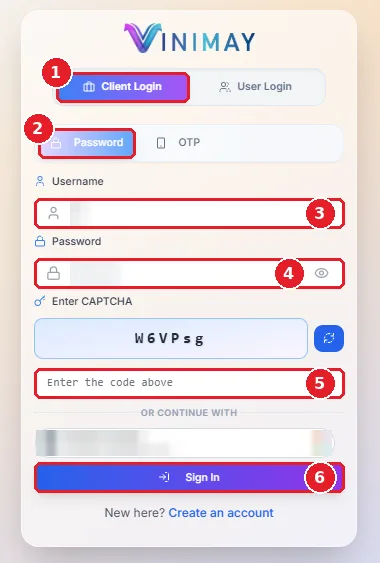
Step 1: Log in to Vinimay
On the login page, select Client Login (image 1) and choose the Password
tab (image 2). Enter your Username (image 3) and Password (image 4). Type the
code shown in the CAPTCHA box (image 5), then click Sign In (image 6).
\ After you log in, you land on the Dashboard. To record a sale, purchase, receipt or payment, click New Transaction (image 7) in the Quick Actions box. Below it, Total Sales (image 8) and Total Purchases (image 9) show your totals for the selected company.
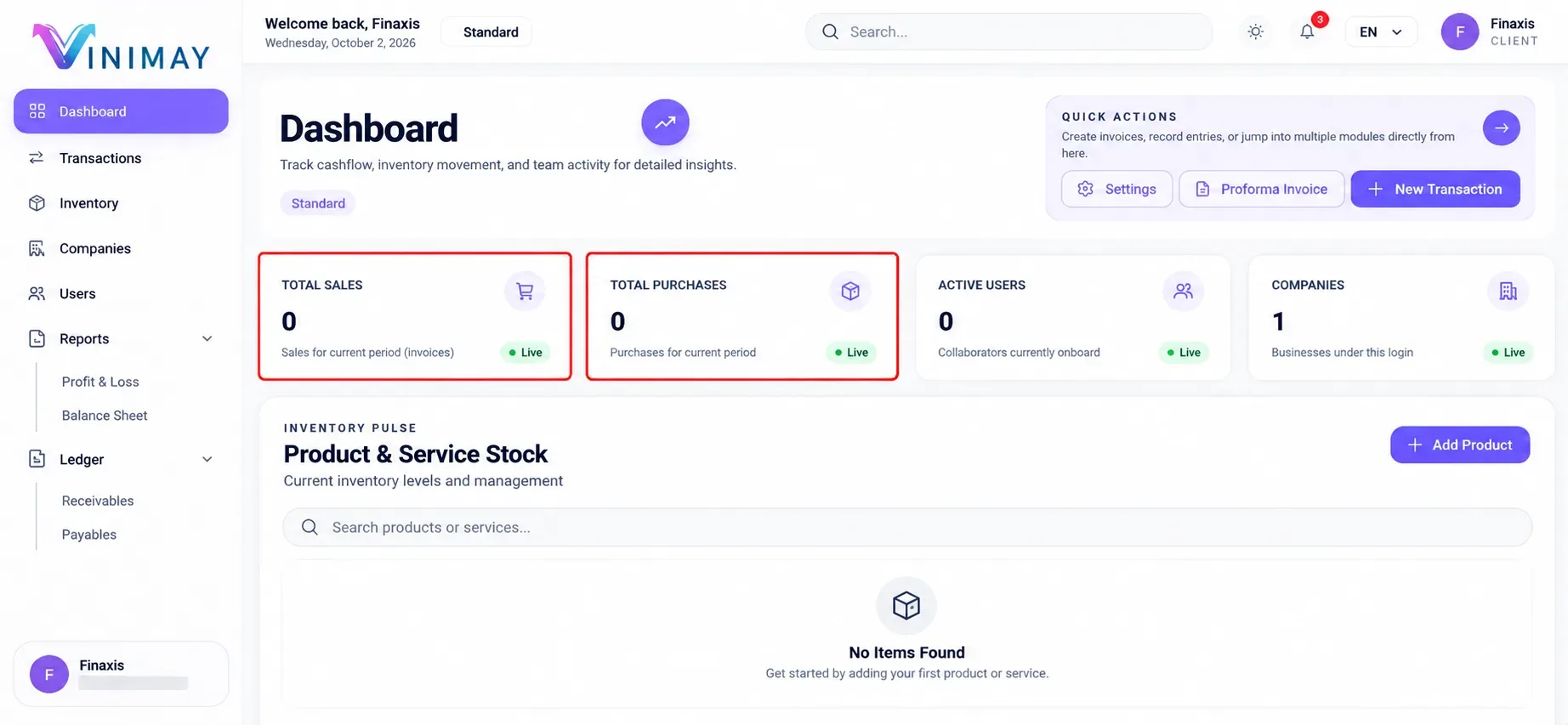
Dashboard in Vinimay
Step 3: Go to Inventory for your stock
records.
In the left menu, click Inventory(image 10). On the Inventory page, the
Products tab (image 11) lists your goods. To add a new item, click Add Product
(image 12).
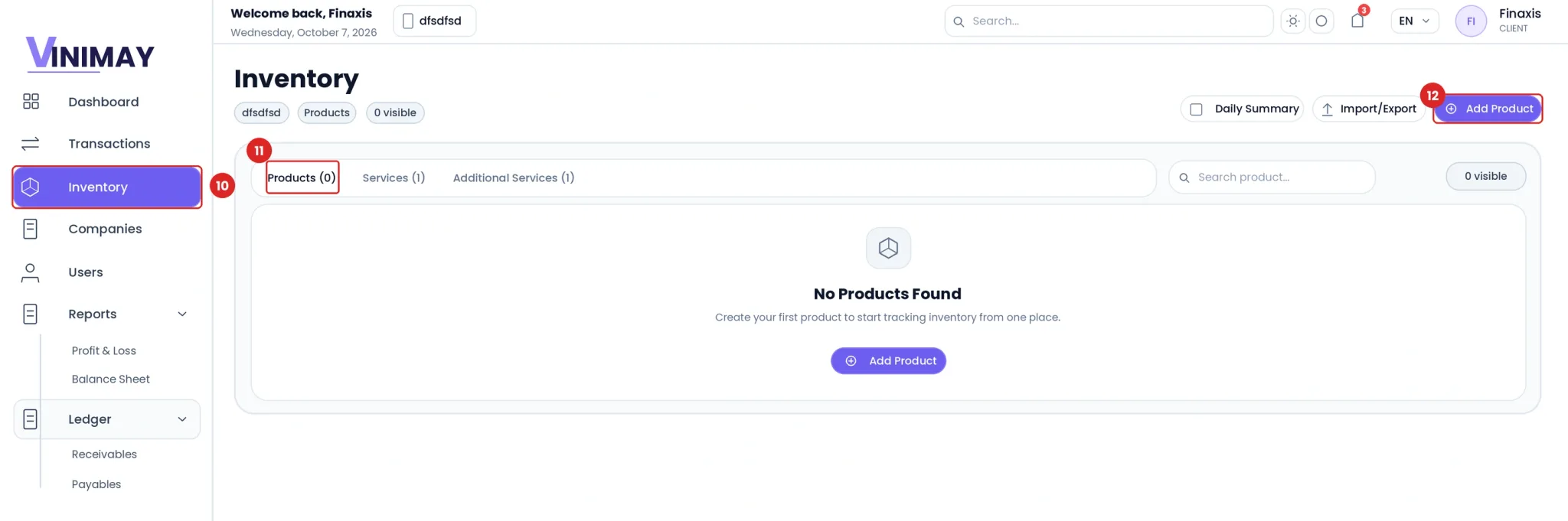
Inventory page in Vinimay
Step 4: Add a product to start your stock
record
In the Create New Product form, type the Product Name (image 13). Enter
the Opening Stock (image 14), which is the quantity you already have, and
choose the Unit (image 15), such as Piece. Fill in the Selling Price (image 16)
and Cost Price (image 17), then click Create Product (image 18).
From now on, Vinimay tracks the quantity of this product as you buy and
sell.
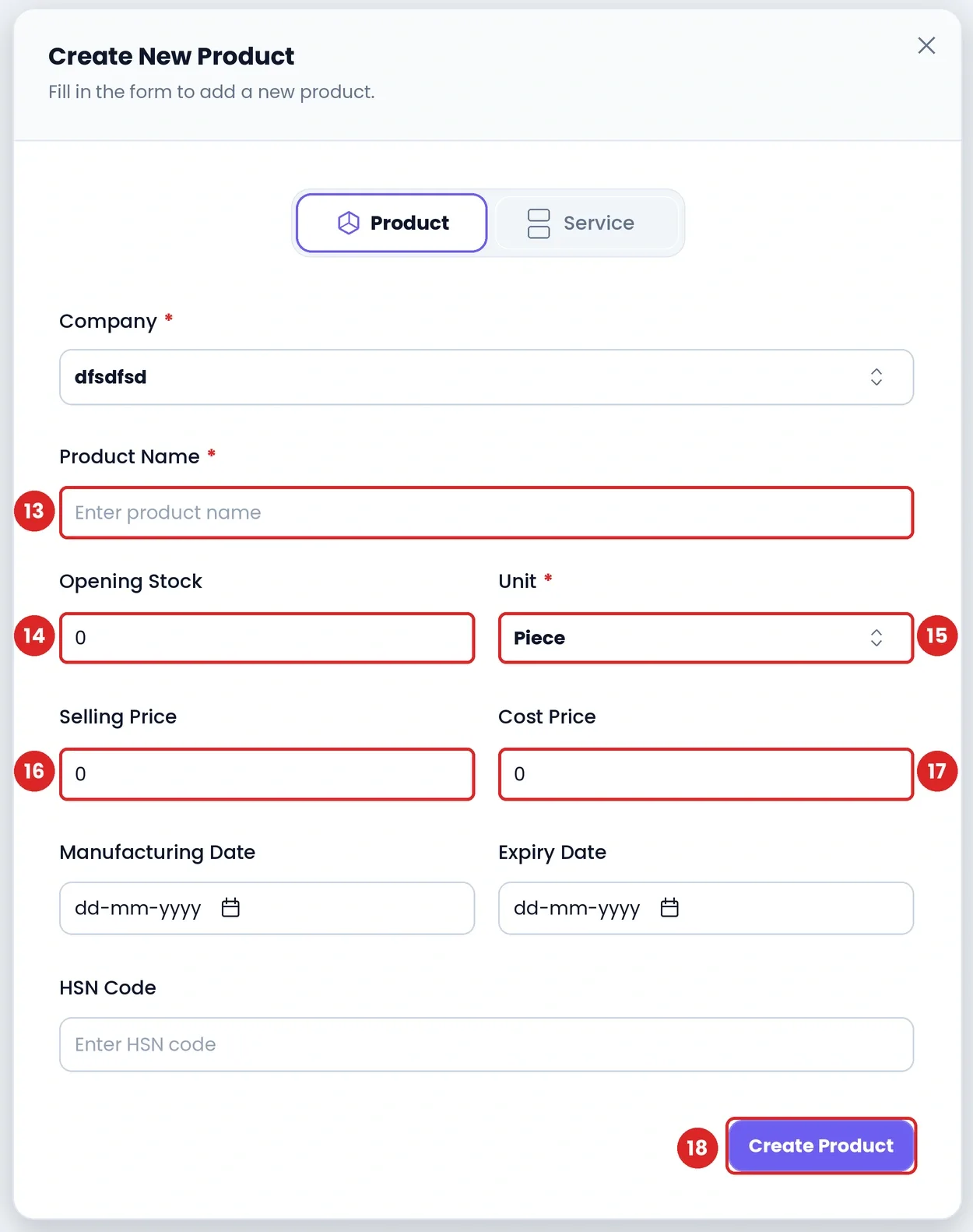
Create New Product form
Step 5: Open the Customer Ledger
In the left menu, click Ledger (image 19). It opens two options:
Receivables (image 20) for customer accounts and payables (image 21) for vendor
accounts. Click Receivables to open the Customer Ledger.
On the Customer Ledger page, use Select Customer (image 22) to search
for a customer. Use From Date (image 23) and To Date (image 24) to see a
particular period.
Once you have recorded customer transactions, the page lists each
customer with their balance, and a View Ledger button opens all entries of that
customer.
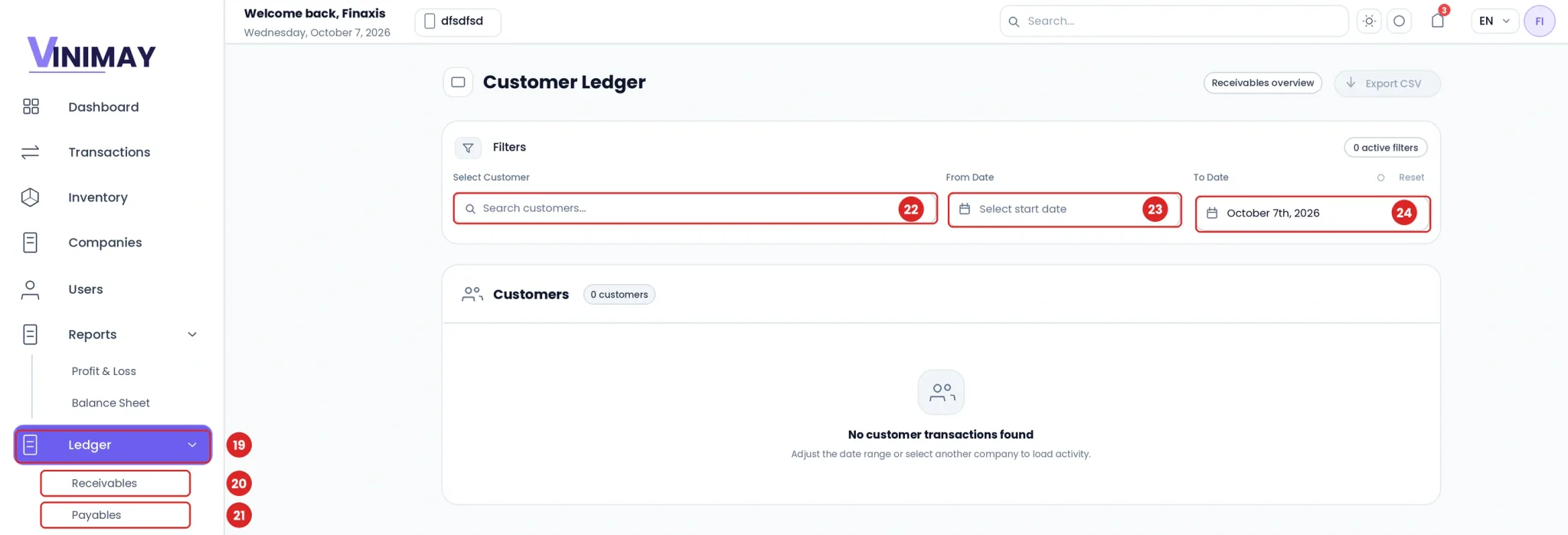
Customer Ledger in Vinimay
Tips for Using Your Ledger
•
Check your ledger weekly to follow up on pending dues
quickly.
•
Always record receipts and payments, otherwise balances
will not match.
•
Use the date filters at month end to review the period.
• Compare your ledger balances with your records before filing returns.
Conclusion
A ledger is the simplest way to know who owes you and whom you owe. Check it weekly, record every receipt and payment, and review it at month end. With Vinimay, your balances stay up to date without any manual posting.
Try Vinimay free and see all your customer and vendor balances in one place.
FAQs
Q1. What is a ledger in simple words?
A ledger is a book (or software page) where all transactions related to one account are
recorded together, so you can see its running balance.
Q2. What is the difference between a journal and a ledger?
A journal
records transactions in the order they happen. A ledger groups the same
transactions account by account.
Q3. What are the main types of ledgers?
The general
ledger, the debtors (customers) ledger, the creditors (vendors) ledger, and the
cash/bank and stock records, depending on the business.
Q4. What is a customer ledger?
It shows each
customer's sales, payments received and the balance still due. In Vinimay it is
under Ledger > Receivables.
Q5. What is a vendor ledger?
It shows
purchases from a vendor, payments made and any advance or balance. In Vinimay
it is under Ledger > Payables.
Q6. What does the ledger balance tell me?
It tells you
the net amount still to be received from, or paid to, an account at a given
point in time.
Q7. Why is the ledger important for small businesses?
It shows who
owes you money and whom you owe, which helps you follow up on dues and plan
cash flow.
Q8. How do I open the customer ledger in Vinimay?
Log in, click
Ledger in the left menu, then click Receivables. The Customer Ledger page opens
with filters for customer and dates.
Q9. Can I check the ledger for a particular period in
Vinimay?
Yes. Use the
From Date and To Date filters on the Customer Ledger page.
Q10. Does a ledger balance of zero mean everything is
settled?
In most cases
yes, it means nothing is pending on that account.
Related Topics
Published by Team Vinimay
Our editorial and compliance specialists create practical guides, tax calculation rules, and operational strategies to empower Indian small business owners and accountants.